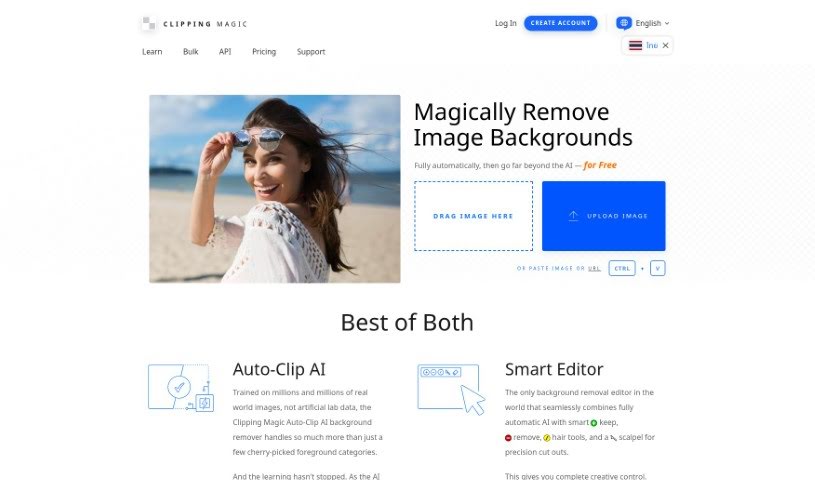
Screenshot of Clipping Magic

Clipping Magic

Discover what Clipping Magic is and how to use it effectively in 2025. We'll explore its features and see how it stacks up against other background removers.

Screenshot

What is Clipping Magic?

Clipping Magic is a handy online tool that uses AI to remove backgrounds from your images. It’s packed with features to make this process smooth and efficient. You can count on automatic background removal, a precise scalpel tool for those tricky cuts, and smart smoothing to get clean edges. It even has a special graphics mode for logos and a dedicated hair tool, which is a lifesaver for isolating hair from backgrounds. Beyond just removal, Clipping Magic lets you control colors, add shadows, resize images, and export them in various formats like SVG and TIFF. It’s really popular for eCommerce, business, and graphic design work, and it’s available through a subscription that starts at just $3.99 a month.

Who created Clipping Magic?

Clipping Magic was actually started by James Diebel. He’s got quite the academic background, with degrees in Engineering Mechanics, Astronautics, and Mathematics, plus a Ph.D. in Aeronautics and Astronautics. He was the one who kicked off the project that eventually led to Vector Magic. Jacob Norda, who holds a Master’s in Electrical Engineering, teamed up with James on this project. Later, Orna Kretchmer, with degrees in Biology and a Ph.D. in Molecular Biology, joined Cedar Lake Ventures back in 2013. More recently, Jonathan Kretchmer, who studied Music Composition, joined the company in 2022.

What is Clipping Magic used for?

Clipping Magic is super versatile and can help with a lot of different tasks:

  • Copy-Paste Marks: You can copy and paste marks across similar images, saving you the trouble of re-drawing when you’re working with a sequence of items.
  • Bulk Clipping: Need to remove backgrounds from a bunch of images? This tool makes it quick and easy to do it for any number of photos at once.
  • Auto-Clip AI: It uses a massive dataset of images to automatically remove backgrounds, giving you a great starting point.
  • Smart Editor: This combines the power of AI automation with manual tools, so you can fine-tune your results perfectly.
  • Hair Tools & Scalpel: These are lifesavers for tricky elements like hair or when you need really precise edits.
  • Multiple Foreground Categories: The smart learning AI can efficiently handle different types of foreground subjects.
  • Color Control: You can fine-tune brightness, shadows, highlights, color temperature, and saturation to get your colors just right.
  • Color Cast Cleaner: This handy feature helps fix any tinting on your foreground that might come from non-white or gray backgrounds.
  • Instant Shadows: Easily create all sorts of shadows and reflections with this feature.
  • Export Options: You can export an Alpha Channel Mask and Clipping Path, which is great for further editing in your existing image workflows.
  • For eCommerce: Make your product photos pop and increase conversion rates. It helps you meet requirements for platforms like eBay and Amazon.
  • For Business: Quickly make backgrounds transparent for marketing materials, presentations, and other business needs.
  • For Graphic Design: Boost your productivity by avoiding the usual hassle of creating clipping paths in Photoshop.
  • For Team Photos & More: People all over the world use it for various things, including team photos and scrapbooking.
  • Logo & Graphics: You can remove backgrounds from logos and computer graphics, keeping even pixel-level details intact.
  • Specialized Edits: It’s great for separating hair from backgrounds, handling foreground tinting, and creating realistic shadows and reflections.
  • SVG & TIFF Exports: You can export clipping paths in formats like SVG and TIFF, which are perfect for further editing in Photoshop.
  • Batch Processing: As mentioned, you can quickly and conveniently remove backgrounds for any number of images in batches.

Who is Clipping Magic for?

Clipping Magic is a great tool for a wide range of people and businesses:

  • Photographers
  • Graphic designers
  • Digital artists
  • Ecommerce businesses
  • Social media managers
  • Marketers
  • Content creators
  • Website developers
  • Anyone in Ecommerce
  • Anyone in Business
  • Anyone in Graphic Design

How to use Clipping Magic?

Using Clipping Magic is pretty straightforward. Just follow these simple steps:

  1. Upload Your Image: Start by uploading the image you want to edit onto the Clipping Magic platform.
  2. Try Auto-Clip AI: Give the automatic feature a go for an initial result. Then, you can refine it using tools like the Scalpel for those really precise cuts.
  3. Use Markers: Make sure to use the red and green markers to clear the background efficiently.
  4. Adjust Smart Edges: Play around with Smart Smoothing, Local Feathering, and other edge controls to get the exact edge quality you’re looking for.
  5. Handle Hair: The Hair Tool makes it easy to separate hair from backgrounds, especially when the colors are distinct.
  6. Smart Auto Crop: Let Clipping Magic handle the cropping automatically. It can adjust margins, alignment, and even optimize shadows for you.
  7. Fine-tune Colors: Use the Color Control options to adjust brightness, shadows, highlights, and more to really enhance your photo’s quality.
  8. Choose Export Settings: Before you download, pick your desired file format, DPI, color space, and quality settings.
  9. Share Your Results: You can get a secure URL to share your edited images, which is great for collaboration or if you need to pass them on.
  10. Undo/Redo: Made a mistake? No worries! The undo/redo feature makes it easy to correct any errors.
  11. Pick a Subscription: Choose a plan that fits your editing needs. This will also give you access to extra features like Bulk Clipping.

By following these steps, you’ll be able to use Clipping Magic effectively to edit and enhance your images with both precision and speed.

Related AI Tools

Discover more tools in similar categories that might interest you

123RF AI Image Generator

Creative Image Generation
Learn More

Stay Updated with AI Tools

Get weekly updates on the latest AI tools, trends, and insights delivered to your inbox

Join 25,000+ AI enthusiasts. No spam, unsubscribe anytime.