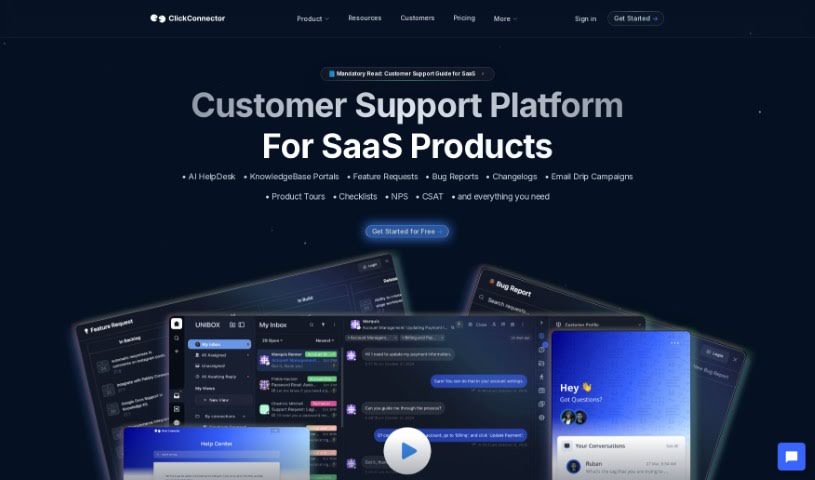
Screenshot of ClickConnector

ClickConnector

Discover what ClickConnector is and how to use it effectively in 2025. We'll explore its features and see how it stacks up against other customer service tools.

Screenshot

What is ClickConnector?

ClickConnector is a smart tool built for customer support. It brings together self-service portals, chatbots, and omni-channel chats to make customer service smoother and more efficient. It is a way to help customers help themselves with easy-to-use portals, handle common questions automatically with chatbots, and keep all your customer conversations in one place, no matter where they come from. It can even offer personalized content, provide support 24/7, and makes sure everything is compliant with data privacy rules. This means fewer support tickets, better social media features, insights into website traffic, and a generally easier experience for everyone.

Who created ClickConnector?

ClickConnector was developed by a company specializing in AI-powered customer support solutions. This platform is specifically designed to improve customer support processes by integrating self-service portals, chatbots, and omni-channel chats, all aimed at streamlining customer service. It first launched on June 1, 2023, and is committed to data privacy, as shown by its use of Cookiebot. The tool’s core purpose is to enhance customer support by automating routine tasks and bringing together all customer communications from various channels into one convenient spot.

What is ClickConnector used for?

  • Chatbot functionality: Handles common questions automatically.
  • 24/7 Customer Support: Offers automated assistance around the clock.
  • Enhances customer support processes: Makes the overall support experience better.
  • Self-service portal capability: Lets customers find answers on their own.
  • Omni-Channel Chats integration: Connects conversations from all channels.
  • Declined support tickets: Helps reduce the number of incoming tickets.
  • Email, SMS and social media integration: Works with various communication methods.
  • Automates routine customer interactions: Takes care of repetitive tasks.
  • Concentrates customer communication on one platform: Keeps everything in a single place.
  • Enhances site usability: Makes your website easier to navigate.
  • Streamlines customer interactions: Simplifies how customers connect with you.
  • Data privacy compliance: Ensures adherence to privacy regulations.
  • Personalized content provision: Offers tailored information to users.
  • Streamlining customer interactions: Makes customer communication smoother.
  • Enhancing customer support processes: Improves how support is delivered.
  • Reducing support tickets: Aims to lower the volume of incoming requests.
  • Email, SMS, and social media integration: Connects with different communication channels.
  • Automating routine customer interactions: Handles everyday customer queries automatically.

Who is ClickConnector for?

  • Operations Managers
  • Team leaders
  • Sales Agents
  • Marketing Managers
  • Other users of ClickConnector
  • Customer Support Agents

How to use ClickConnector?

To get the most out of ClickConnector, here’s a simple guide:

  1. Getting Started: First, take a moment to explore ClickConnector’s features. Understanding how its self-service portals, chatbots, and omni-channel chats work will help you streamline your customer service right from the start.
  2. Enhancing Customer Support: Make good use of the self-service portal. It lets customers find solutions to their issues on their own, which frees up your agents to handle more complex or urgent queries. The chatbots are great for automating those routine questions, really easing the burden on your support team.
  3. Reducing Support Tickets: Empower your customers to solve problems independently using the self-service portal. This is a key way to cut down on the number of support tickets you receive. Plus, the AI chatbots can quickly answer common questions, which also contributes to fewer tickets landing in your agents’ inboxes.
  4. 24/7 Customer Support: Take advantage of ClickConnector’s AI-powered chatbots to provide constant, automated responses. This ensures your customers can get help with standard inquiries anytime, day or night.
  5. Omni-Channel Chats Integration: Bring all your customer conversations together in one place. By consolidating communications from SMS, email, and social media, you can offer a consistent and efficient customer service experience, no matter the platform.
  6. Cookiebot Compliance: Pay attention to ClickConnector’s commitment to data privacy, often indicated by a ‘Powered by Cookiebot’ tag. This compliance is important for features like personalized content, social media integration, traffic analysis, and improving your site’s usability.

By following these steps, you’ll be well on your way to using ClickConnector effectively to streamline your customer support, improve customer interactions, and maintain data privacy.

Related AI Tools

Discover more tools in similar categories that might interest you

Stay Updated with AI Tools

Get weekly updates on the latest AI tools, trends, and insights delivered to your inbox

Join 25,000+ AI enthusiasts. No spam, unsubscribe anytime.