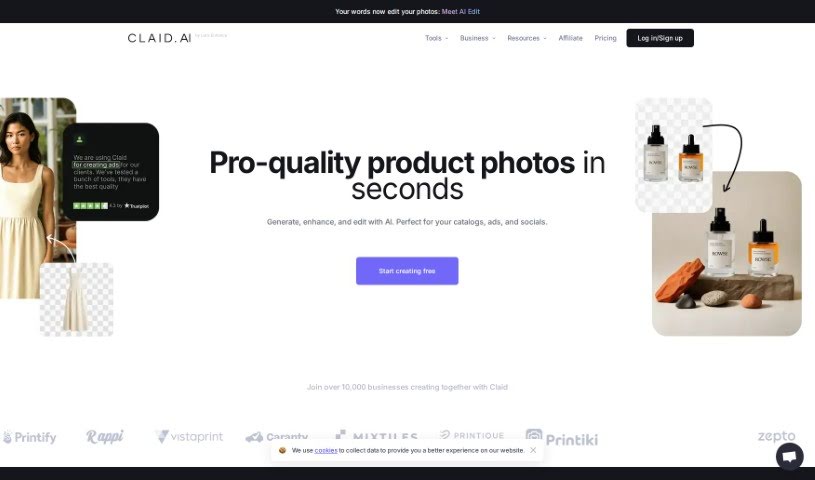
What is Claid AI?
Claid is a computer vision startup that’s really changing the game for how we create, edit, and manage photos. They’re doing this with their cutting-edge AI technology. The company got its start back in 2017 with a clear goal: to fix the problem of low-quality product photos that plague e-commerce sites. To do this, they developed some truly impressive AI tech to boost photo quality and resolution. This led to the creation of Let’s Enhance.io, a platform packed with visual technology advancements for all sorts of users.
Claid offers solutions that automate image enhancement and generation on a large scale, all through their API. It’s super easy for users to improve image quality, content, and delivery. You can use the Claid API for things like making images sharper (upscaling), creating HDR effects, and general editing. The API handles both real-time and batch processing, supports high-resolution images, is simple to integrate, and even offers discounts for bulk usage, which really helps with efficient operations. If you want to test the waters, you can try out the Free Trial plan. It gives you access to the features found in the Professional plan, though there are limits on how many product images you can upload.
Basically, Claid wants to help digital platforms grow. They do this by automating the often tedious process of preparing images, making user-generated content look much better, and generally improving the visual appeal of products. The idea is to give customers a more accurate impression of what they’re buying, which in turn can boost conversion rates and save money.
Claid has already processed millions of photos and teamed up with major global companies. They’re positioning Claid as the next big thing in photo editing for online marketplaces.
Who created Claid Ai?
Claid Ai was founded by Vlad Pranskevicius, who is also the CTO and Co-Founder. The company itself is a pretty diverse group, with over 25 people spread across 15 countries, speaking more than 10 languages. As a computer vision startup, Claid Ai is all about revolutionizing how photos are created, edited, and managed, all thanks to its advanced AI technology. They started in 2017 with a mission to tackle the issues surrounding poor-quality product photos for e-commerce businesses. This drive led them to develop groundbreaking AI solutions specifically for enhancing photo quality and resolution.
What is Claid Ai used for?
Claid AI is incredibly versatile and can be used for a wide range of tasks related to image enhancement and creation:
- Image Enhancement: Making existing photos look better.
- Automated Quality Improvement: Automatically improving the quality of customer images.
- Automating Image Editing: Streamlining the entire image editing process.
- Product Image Enhancement: Making product photos look more appealing.
- Background Removal: Easily removing backgrounds from images.
- Color and Lighting Correction: Automatically fixing colors and lighting issues.
- Background Generation: Creating new backgrounds from templates.
- Outpainting: Using AI to extend images beyond their original borders.
- Exporting: Saving images in popular formats suitable for platforms like Instagram stories and Shopify products.
- API for Scale: Automating image enhancement and generation at scale using the Claid API.
- API Integration: Integrating the Claid API for both real-time and batch processing needs.
- Boosting Conversion Rates: Helping businesses sell more by making product images more attractive.
- E-commerce Optimization: Enhancing product images specifically for e-commerce platforms.
- Improving Image Quality and Resolution: Generally making images sharper and clearer.
- Background Removal: A specific feature for taking out backgrounds.
- User-Generated Content Improvement: Automatically making customer-submitted photos look better.
- Custom Backgrounds: Adding custom backgrounds to product images.
- Store Management: Automating image editing for managing online stores and updating restaurant information.
- Increasing Product Listings: Helping platforms upload more products by simplifying image preparation.
- Resolution and Quality Boost: Improving the overall resolution and quality of images.
- Customer Image Improvement: Automating the process of enhancing photos submitted by customers.
- Solving Image Quality Issues: Addressing common problems that arise with image quality.
- Streamlined Preparation: Simplifying image preparation and enhancing user-generated content.
- Time Savings: Saving significant time on image editing tasks.
- Accurate Impressions: Improving conversion rates by ensuring images convey a more accurate impression to customers.
- Digital Platform Automation: Automating image preparation for various digital platforms.
- User Content Enhancement: Improving the quality of content created by users.
- More Images Per Product: Enabling platforms to upload more images for each product.
- Customer Perception: Helping customers get a more accurate impression of products.
- Traffic Savings: Potentially saving on bandwidth or traffic costs.
- Automated Enhancement: Automatically improving the quality of customer images without manual adjustments.
- Automated Editing: Streamlining the entire editing process.
- User Content Solutions: Solving image quality problems specifically for user-generated content.
- Automated Image Creation: Generating new images automatically.
- Brand Consistency: Helping maintain a consistent visual brand identity.
- Zapier Integration: Connecting Claid with Zapier for seamless workflow automation.
- Upscaling: Increasing image resolution.
- Resizing and Cropping: Adjusting image dimensions.
- Color Correction: Automatically fixing color issues.
- Outpainting: Extending images with AI.
- Marketplace Solution: A next-generation photo editing tool for marketplaces that automates image prep and improves user content.
- Platform Growth: Helping digital platforms upload more images per product, giving customers a better impression and improving sales.
- Workflow Automation: Automating image workflows with the Claid API for enhancement and generation at scale.
- Optimized Workflows: Integrating the Claid API for image processing to streamline workflows and reduce editing time.
- High-Resolution Experience: Experiencing images in high resolution thanks to Claid API’s capabilities.
- E-commerce Quality: Improving image quality and resolution for e-commerce platforms using AI.
- Effortless Enhancement: Automatically improving customer image quality without needing to tweak settings.
- User Content Boost: Automatically enhancing content created by users.
- User Content Quality: Solving common image quality problems found in user-generated content.
- Visual Tech for All: Offering a simple platform that brings advanced visual technology to marketers, entrepreneurs, photographers, and designers.
- Content Improvement: Enhancing user-generated content through automated image improvements.
- More Product Images: Increasing the number of images available for each product on platforms.
- Accurate Product Views: Helping customers get a more accurate impression of products.
- Conversion Improvement: Boosting conversion rates through better-looking images.
- Traffic Savings: Reducing traffic costs associated with image uploads.
- Editing Enhancements: Improving editing processes with upscaling and HDR API features.
- Automatic Quality: Automatically improving image quality without manual parameter changes.
- Problem Solving: Addressing common issues with user-generated content quality.
- Automated Creation & Editing: Generating backgrounds and editing images automatically.
- Platform Prep: Automating image preparation for digital platforms.
- More Uploads: Enabling platforms to upload more images.
- Accurate Impressions: Helping customers form accurate impressions of products.
- E-commerce Quality Boost: Improving image quality and resolution for e-commerce platforms.
- Automatic Quality Improvement: Automatically enhancing image quality.
- Automated Editing: Streamlining the editing process.
- Automated Prep: Automating image preparation tasks.
- Customer Image Help: Automatically enhancing customer images.
- Restaurant Management: Increasing the number of restaurants on a platform and simplifying updates.
- Restaurant Info: Making restaurant info updates and store management quicker and easier.
- Optimized Editing: Optimizing editing processes with upscaling and HDR API.
- Time Savings: Saving time on editing and managing restaurant information.
- User Content Quality: Improving the quality of user-generated content.
- Scale Automation: Automating image enhancement and generation at scale.
Who is Claid Ai for?
Claid AI is designed to help a variety of professionals who work with images, including:
- PR Specialists: To ensure polished visual press materials.
- Team Lead Web Squads: For managing and optimizing website visuals.
- ML Product Managers: To integrate AI-powered image solutions.
- Engineers: Including Front-end, Back-end, ML Research, and Infrastructure engineers who need to implement image processing capabilities.
- Customer Experience Managers: To improve the visual aspects of customer interactions.
- Marketing Designers: To create compelling and high-quality visual content.
- Partnership Managers: To leverage visual technology in collaborations.
- Image Quality Specialists: To ensure all images meet high standards.
- Photographers: To enhance their professional work.
- Marketers: To create more effective visual campaigns.
- Entrepreneurs: To present their products and services professionally.
- Designers: To streamline their creative workflows and enhance visual assets.
How to use Claid Ai?
Using Claid AI is pretty straightforward. Here’s a step-by-step guide:
- Explore Claid Plans:
- Claid offers three main subscription plans: Essentials, Professional, and Upscale. You can pick the one that best fits your business needs and budget.
- These plans come with various features, such as AI background creation, handy image editing tools, and templates to spark your design ideas.
- Sign Up or Start Free Trial:
- You can begin with a Free Trial, which gives you access to the Professional plan’s features but limits you to 5 trial images.
- Once the trial is over, you can subscribe to a plan. If you’re a developer looking to integrate Claid directly, you can also purchase a dedicated API plan.
- Upload Images:
- Use Claid to upload your product images. The tool is designed to enhance them.
- Depending on your plan, the tool supports images up to certain sizes.
- Enhance and Generate Images:
- Claid provides several features to improve your images. This includes general image enhancement, removing backgrounds, correcting colors, and using outpainting to extend images.
- You can also generate new images with custom backgrounds or use text-to-image features to create backgrounds.
- API Integration:
- If you’re a developer, the Claid API is a great way to automate your image workflows. It’s perfect for enhancing and generating images at a large scale.
- You can really make the most of Claid’s image enhancement power through API integration and take advantage of volume discounts.
- Adjust Subscription:
- Need to change your plan? You can upgrade, downgrade, or cancel your Claid Plan anytime by reaching out to their customer support team.
- Maintain Copyright:
- Just so you know, any images you generate or edit using Claid are not subject to Claid’s copyright. They’re yours to use.
By incorporating Claid into your daily work, you can effortlessly streamline your image creation, enhancement, and automation processes. Elevate your visual content with Claid AI’s powerful features and integrations!