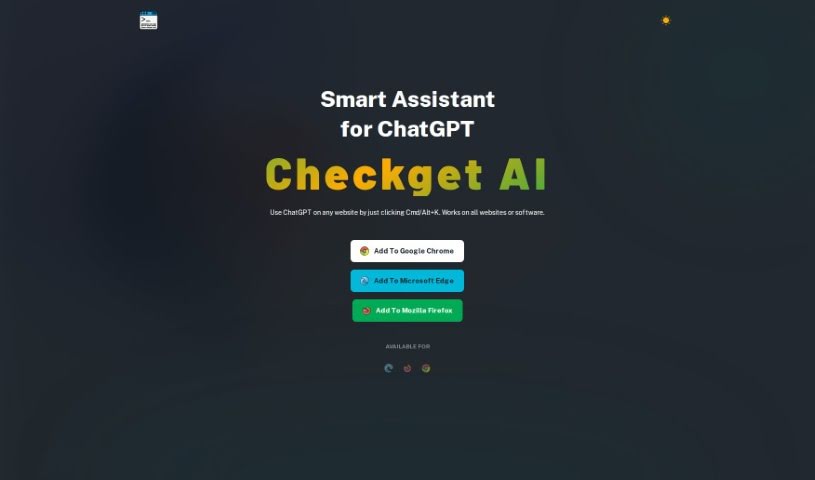
Screenshot of Checkget

Checkget

Discover what Checkget is and how to use it effectively in 2025. We'll explore its features, compare it to other AI Assistants, and show you how to get the most out of it.

Screenshot

What is Checkget?

Checkget is your smart sidekick for ChatGPT. It’s designed to make using ChatGPT even better by giving you easy access and help that fits what you’re doing right then and there. You can use ChatGPT’s powerful AI right on any website you visit, just by using simple keyboard shortcuts. Need to ask a question, get a summary, translate something, fix mistakes, or change how long or what tone your text has? Checkget can do all that. Plus, it offers a dark mode for your comfort, keeps your communications private and secure with encryption, and has different subscription plans. Higher tiers give you faster responses and access to GPT-4. As a nice bonus, Checkget donates a portion of its earnings to carbon removal projects, showing they care about the environment.

Who created Checkget?

Lucian Obrien is the creator of Checkget, as noted in the document “checkget.pdf.” The company’s main goal is to offer a Smart Assistant that really improves how people use ChatGPT. They focus on making it easy to access, context-aware, and packed with useful AI features, all while keeping your privacy and offering flexible plans. They also contribute to environmental sustainability by donating part of their revenue to carbon removal initiatives.

What is Checkget used for?

Checkget is incredibly versatile! Here’s a rundown of what you can do with it:

  • Ask questions: Get quick answers on the fly.
  • Summarize text: Condense long articles or documents.
  • Translate text: Break down language barriers.
  • Correct errors: Polish your writing by fixing mistakes.
  • Adjust text length: Make text shorter or longer as needed.
  • Rephrase sentences: Find different ways to say things.
  • Modify text tone: Change the feel of your writing.
  • Grammar fixes: Ensure your grammar is spot on.
  • Change tone of voice: Adapt your writing style.
  • Enhance your ChatGPT experience: Make interacting with ChatGPT smoother.
  • Easy Access: Activate it quickly with shortcuts on Mac or Windows.
  • Context-Awareness: It adapts to whatever you’re working on.
  • Versatile AI Capabilities: It handles answering, translating, summarizing, and much more.
  • Privacy and Security: Enjoy encrypted communication and a Local Mode for extra privacy.
  • Flexible Subscription Plans: From free options to premium plans with GPT-4.
  • Browser Compatibility: Works on Google Chrome, Microsoft Edge, and Mozilla Firefox.
  • Carbon Removal Donations: A portion of revenue supports environmental efforts.
  • Pricing Options: Various plans to suit different needs.
  • Faster Response Times: Get quicker results with premium plans.
  • Priority Support: Get help faster when you need it.
  • Environmental Sustainability: Help reduce carbon footprints.

Who is Checkget for?

Checkget is a great tool for a variety of professionals:

  • Customer support teams
  • Developers
  • Web designers
  • CEOs and Executives
  • Designers

How to use Checkget?

Using Checkget is pretty straightforward. Just follow these simple steps:

  1. Activate it: Press ⌘+K on your Mac or Alt+K on your Windows PC. This brings up Checkget, giving you access to ChatGPT’s AI right on any website you’re browsing.
  2. Get Contextual Help: Checkget is smart about what you’re doing. Whether you’re writing an email or trying to explain complex code, it offers relevant help based on the text you select and the commands you use.
  3. Use the AI Functions: You’ve got a whole suite of AI tools at your fingertips! You can ask questions, summarize content, translate text, fix errors, change how long your text is, rephrase sentences, or adjust the tone to match what you need.
  4. Enjoy Privacy and Security: Checkget cares about your comfort and privacy. It offers an optional dark mode and uses encrypted communications to keep your data safe.
  5. Pick Your Subscription: There are different plans available. You can start with a free option that offers faster response times and GPT-3.5 support, or upgrade to premium plans for exclusive GPT-4 access and priority support.
  6. Boost Privacy with Local Mode: If you want even more privacy, you can use Local Mode. Just enter your own ApiKey to connect directly with ChatGPT, keeping your data entirely private.
  7. Check Compatibility: The Checkget extension works smoothly on Google Chrome, Microsoft Edge, and Mozilla Firefox browsers.
  8. Black Friday Deal: Keep an eye out for special promotions like the current Black Friday sale, which offers up to 50% off subscription plans!

By following these steps, you can easily add Checkget to your daily browsing routine and take full advantage of its helpful AI features.

Related AI Tools

Discover more tools in similar categories that might interest you

Stay Updated with AI Tools

Get weekly updates on the latest AI tools, trends, and insights delivered to your inbox

Join 25,000+ AI enthusiasts. No spam, unsubscribe anytime.