What is Chatwoot?
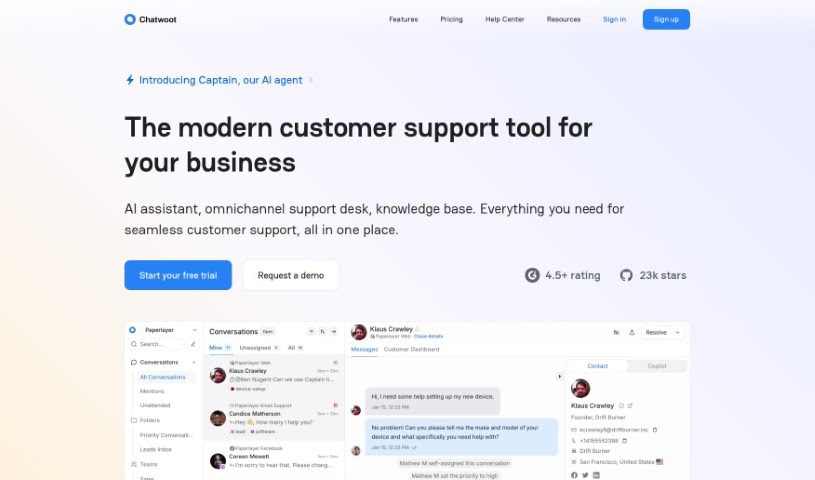
Chatwoot is an open-source customer support platform powered by AI. Its main goal is to make the customer support experience better for everyone involved, without making things complicated for users. It’s pretty smart, actually – it uses AI to tell the difference between a real support request and just a simple question. This makes the whole support system run much more smoothly. The platform also gives customers tools to help themselves, so they can find answers on their own. This means less work for your support team and happier customers, which is a win-win for efficiency.
Chatwoot offers a special search feature called Chat-GPT. Customers can use this to look through articles and find the information they need without having to reach out to a support agent directly. On top of that, it helps manage incoming conversations by prioritizing them, offers natural language search so you can find things easily, and even has Smart Compose to help you write better help center articles. Security is a big deal for them, too. They support installations you can host yourself and follow important rules like GDPR, CPRA, and HIPAA. Plus, you can easily switch between different vendors or even host your own Large Language Models (LLMs). This gives you great control over your data privacy.
Who created Chatwoot?
Chatwoot, this open-source AI customer support platform, first came out on November 21, 2023. The company behind it is called Chatwoot.ai. Their big idea is to improve customer support using AI tools, letting customers help themselves, and making sure the most important conversations get attention first. Chatwoot.ai really cares about data security; they support self-hosted setups and are even SOC 2 Type II compliant. This means you can switch between different LLM providers or use your own, keeping your data private and secure.
What is Chatwoot used for?
Here’s a look at what Chatwoot helps you do:
- Prioritize Conversations: You can sort incoming messages based on what they’re about and send them to the right teams.
- Improve Response Times: It helps you spot and fix duplicate or similar conversations, so you can respond faster.
- Label Suggestions: Get helpful suggestions for labels to categorize your conversations.
- Natural Language Search: Use AI to search for information naturally, getting accurate results even if you don’t use exact keywords.
- Smart Compose for Articles: Writing help center articles is easier with real-time suggestions to cut down on mistakes.
- Self-Hosted Support: You can host it yourself, giving you control over your data and helping you meet regulations.
- SOC 2 Type II Compliance: They’re proud to be SOC 2 Type II compliant, meaning your data is kept safe and secure.
- Flexible LLM Options: You can easily switch between different vendors or self-hosted Large Language Models (LLMs) to keep your data private and under your control.
- Better Support Experience: It enhances customer support by clearly separating actual support requests from general questions.
- Customer Self-Service: Customers can find answers on their own, which reduces the load on your support team and makes customers happier.
Who is Chatwoot for?
How to use Chatwoot?
To get the most out of Chatwoot, here’s a simple guide:
- Prioritize Conversations: Start by sorting your incoming messages based on their content. Then, route them to the right teams, making sure the context is clear.
- Intelligent Housekeeping: Keep things tidy by quickly finding and resolving duplicate or similar conversations. This really helps improve your response times. You’ll also get suggestions for labels, making it easier to categorize conversations.
- Natural Language Search: This is a neat feature! Use AI-powered search that understands natural language. You can find what you need even if you don’t type in the exact keywords.
- Smart Compose for Articles: Writing articles for your help center just got simpler. You get real-time predictive text suggestions, which helps reduce errors and typos.
- Security First: You can benefit from self-hosted installations. This means you keep control over your customer data and can easily comply with regulations like GDPR.
- SOC 2 Type II Compliance: Chatwoot is committed to strong security measures. They adhere to strict standards to ensure your user data is kept safe and secure.
- Open-source, Self-hosted: Take full charge of your data. You can host Chatwoot yourself on your own servers or use a cloud provider. This ensures you meet various regulatory requirements.
- Seamless LLM Switching: Need more control or privacy? You can easily switch between different vendors or self-hosted Large Language Models (LLMs) to manage your data privacy and control effectively.
- Empower Customers with Self-Service Tools: Give your customers the tools they need to find answers on their own. This cuts down on the work your support team has to do and boosts customer satisfaction.
- Universal Search Interface: Set up a global Chat-GPT interface. Customers can use this to interact with articles and solve simple questions without needing to contact support directly.
- Live Chat SDK: Make sure customers can easily reach your support team for immediate help. The live chat SDK makes this straightforward.
- Agent Productivity Tools: Use AI to get smart recommendations for replies, priority, labels, and more, all based on the conversation’s context. This speeds up responses and makes them more accurate.
- Enhanced Communication Efficiency: The AI suggests responses based on the conversation context. This really improves how efficiently and accurately your team communicates.
- Auto Triage Conversations: Automatically prioritize incoming conversations based on their content. Then, route them to the appropriate teams quickly.
- Enhanced Security Measures: Chatwoot supports self-hosted installations and is SOC 2 Type II compliant. This ensures your data is safe and you meet regulatory requirements.
- Seamless Data Privacy: You can easily switch between vendors or self-hosted Large Language Models. This lets you prioritize data privacy and maintain control.
By following these steps, you can really make the most of Chatwoot’s features. It’s a great way to improve your customer support and make your communication processes run much more smoothly.