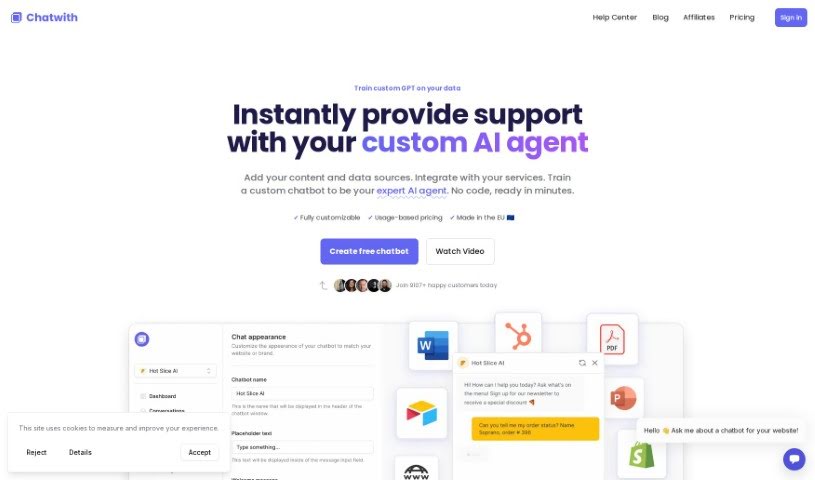
Screenshot of Chatwith

Chatwith

Discover what Chatwith is and how to use it effectively in 2025. We'll explore its features and see how it stacks up against other chatbots.

Screenshot

What is Chatwith?

Chatwith is a really flexible AI chatbot platform. It lets you build your own support agent, trained specifically on your content and back-end data. It is a smart assistant that can handle all sorts of customer questions. It can tell people about inventory in real-time, or even help generate documents. You can easily put this chatbot right on your website, which is a great way to boost customer service and cut down on the work your support team has to do. Chatwith comes packed with features like custom integrations, detailed chatbot analytics, the ability to create multiple chatbots for different needs, and even white-label options so you can brand them as your own. It supports powerful AI models like GPT-4 and offers multilingual capabilities. Plus, you get actionable insights, lots of customization options, and you can train it on your specific data sources.

Who created Chatwith?

Chatwith was actually started by the team at TheNanobits. They offer AI chatbot services that can be trained using your website content and API. These custom chatbots are designed to handle visitor questions, manage things like inventory checks, and even generate documents. The main goal is to really improve customer service and effectively lighten the load on support teams.

What is Chatwith used for?

  • Unlimited messages: Chat as much as you need.
  • Priority support: Get help when you need it, fast.
  • Custom Integrations: Connect Chatwith to your existing tools.
  • Create a support agent trained on website content and API: This agent can handle visitor questions, provide real-time inventory information, and even generate documents.
  • Embed the chatbot on your website: This is a fantastic way to improve customer service and reduce the workload for your support team.
  • Train the chatbot to answer questions about your website, files, and more: Make it an expert on your specific information.
  • Go beyond Q&A: Let the chatbot use any of your apps to help users.
  • Create multiple chatbots: Build different ones for various use cases or even different websites.
  • Resell chatbots with white-label features: Offer branded chatbots as part of your own business.
  • Access conversations: See the chats between your chatbot and page visitors.
  • Customize the chatbot: Tailor its look and feel with colors, icons, themes, and even your brand voice.
  • Collect customer data: Gather important info like name, email, and phone number.
  • Automatic training: Keep your chatbot up-to-date automatically.
  • Unlimited training: Train it as much as you need.
  • Custom actions: Define specific tasks for your chatbot.
  • Custom styling: Fine-tune the appearance.
  • Migration assistance: If you’re moving from another provider, we can help.
  • Installation assistance: We’ll help you get it set up.
  • Ongoing maintenance: We ensure it keeps running smoothly.
  • Train the chatbot to answer questions about your website, files, and more: This is key to making it a knowledgeable resource.
  • Go beyond just Q&A: Let the chatbot interact with your apps to provide richer experiences.
  • Review conversations and correct the chatbot: Help it learn and give even better answers.
  • Access conversations between your chatbot and page visitors: This gives you valuable insights.
  • Create multiple chatbots: You can have different bots for different purposes or websites.
  • Features that help you resell chatbots: Make it part of your business offering.
  • Use our powerful API: Access your chatbot from other applications.
  • Change name, icon, theme, position, color, CSS… make it yours: Fully personalize it.
  • Install on popular website builders: Easily add your Chatwith chatbot to Shopify, WordPress, Framer, Webflow, and more.
  • Collect visitor info: Get names, emails, and phone numbers from chat visitors.
  • Train custom GPT on your data: Build a specialized AI using your specific information.
  • Instantly answer questions: Provide quick responses with your custom AI chatbot.
  • Add your content and data sources: Feed it the information it needs.
  • Integrate with your services: Connect it to your existing systems.
  • Train a custom chatbot to be your expert AI agent: Make it the go-to expert.
  • White-label features: Resell chatbots as part of your business with customizable options.
  • Knowledge base assistant for e-commerce: Perfect for online stores needing support.
  • Real estate lead generation: Capture leads effectively in real estate.
  • Install GPT on website: Easily deploy GPT capabilities on your site.

Who is Chatwith for?

  • Knowledge base assistant: Helps users find information quickly.
  • E-commerce customer support agent: Handles online shopping queries.
  • Real estate lead generation: Captures potential client information.

How to use Chatwith?

Here’s how you can get started with Chatwith:

  1. Train Your Custom GPT: First, add your content and data sources. You can also integrate with your services. Then, train a custom chatbot to act as your expert AI agent. The best part? You don’t need any code, and it’s ready in just minutes.
  2. Custom GPT Actions: Connect your chatbot to different apps or your own API. This ensures it always has the latest data and can perform tasks for you or your customers.
  3. Installation and Integrations: Adding your AI-powered chatbot to your website is super easy – just a single line of code! You can also integrate it with your favorite tools. Plus, you can share it via a link or add it to platforms like Slack, WhatsApp, or Telegram.
  4. Train ChatGPT on Website and Files: Make your chatbot answer most queries automatically by training it with content from your website, knowledge base, and any files you upload in various formats.
  5. Customize GPT: Make it truly yours by matching your brand. You can personalize the chatbot with your specific colors, icons, theme, brand voice, and much more.
  6. Multilingual Support: ChatGPT can communicate in over 95 languages, which is fantastic for connecting with customers no matter their language preference.
  7. Analytics: Get valuable insights into customer interactions. Powerful analytics, notifications, and charts will help you improve your product and support.
  8. Custom Integrations: Install the chatbot on your website, connect it with your favorite tools, or share it through channels like Slack, WhatsApp, and more.
  9. Multiple Chatbots: Need different bots for different purposes or websites? No problem. You can create multiple chatbots and even use different AI models as needed.
  10. White-label Features: Want to resell chatbots as part of your business? It’s easy with our customizable options.
  11. Chatbot API: Access your chatbot from other apps using the powerful Chatbot API.
  12. Customizable Options: Make it your own by changing the name, icon, theme, position, color, CSS, and more to perfectly align with your brand.
  13. Security and Maintenance: Implement guardrails to prevent abuse, automate chatbot training, and ensure secure operations with features like an allow list.
  14. Customer Interaction: Collect customer information and engage effectively using customizable lead collection and notification features.

Following these steps will help you make the most of Chatwith to build a powerful AI chatbot that’s perfectly tailored to what you need.

Related AI Tools

Discover more tools in similar categories that might interest you

Stay Updated with AI Tools

Get weekly updates on the latest AI tools, trends, and insights delivered to your inbox

Join 25,000+ AI enthusiasts. No spam, unsubscribe anytime.