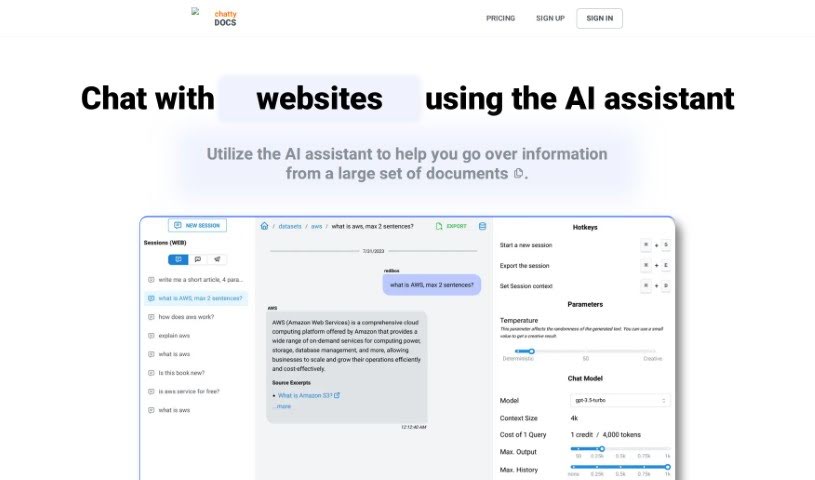
What is ChattyDocs?
From what I’ve gathered about ChattyDocs, it’s an AI-powered tool that lets you talk to your documents, PDFs, and other text files. Instead of slogging through them yourself, you can just chat with an AI assistant. You can upload your files, create your own data collections (we call them datasets), share these datasets publicly if you want, and even set up a Telegram bot. Plus, you get to fine-tune how creative and responsive the AI is. It’s built to work on your desktop, phone, and through Telegram, and it helps you keep track of your data usage.
So, basically, ChattyDocs is your AI buddy for documents. It lets you chat with them, manage your data collections, share them with others, and even build Telegram bots to answer questions using your data, all while letting you control the AI’s personality and how it handles your information.
Who created ChattyDocs?
ChattyDocs was launched on June 17, 2024, by a founder whose identity isn’t publicly known. It’s an AI tool designed to let you chat with your documents, PDFs, and other text files. It is having an AI assistant that reads them for you. You can manage your data, create collections of information (datasets), and even share these datasets with others using a simple link. If you’re a Telegram user, you can also set up a bot to interact with your data.
What is ChattyDocs used for?
ChattyDocs is pretty versatile! Here’s a rundown of what you can do with it:
- Track how you use your data: Keep an eye on your dataset usage.
- Index data in the background: It works on your data without you needing to wait.
- Customize your datasets: Tailor your data collections to your needs.
- Works with Telegram: Connect it to your Telegram for easy access.
- Grab data from websites: It can pull information directly from web pages.
- Delete datasets easily: If you don’t need a dataset anymore, you can remove it.
- Upload from your device: Bring your own files into the system.
- Available everywhere: Use it on your desktop, phone, or Telegram.
- Get document-specific answers: The AI focuses its responses on the files you provide.
- Preview chats anywhere: See your chat sessions on the app, web, or Telegram.
- Process files quietly: It handles file processing in the background.
- Skip manual reading: Let the AI do the heavy lifting instead of reading documents yourself.
- Manage your data: Create, organize, and keep your datasets in order.
- Share public datasets: Make your data collections accessible to anyone via a link.
- Use a Telegram bot: Ask questions using your dataset’s information through a bot.
- Upload and manage files: Easily bring files from your device into the system.
- Add or remove documents: You can change what’s in your datasets whenever you like.
- Track your subscription: Monitor your data usage and subscription limits.
- Control chat settings: Adjust things like chat history and how much output the AI gives.
- Export Q&A: Save your question-and-answer sessions for later.
- Simulate AI personalities: Make the AI assistant chat like a specific character.
Who is ChattyDocs for?
ChattyDocs is a great tool for a variety of people, including:
- Professionals who deal with data management.
- AI developers building new applications.
- Researchers in AI and data science.
- Anyone working with documents and datasets regularly.
- Document management specialists.
- Data Analysts who need to process information.
- Researchers of all kinds.
- Knowledge Managers organizing information.
- Content creators working with lots of text.
- AI researchers pushing the boundaries.
- Data scientists analyzing complex data.
- Document Analysts who need to understand files deeply.
- Research analysts synthesizing information.
- Data Managers overseeing data assets.
- Writers looking for efficient research methods.
- Students working on projects.
- Editors reviewing large volumes of text.
- Journalists gathering and processing information.
How to use ChattyDocs?
Using ChattyDocs is pretty straightforward. Just follow these steps:
- Upload your data:
- You can upload files directly from your computer or give the tool a website link. It’ll then automatically download and process the content.
- Feel free to add or remove documents from your dataset whenever you need to.
- Set up your dataset:
- Pick the chat model you want to use and set the context size appropriately.
- You can also adjust the AI’s creativity level (the ‘temperature’) and give it a name and a specific personality.
- If you want to share your dataset, you can make it public with a simple link.
- Chat with your dataset:
- The AI will provide answers, and importantly, it will show you the sources it used.
- You can export all your questions and answers with just one click.
- The tool supports multiple chat sessions that can remember your conversation history.
- You can also provide specific context for each chat session.
- Explore extra features:
- You can preview your chat sessions across different platforms – whether you’re using the app, the web version, or Telegram.
- ChattyDocs is accessible on your desktop, mobile devices, and via Telegram.
ChattyDocs also offers customization options, letting you control input and output sizes, fine-tune the AI’s creativity and how it responds, and even simulate a particular personality for your AI assistant. It’s designed for efficient data management, with features for organizing datasets, creating public ones, and keeping track of how much data you’re using. You can export your Q&A sessions, manage how context is allocated, and keep chat sessions active for ongoing conversations.