What is Chattab?
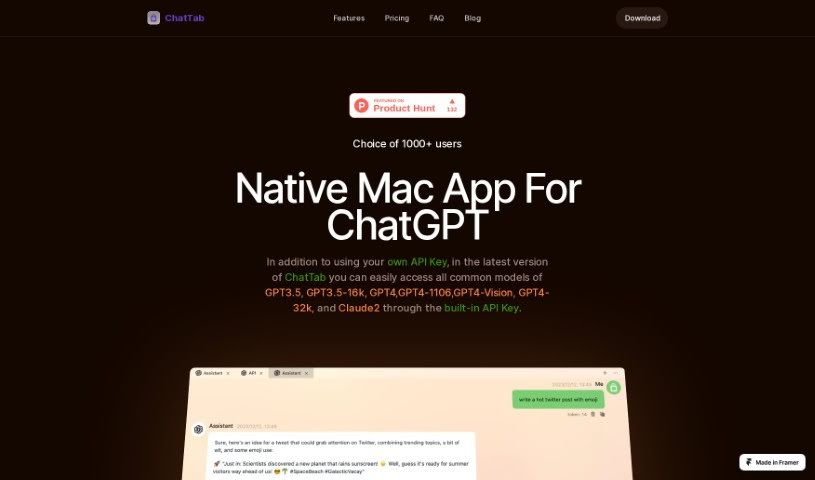
ChatTab is a neat, minimalist app for Mac that lets you have conversations with different prompts, neatly organized into separate tabs. It’s built to feel like a native Mac app, meaning it uses less memory and starts up faster. You can easily hop between various message conversations using these tabs, and it offers a great Markdown experience, supporting things like headings, code snippets, and lists. The app also handles multiple languages, with all translations powered by ChatGPT. What’s really great is that ChatTab puts your privacy and security first – it doesn’t store any of your data or keep any tracking logs. You can try ChatTab for free, though the free version is limited to just one tab. Your personal information is handled securely through Apple’s iCloud service; ChatTab itself doesn’t store any of it. You’ll need a macOS device, and it works best with macOS 11.0 or newer. If you’re not happy with it, you can get a refund within 7 days of your purchase.
Who created Chattab?
ChatTab was founded by Jessica Abrams, who also founded Oloop Analytics. The company got its start in the summer of 2022 with a small, four-person team working remotely from different parts of the world. ChatTab provides a Mac app specifically for ChatGPT, offering a smooth, native experience. Key features include the ability to use multiple tabs for different conversations, support for various GPT models, and a strong commitment to user privacy and security, meaning no data or logs are stored by the app.
What is Chattab used for?
- You can bring up a handy floating window over any app you’re using to chat with experts from various fields, each in their own tab.
- It’s easy to switch between different message conversations thanks to the multiple tabs.
- You get to enjoy Markdown features like headings, code blocks, and both ordered and unordered lists.
- The app supports many languages, with all translations done using ChatGPT.
- Your privacy and security are a priority, as ChatTab doesn’t store any data or tracking logs.
- You can access popular models like GPT3.5, GPT3.5-16k, GPT4, GPT4-1106, GPT4-Vision, GPT4-32k, and Claude2 by using your own API Key directly within the app.
- There’s a free trial available, but it’s limited to just one tab.
- Personal information is handled securely by storing it with Apple’s service (iCloud), and ChatTab itself doesn’t keep any of your data.
- To use ChatTab, you’ll need a macOS device and your own OpenAI API key.
- If you’re not satisfied, you can request a refund within 7 days of purchasing.
- It’s perfect for chatting with experts from different fields, each in their own tab.
- You can easily call up a floating window over any app to start a conversation.
- Switching between different message conversations is a breeze with the multiple tabs.
- You’ll love the excellent Markdown experience, complete with support for headings, code, and various list types.
- The app supports multiple languages, with translations handled by ChatGPT.
- Rest assured, your privacy and security are protected because no data or tracking logs are stored.
- You can chat with experts from different fields, each in their own dedicated tab.
- It offers a native experience that’s lighter on memory and starts up faster.
- Easily switch between multiple tabs to manage different message conversations.
- Enjoy the best Markdown experience, including support for headings, code, ordered lists, and unordered lists.
- The app supports multiple languages, with translations provided by ChatGPT.
- Your privacy and security are guaranteed, as ChatTab doesn’t store any data or tracking logs.
Who is Chattab for?
- Experts from all sorts of different fields.
- Anyone who needs to consult with experts in various specialized areas.
How to use Chattab?
To get started with Chattab on your Mac, just follow these simple steps:
- Installation and Setup:
- First, download Chattab for free and install it on your macOS device. Make sure your system is compatible (macOS 11.0+). You’ll also need to have your own OpenAI API key ready.
- Top Features to Enjoy:
- You’ll appreciate the native Mac experience, which means it starts up faster and uses less memory.
- Using multiple tabs makes it super easy to switch between different conversations.
- The Markdown support is excellent, covering things like headings, code blocks, and various list formats.
- You can access language options that have been translated using ChatGPT.
- ChatTab really focuses on keeping your data private and secure, so it doesn’t store any information or tracking logs.
- Frequently Asked Questions:
- Free Trial: Feel free to download and use it for free, but remember the free version is limited to one tab.
- Credit Card Needed?: Nope, no credit card is required for the free plan.
- Personal Information: All your information is stored securely using Apple’s service (iCloud). ChatTab itself doesn’t keep any of your data.
- Refund Policy: If you’re not satisfied for any reason, you can request a refund within 7 days of your purchase.
- More Details:
- In the latest version, Chattab lets you connect to various GPT models, including GPT3.5, GPT4, and others, using your built-in API Key.
- The tool strongly emphasizes user privacy and security by not storing any data or tracking logs.
By following these steps, you’ll be able to use Chattab effectively on your macOS device for engaging conversations with experts across many different fields.