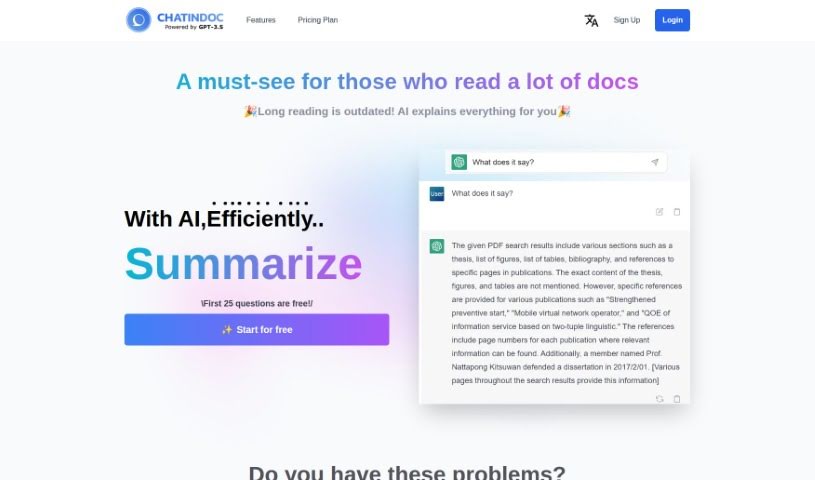
What is ChatInDoc?
ChatInDoc is a really smart PDF viewer that’s built with OpenAI’s ChatGPT. It is a way to have a conversation with your documents. It’s designed to help you quickly get through long, complicated PDFs, whether they’re academic papers, detailed reports, or instruction manuals. You can just ask it questions right in the chat, and the AI can help summarize parts, explain tricky terms, or even analyze entire reports. It’s powered by GPT-3.5 and GPT-4, so it’s pretty capable. You can expect features like super-fast PDF analysis, clear summaries of complex stuff, easy explanations for words you don’t know, and even analysis of those dense IR reports. Plus, it works in multiple languages. There’s a free plan if you want to try it out, with some limits, and a Pro plan that gives you more ‘points’ for more questions and lets you handle bigger files, among other perks.
Who created ChatInDoc?
Chatindoc Overview:
Chatindoc was born out of a desire to completely change how we deal with PDF documents, all thanks to AI. It officially launched on May 15, 2023. The founder actually came up with the idea because they found reading long documents tough during their own student days. Chatindoc brings in ChatGPT, the AI system from OpenAI, to do the heavy lifting. This AI, running on GPT-3.5 and GPT-4, lets you actually talk to your PDFs. You can ask questions, get summaries, have terms explained, and even get analysis for things like academic papers or manuals. Chatindoc offers both free and paid plans, supports many languages, and can handle large documents. Its standout feature is the chat-based interface, making document analysis efficient and interactive.
What is ChatInDoc used for?
ChatInDoc is incredibly versatile for anyone working with documents. Here’s a breakdown of what it can do:
- Summarize PDF content: Get quick overviews of long documents.
- Supports various file formats: It doesn’t just do PDFs; you can also upload Office documents and plain text files.
- PDF Viewer: It’s a straightforward PDF viewer, making it easy to just look at your documents.
- Analyze IR reports: Get insights from your investigative reports.
- Read academic papers with AI: Make studying easier by asking questions about your research.
- Help with instruction manuals: Understand how things work without reading every single page.
- Look up and explain terms: Instantly get definitions for words you don’t recognize.
- Fast PDF comprehension with AI: Speed up how quickly you understand documents.
- Ask questions while reading: Engage directly with the content.
- Interactive document analysis: Dive deeper into your documents through conversation.
- Summarize PDF content: Get the gist of any PDF quickly.
- Explain unfamiliar terms: Never get stuck on a word again.
- Analyze IR reports: Quickly break down complex reports.
- Read academic papers efficiently: Save time on your research.
- Read and extract information from instruction manuals: Get the information you need, fast.
- Efficiently analyze long and complex PDF documents: Tackle academic papers, IR reports, and instruction manuals with ease.
- Interact with ChatInDoc by asking questions in chat: Have a direct conversation with your documents for analysis.
- Summarize sections of PDFs: Focus on specific parts that need clarification.
- Explain unfamiliar terms within PDFs: Build your vocabulary as you read.
- Analyze IR reports quickly via chat and output them in table format: Get structured insights from your reports.
- Reduce man-hours when reading academic papers by asking questions via chat: Spend less time reading, more time understanding.
- Easily access information from instruction manuals without reading the entire document: Find what you need, when you need it.
- Utilize GPT-3.5 and GPT-4 for fast PDF comprehension and analysis: Benefit from powerful AI for quick understanding.
- Support multiple languages and offer user-friendly chat UI: Accessible and easy to use for everyone.
- Delete PDF files from ChatInDoc server when necessary: You have control over your data.
- Quick analysis of PDFs: Get fast overviews.
- Summarizing complex sections of PDFs: Break down dense information.
- Explanations of unfamiliar terms in PDFs: Clarify any confusing words.
- Analysis of IR reports via chat: Get quick insights from your reports.
- Reduction of man-hours when reading academic papers: Streamline your research process.
- Reading instruction manuals efficiently: Get up to speed quickly.
- Reducing time spent looking up unfamiliar terms: Keep your reading flow going.
- Efficient comprehension of large PDF files: Tackle big documents without the struggle.
- Interacting with PDFs through chat: A more dynamic way to engage with content.
- Generating table-style reports for analyses: Get your findings presented clearly.
Who is ChatInDoc for?
ChatInDoc is a fantastic tool for anyone who regularly works with lengthy or complex documents. This includes:
- Researchers: Get through research papers faster.
- Academics: Streamline your study and analysis.
- Students: Make assignments and reading much more manageable.
- Academic Researchers: Deep dive into papers without getting bogged down.
- Technical Writers: Understand and explain complex information more easily.
- Professionals Analyzing Complex Documents: Get quick insights from reports and data.
- Professionals reading long and complex documents: Whether it’s academic papers or instruction manuals, ChatInDoc helps.
- Language Learners: Use it to understand new vocabulary and complex texts.
- Professionals handling complex documents or reports: Simplify your workflow.
- Creators of instructional manuals: Ensure your manuals are clear and easy to understand.
How to use ChatInDoc?
Using ChatInDoc is pretty straightforward. Here’s a simple guide to get you started:
- Sign Up and Pick a Plan: First, sign up. You can start with the free plan, which gives you 2,000 points each month – that’s enough for about 20 questions. No credit card is needed for this. If you find yourself needing more, the Pro plan costs $10 a month and offers a generous 200,000 points, which translates to roughly 2,000 questions.
- Upload Your Documents: You can upload files in PDF, MS Doc, or TXT formats. For the best experience, it’s a good idea to upload files that are around 100 pages long.
- Chat with the AI: Once your document is uploaded, you can start asking questions or giving commands in the chat window. Need a summary? Want a term explained? Just ask!
- Explore the Features: Take advantage of everything ChatInDoc offers, like quick PDF analysis, looking up terms, analyzing IR reports, or getting help with academic papers. The AI, powered by GPT-3.5 and GPT-4, is there to help you understand and respond to your queries effectively.
- Manage Your Files: If you’re on the free plan, you can keep up to 5 PDFs at a time, each up to 10MB. These might be removed after about a week. Pro users get to keep up to 30 PDFs, each up to 50MB, and they won’t be automatically deleted.
- Read Smarter: Try asking the AI to ‘summarize this’ for a section you’re stuck on, or ‘explain this term’ if you encounter something new. It’s also great for analyzing complex content, making it a real lifesaver for academic reading or figuring out instruction manuals.
By following these steps, you’ll be able to use ChatInDoc to quickly analyze and understand even the most complex documents, all thanks to its AI and easy-to-use chat interface.