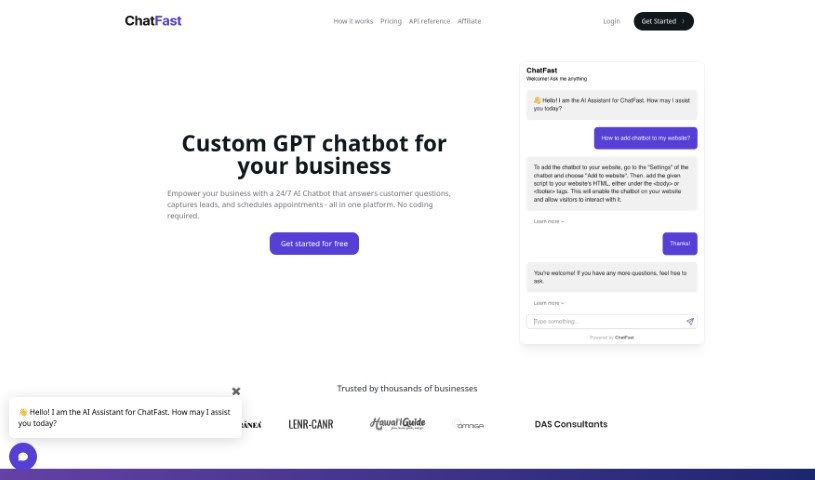
Screenshot of ChatFast

ChatFast

Discover what ChatFast is and learn how to use it effectively in 2025. We'll explore its features and see how it stacks up against other chatbots.

Screenshot

What is ChatFast?

ChatFast is a platform that lets you build your own GPT chatbots using your own data. It is a way to create a smart assistant that can answer questions based on the information you provide, and you can even put it right on your website. You can train these chatbots with all sorts of data – like plain text files, PDFs, or even by pointing them to website URLs. Plus, you can set up custom Q&A pairs to really guide how the chatbot responds to specific questions. It also helps you gather information about who’s interacting with your chatbot and gives you insights into those conversations. It’s pretty neat because it supports multiple languages too!

Who created ChatFast?

Chatfast.io was founded by someone whose specific details aren’t readily available in the information I have. What’s important is that the platform itself empowers users to build GPT chatbots from their own data. It’s designed to work with various languages and different kinds of data sources. You can train your chatbots, add custom Q&A to steer their responses for particular questions, and even collect visitor information to understand how people are using them. If you’re on a paid plan, you can also get API access. And if you ever need to stop, you can cancel your plan anytime by reaching out to support.

What can you do with ChatFast?

  • Answer questions based on your data.
  • Embed your custom chatbots directly onto your website.
  • Add specific Q&A to guide how the chatbot answers particular questions.
  • Collect information from your website visitors.
  • Get insights into how visitors are interacting with your chatbot.

Who would find ChatFast useful?

  • Anyone handling customer support.
  • Content creators looking to engage their audience.
  • Website owners wanting to add interactive elements.
  • Marketers aiming to improve lead generation or engagement.
  • Sales professionals needing quick answers for prospects.
  • Data Analysts who want to make data accessible.
  • Small Business Owners looking to scale their support or information delivery.

How do I get started with ChatFast?

Using ChatFast.io is pretty straightforward. Here’s a quick rundown of the steps:

  1. Sign Up: First, head over to the ChatFast.io website and create your account.
  2. Choose a Plan: You’ll need to pick a plan that fits what you need. They offer a few options:
    • Free: This is a great starting point, giving you 1 chatbot, about 15 message credits each day, and it uses GPT-3.5.
    • Basic: This plan is perfect for smaller teams. You get 5 chatbots, 2,000 message credits, and the ability to add custom Q&A.
    • Premium: If you need a bit more, this plan provides 8 chatbots, 8,000 message credits, and some more advanced features.
    • Elite: This is for larger teams, offering 15 chatbots, a generous 30,000 message credits, and even more capabilities.
  3. Create Your Chatbot: This is where the magic happens!
    • Start by uploading your data. You can use plain text files, PDFs, or even website URLs.
    • Train your chatbot using these various data sources.
    • You can add custom Q&A to help the chatbot answer specific questions more accurately.
    • Customize it further to collect visitor information and gain insights into their interactions.
  4. Embed Your Chatbot: Once you’ve got your chatbot set up just right, you can easily embed it on your website. This way, it can help your users in real time.
  5. API Access:
    • If you’re looking for more advanced integration, API access is available for those on paid plans.
    • You can find all the details you need in the API section.
  6. Need Support?:
    • If you have any questions or need assistance, feel free to reach out to [email protected].
    • Email support is available for all paid plans.
  7. Cancellation:
    • We understand plans can change, so you can cancel your subscription at any time. Just email [email protected] to do so.

Basically, ChatFast.io makes it easy for anyone to create interactive GPT chatbots using their own data. It supports multiple languages and gives you useful analytics, all designed to make your website more engaging and improve the user experience.

Related AI Tools

Discover more tools in similar categories that might interest you

Stay Updated with AI Tools

Get weekly updates on the latest AI tools, trends, and insights delivered to your inbox

Join 25,000+ AI enthusiasts. No spam, unsubscribe anytime.