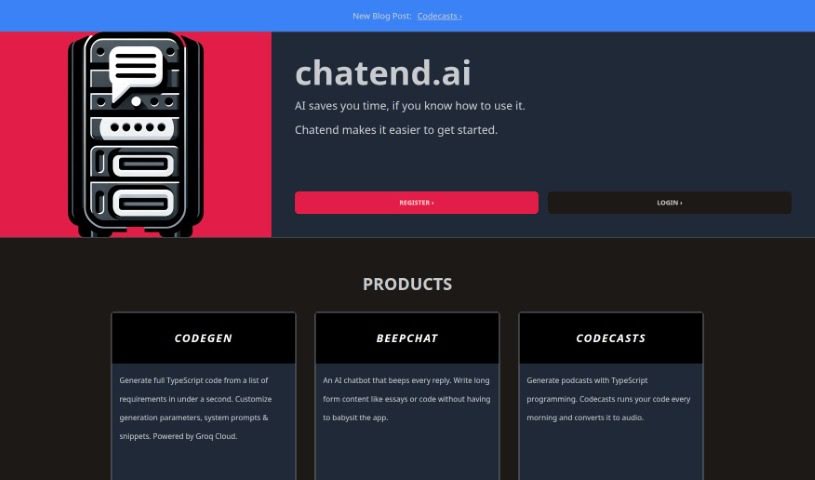
Screenshot of Chatend

Chatend

Discover what Chatend is and how to use it effectively in 2025. We'll explore its features and see how it stacks up against other chatbots.

Screenshot

What is Chatend?

Chatend is a platform that lets you build, launch, and chat with your very own AI-powered chatbot applications. It comes with a handy self-service portal called the Chatend IDE, which is where you’ll create and manage all your bots. You can use features like Custom Commands to teach your bots how to interact with both the digital and physical worlds, Keystore to keep data saved long-term, Environment Variables to share information between commands, and System Prompt to guide how your bot behaves.

For everyday folks, Chatend can do things like summarize your emails, control your smart home lights, set reminders for you, help you find your car, pull out key info from the news, or keep you updated on sports scores. If you’re using it in a group chat, it can summarize conversations, answer questions, play games, keep an eye on financial news, and even give a shout-out to active members.

Businesses can really benefit from Chatend too. You can send personalized emails and PDFs to your customers, answer their questions using your company’s own documents, search through databases, keep tabs on financial data, pull information from Salesforce, and connect with all sorts of other APIs. We’ve seen Chatend used successfully in many real-world examples, and it’s known for being easy to set up, having clear pricing, allowing code customization, letting you deploy bots on many different channels, and offering dedicated account management support.

Who created Chatend?

Chatend first appeared on August 28, 2023. Cody Taylor is the individual behind its creation. Chatend is a company that offers a self-service portal, the Chatend IDE, designed for users to develop, deploy, and interact with their own AI-driven chatbot applications. Key features include Custom Commands for bot interaction with digital and physical realms, Keystore for persistent data storage, Environment Variables for sharing API keys, and System Prompt to guide bot behavior. Chatend is useful for individuals needing to summarize emails, manage home devices, set reminders, or track sports scores. In group settings, it can summarize chats, play games, and monitor financial news. Enterprise users can leverage it for sending personalized communications, answering questions from company documents, and integrating with various APIs. The platform is quite versatile, supporting deployment across multiple channels like email, SMS, phone, and various messaging apps.

What is Chatend used for?

  • Building, launching, and chatting with your own AI-powered chatbot applications.
  • Creating and managing your bots using the Chatend IDE.
  • Teaching your bots to interact with both digital and physical worlds through Custom Commands.
  • Using handy features like Keystore for saving data, Environment Variables for sharing API keys, and System Prompt to guide your bot’s behavior.
  • Summarizing your email inbox, controlling your home lights, setting reminders and events, finding your car, pulling out important information from industry news, and tracking sports scores and news.
  • In group chats, it can summarize conversations, answer questions, play games, monitor financial news and stock prices, and acknowledge active members.
  • For businesses, it helps send personalized emails and PDFs to customers, answer questions using company documents, search databases, monitor invoices, and connect with any API.
  • It’s been successfully used in case studies like Emma, West Ham GC, Ask Andi for Munichain, and @I95Progress on Twitter.
  • You get clear pricing, the ability to customize your code, a single interface for all services, and you can deploy your bots on many channels, including email, SMS, phone, and various messaging platforms.
  • It’s easy to set up, you get a dedicated account manager, and it offers a range of features for individuals, group chats, and enterprise users.

Who is Chatend for?

  • Individuals who want to summarize their email inboxes, control their home lights, set reminders and events, find their cars, extract key information from industry news, and track sports scores and news.

How to use Chatend?

Here’s how you can get started with Chatend:

  1. First, sign up for an account on the Chatend platform.
  2. Then, head over to the self-service portal, the Chatend IDE, where you’ll build and manage your bots.
  3. Make sure to use powerful features like Custom Commands to teach your bots how to interact with both the digital and physical worlds.
  4. You’ll also want to take advantage of features like Keystore for reading and writing persistent data, Environment Variables for sharing API keys, and System Prompt to guide your bot through its interactions.
  5. For your personal tasks, Chatend can help summarize email inboxes, control home lights, create reminders, find your car, pull information from news articles, and track sports scores.
  6. When you’re in group chats, it can summarize transcripts, answer questions, play games, keep an eye on financial news, and acknowledge active members.
  7. If you’re an enterprise user, Chatend offers ways to send personalized emails and PDFs, answer questions using your company’s documents, monitor invoices, and integrate with APIs.
  8. You can deploy your chatbots on a variety of channels, such as email, SMS, phone, Slack, Discord, WhatsApp, and more.

Chatend has been successfully used in various case studies, and it’s known for its easy setup, cost transparency, code customization, and dedicated account management. The platform supports deployment on multiple channels to fit different communication needs.

Related AI Tools

Discover more tools in similar categories that might interest you

Stay Updated with AI Tools

Get weekly updates on the latest AI tools, trends, and insights delivered to your inbox

Join 25,000+ AI enthusiasts. No spam, unsubscribe anytime.