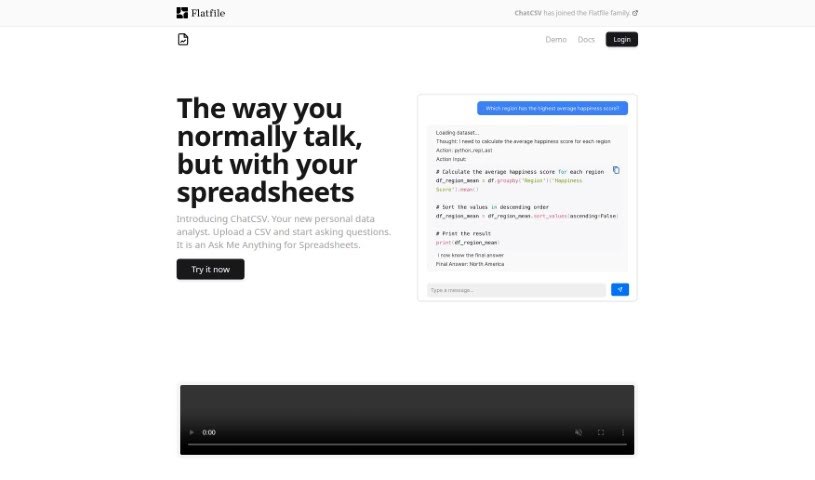
Screenshot of ChatCSV

ChatCSV

Discover ChatCSV in 2025! Learn what this personal data analysis tool is, how to use its features effectively, and how it stacks up against other data analytics tools.

Screenshot

What is ChatCSV?

ChatCSV is a personal data analysis tool designed to make working with CSV files much simpler. It is a way to chat with your spreadsheets! It lets you ask questions directly about your CSV data, analyze it, and get insights without needing to be a data expert. You can upload files from your computer, paste data right from your clipboard, or even use a URL. ChatCSV can even suggest common questions to ask about your data and show you the answers with charts. Plus, it keeps a history of your conversations, making it easy to revisit your analysis later.

This tool is a real help for industries like retail, e-commerce, finance, banking, marketing, and advertising. It can help you understand customer behavior, spot trends, analyze marketing campaigns, look at demographic data, and dive into market research. It really helps make sense of all that information.

When you’re using ChatCSV, you can easily manage your discussions. You can rename them, delete ones you don’t need anymore, or even share them with colleagues. This makes it super easy to work together on data analysis. If you’re not sure about it, there’s a demo available so you can try it out first. The subscription plans are pretty flexible too; you can change them or cancel whenever you need to.

Basically, ChatCSV takes the complexity out of data analysis by giving you a conversational way to interact with your CSV files. It even helps by suggesting questions you might want to ask based on the data you’ve uploaded. This means you don’t need to know SQL or be a data scientist to get valuable insights. You can just ask what you need to know in plain English.

Who created ChatCSV?

About Chatcsv:

Chatcsv was developed by Flatfile and launched on June 20, 2024. It’s a personal tool for analyzing data, turning spreadsheets into an interactive space where you can directly ask questions, analyze, and uncover insights from your CSV documents. The platform is useful across many sectors, including retail, e-commerce, finance, banking, marketing, and advertising. You can upload CSV files from various sources, ask all sorts of questions, get visual answers in the form of charts, and manage your conversations by renaming, deleting, or sharing them. Chatcsv’s main goal is to make data analysis more accessible by offering a conversational interface and simplifying how you read and analyze CSV files.

What is ChatCSV used for?

  • Retail and E-Commerce: Get a handle on trends, understand customer behavior, and manage inventory more effectively.
  • Finance and Banking: Quickly see trends and analyze transaction data.
  • Marketing and Advertising: Break down campaign performance, analyze customer demographics, and explore market research data.
  • Optimizing Retail and eCommerce: Easily visualize how sales are distributed across different product categories.
  • Optimizing Finance and Banking: Simplify the process of analyzing how many transactions happen each day.
  • Optimizing Marketing and Advertising: Streamline campaign analysis and understand click-through rates for your email campaigns.

How to use ChatCSV?

Here’s how you can get the most out of ChatCSV:

  1. Upload Your Data: The first step is to get your CSV file into ChatCSV. You can upload it straight from your computer, paste data directly from your clipboard, or provide a URL if your data is online.
  2. Ask Questions: Once your data is uploaded, ChatCSV will suggest some common questions based on what it finds. Feel free to pick one of those or ask your own specific questions to dig deeper into what you need to know.
  3. Visualize Results: ChatCSV can provide chart-based answers to your questions. You can ask for different chart types, like bar charts or pie charts, to help you see and understand your data more clearly.
  4. Manage Conversations: Keep track of all your data analysis sessions using the Chat History feature. You can rename conversations to make them more descriptive, delete ones you no longer need, or share them with colleagues to encourage teamwork on your data.
  5. Obtain Insights: ChatCSV is designed to help various industries like retail, finance, and marketing. It assists in understanding trends, customer behavior, managing inventory, analyzing financial transactions, campaign performance, demographic insights, and market research.
  6. Subscription Plans: ChatCSV offers flexible plans to suit different needs. There’s a free trial, and then paid options like Pro and Enterprise. These plans offer benefits such as faster responses, API access, unlimited messages daily, and extra storage and support.
  7. Demo and Trial: If you want to see how it works before signing up, you can access a demo. The subscription plans are flexible, and you can cancel them anytime if your needs change.
  8. Parent Company: Flatfile has acquired ChatCSV, though the exact impact of this acquisition on the services provided hasn’t been detailed.

By following these steps, you can effectively use ChatCSV to analyze your data and uncover valuable insights from your CSV files.

Related AI Tools

Discover more tools in similar categories that might interest you

Stay Updated with AI Tools

Get weekly updates on the latest AI tools, trends, and insights delivered to your inbox

Join 25,000+ AI enthusiasts. No spam, unsubscribe anytime.