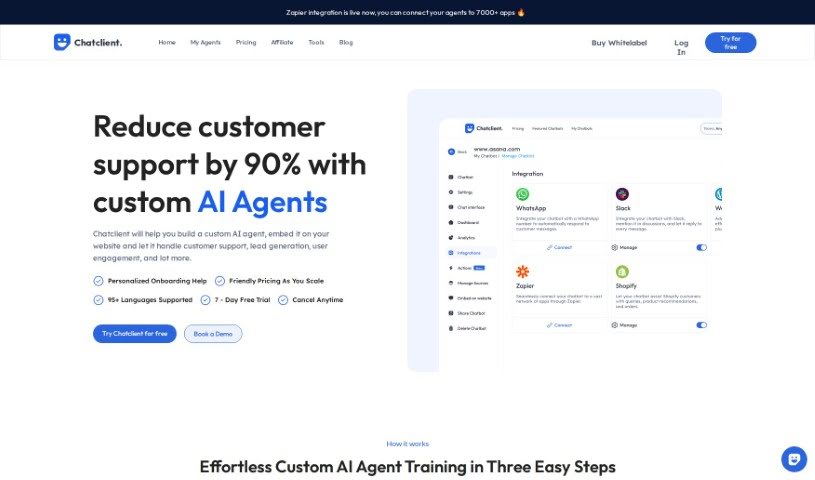
Screenshot of Chatclient

Chatclient

Discover what Chatclient is and how to use it effectively in 2025. We'll explore its features and see how it stacks up against other chatbots.

Screenshot

What is Chatclient?

Chatclient is a custom AI chatbot builder. It’s designed to train ChatGPT using your own data, making it super easy to add a chat widget to your website. You can simply upload documents or link to your existing content, and then create a chatbot that can answer questions based on that information. People who’ve used Chatclient really like its user-friendly interface and how simple it is to customize. They’ve also found it helps boost customer engagement and satisfaction. Basically, this tool offers help all day, every day, by giving customers quick, accurate answers to their questions. This, in turn, can really improve how users interact with your site and lead to more conversions.

Who created Chatclient?

Joshua David, the Co-Founder & CEO at SETVI, is the person behind Chatclient. It first launched on August 3, 2023. The idea was to give businesses a way to build custom AI chatbots by training ChatGPT on their specific data, and then easily put a chat widget on their website. The company offers different plans, each with its own set of features. These can include things like message credits, how many chatbots you can have, how many characters each chatbot can handle, and whether you get access to advanced versions like GPT-4o.

What is Chatclient used for?

  • Empower Your Business with AI: Give your business an AI edge.
  • Instant Customization: Tailor the user experience quickly and easily.
  • 24/7 Autonomous Assistance: Provide customer support around the clock without manual intervention.
  • Effortless Integration: Streamline operations and boost user engagement by embedding it easily.
  • Train Your AI Chatbot in Seconds: Adapt to any data format with a quick training process.
  • Round-the-Clock Engagement: Keep potential customers engaged and convert them into loyal ones at any hour.
  • Boost User Engagement: Improve how users interact with your site through seamless integration.
  • Enhance Customer Experience: Offer immediate answers to customer questions.
  • Increase Customer Satisfaction and Conversions: Provide autonomous support that leads to happier customers and more sales.
  • Custom Chatbot Training Process: It only takes three simple steps to get your chatbot ready.
  • Custom AI Chatbot Creation: Build AI chatbots specifically designed for businesses.
  • Instant Customization: Train your AI chatbot in seconds, adapting quickly to any data format for a tailored user experience.
  • Effortless Integration: Simply embed the chatbot widget on your website for immediate operational efficiency and boosted user engagement.
  • Enhanced Operational Efficiency: Make your day-to-day tasks smoother and improve how users interact with your site.
  • Training on Various Data Types: It can learn from PDFs, CSV files, docx documents, and plain text.
  • Immediate Responses: Get instant answers to customer questions.
  • Boosted Customer Engagement and Satisfaction: Keep customers happy and involved.
  • Conversion of Potential Leads: Turn interested visitors into regular customers.
  • Secrecy Maintained: Your training data is kept private.
  • Instant Customization: Train your AI chatbot in seconds, adapting quickly to any data format for a tailored user experience.
  • 24/7 Autonomous Assistance: Round-the-clock AI support, engaging and converting potential customers into loyal ones with ease.
  • Effortless Integration: Simply embed the chatbot widget on your website for immediate operational efficiency and boosted user engagement.

Who is Chatclient for?

  • Customer service representatives
  • Website administrators
  • Marketing professionals
  • Sales Representatives
  • Website developers
  • Business owners
  • Customer support teams
  • Customer Success Managers

How to use Chatclient?

To get the most out of ChatClient, just follow these simple steps:

  1. Upload Your Data: Start by uploading the information you want your chatbot to learn from. This can include website URLs, PDFs, CSV files, docx documents, or even just plain text.
  2. Select What to Train On: Pick the specific documents or web pages you want your chatbot to focus on. Then, just click to start the training process.
  3. Integrate It: Easily add ChatClient as a chatbot widget to your website. This will help make your operations more efficient and keep users engaged.
  4. Get Round-the-Clock Assistance: ChatClient provides autonomous support 24/7, meaning it can give customers instant answers whenever they need them.
  5. Check File Compatibility: You can use a variety of file formats for training, including website URLs, PDFs, CSV files, docx files, and plain text, making it very flexible.
  6. Customize Your Chatbot: Make your AI chatbot unique by providing your data and training it on the specific documents or pages you choose.
  7. Deploy It: Once training is complete, you’ll get embed code. Just copy this code and add it to your website. Your personalized AI chatbot will then be ready to answer customer questions.
  8. See the User Feedback: Expect positive feedback from users who notice increased customer engagement, higher satisfaction, and better conversion rates thanks to ChatClient.

By following these steps, you can really make ChatClient work for you. It’s a great way to boost customer engagement, provide instant answers, and make your website experience much better for everyone.

Related AI Tools

Discover more tools in similar categories that might interest you

Stay Updated with AI Tools

Get weekly updates on the latest AI tools, trends, and insights delivered to your inbox

Join 25,000+ AI enthusiasts. No spam, unsubscribe anytime.