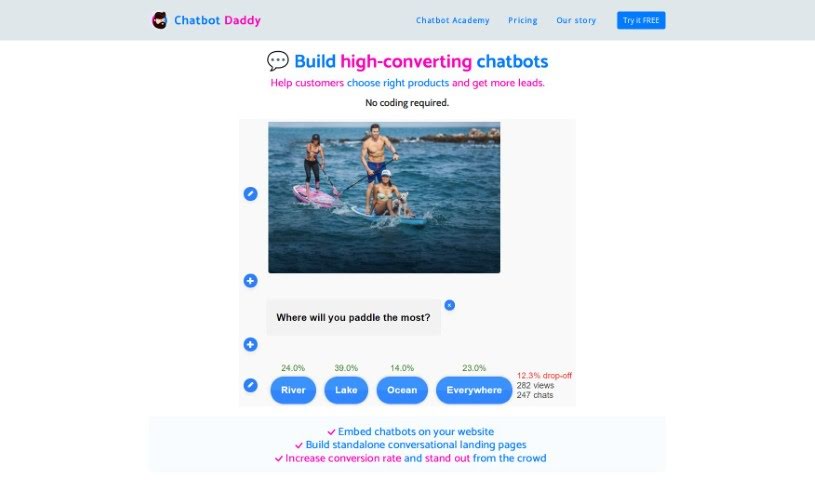
Screenshot of Chatbot Daddy

Chatbot Daddy

Discover what Chatbot Daddy is and how to use it effectively in 2025. We'll explore its features and see how it stacks up against other chatbots.

Screenshot

What is Chatbot Daddy?

Chatbot Daddy is a handy tool that makes building chatbots and conversational forms super simple. You can use it to automate how you talk to customers, suggest products, and gather leads – all without needing to write a single line of code. It comes with a visual builder, a unique markdown-inspired code that’s easy to read, full design customization, and the ability to embed your chatbots anywhere. Plus, you can create chatbot sequences, get email notifications, and connect it with popular tools like Pipedrive, Sendy, and Mailchimp.

What’s great is that it’s really user-friendly and intuitive, so you won’t need constant IT help. By putting chatbots on your website or creating standalone landing pages with engaging conversations, you can really boost your conversion rates.

Who created Chatbot Daddy?

Matt Marko is the creator behind Chatbot Daddy. He launched it on March 28, 2022. The whole idea behind the platform is to make creating chatbots and conversational forms straightforward. It helps automate customer interactions, generate leads, and offers features like an easy-to-use chatbot builder with readable code, customizable designs, embedding options, CRM integrations, and email notifications.

What is Chatbot Daddy used for?

Chatbot Daddy is incredibly versatile! Here’s a look at what you can do with it:

  • Generate Leads: Collect contact information from potential customers.
  • Automate Customer Interactions: Make your customer service more efficient.
  • Help Customers Select Products: Guide users to the right products.
  • Product Recommendations: Suggest items based on customer needs.
  • Lead Collection and Scoring: Gather and qualify leads automatically.
  • Sales Automation: Streamline your sales processes.
  • Form and Settings Customization: Tailor forms and settings to your needs.
  • Subscription to Newsletters: Easily get people signed up for your mailing lists.
  • Automate Various Tasks: Link it with other applications to automate workflows.
  • Create, Share, or Sell Chatbot Templates: Build and distribute your own chatbot designs.
  • Increase Conversion Rates: Make your website more engaging.
  • Automate Lead Qualification: Speed up the process of identifying good leads.
  • Send Email Notifications: Stay informed about submissions and interactions.
  • Embedding Chatbots: Place interactive chatbots directly on your web pages.
  • Create Conversational Landing Pages: Build standalone pages that engage visitors through conversation.
  • Automate Business Processes: Streamline various operational tasks.

Who is Chatbot Daddy for?

This tool is a great fit for a variety of professionals:

  • Digital marketers
  • Salespersons and Salespeople
  • Business owners
  • Human Resources professionals
  • Web Developers
  • CRM specialists

How to use Chatbot Daddy?

Getting started with Chatbot Daddy is straightforward. Just follow these steps:

  1. Create Chatbots and Conversational Forms: Use the visual builder to design interactive chatbots. No coding is needed!
  2. Utilize Human-Readable Code: If you like, you can code using a markdown-inspired language that’s easy to understand and customize.
  3. Customize Design: Make your chatbots look exactly how you want with full design customization options to match your brand.
  4. Embed Chatbots: Easily place your chatbots on your website or create standalone landing pages to engage visitors.
  5. Automate Customer Interactions: Turn boring static forms into engaging conversations for things like product recommendations or lead scoring.
  6. Manage Chatbots Easily: The Chatbot Daddy app makes managing your chatbots and adjusting settings a breeze.
  7. Enhance User Engagement: Use chatbots to create more interactive experiences that boost conversion rates.
  8. Integrate with CRM Tools: Connect Chatbot Daddy with your Customer Relationship Management tools to automatically upload leads.
  9. Email Notifications: Set up email alerts for form submissions and other important interactions.
  10. Utilize Human-Readable Code: This unique coding language, inspired by markdown, is perfect for sharing, creating, or even selling your chatbot templates.
  11. Connect with Other Applications: Link Chatbot Daddy to various apps to automate tasks like managing leads or signing people up for newsletters.
  12. Subscription to Newsletters: Make it easy for users to subscribe to your newsletters, improving lead collection and interaction.

Basically, Chatbot Daddy makes creating and managing chatbots simple, helping you engage users and generate more leads without any coding hassle.

Related AI Tools

Discover more tools in similar categories that might interest you

Stay Updated with AI Tools

Get weekly updates on the latest AI tools, trends, and insights delivered to your inbox

Join 25,000+ AI enthusiasts. No spam, unsubscribe anytime.