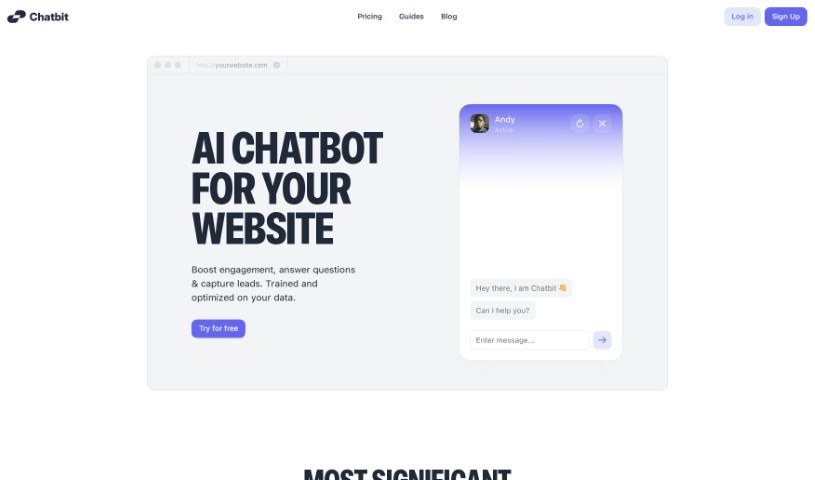
Screenshot of Chatbit

Chatbit

Discover what Chatbit is and how to use it effectively in 2025. We'll explore its features and see how it stacks up against other Customer Service Tools.

Screenshot

What is Chatbit?

Chatbit is a handy tool that lets you build your own AI chatbots for your website. They are digital assistants that can chat with your visitors, answer their questions, and even help you collect leads. What’s really great is that you can make these chatbots feel unique by adjusting how they respond, based on what you know about the visitor. And the best part? You don’t need any coding skills at all. It’s designed to be super easy for everyone, no matter your tech background. You can get a chatbot up and running on your site in less than five minutes. Chatbit can handle a massive amount of information – up to 11 million characters for context input. You also get to customize how your chatbot looks and what its personality is like. Plus, it’s built to capture leads from visitor interactions. It even supports multiple languages and sends you your leads daily. Chatbit really focuses on making the whole experience smooth and quick, aiming to boost your customer service with engaging conversations, instant answers, and smart feedback based on user data. It’s a really well-suited tool for creating AI chatbots that fit your specific needs.

Who created Chatbit?

Chatbit was developed by an AI company that specializes in providing AI chatbot services. It first launched on March 24, 2024. Since then, it’s offered features like boosting customer engagement, collecting leads, and allowing customization without any coding. You can really make the chatbot your own by adjusting its look, personality, and even adding your logo to match your brand perfectly.

What is Chatbit used for?

  • Making customer service better
  • Being easy for people without tech skills to use
  • Supporting different languages
  • Helping customers
  • Improving how you help customers
  • Gathering leads
  • Collecting potential customer information
  • Getting website visitors involved in conversations
  • Making the experience feel personal for each visitor
  • Providing a smooth, optimized experience for users
  • Answering customer questions
  • Responding to customer inquiries
  • Building custom AI chatbots for websites
  • Chatting with visitors
  • Adjusting chatbots based on what you know about users
  • Allowing chatbots to handle a lot of text in their answers
  • Customizing the chatbot’s look
  • Changing the bot’s personality
  • Adding chatbots to websites easily
  • A feature for customer engagement
  • A feature for collecting leads
  • Tailoring chatbots using user data
  • No coding needed
  • Boosts customer service
  • A high limit for text input
  • An interface that’s very customizable
  • Ability to change the bot’s personality
  • Options for customizing the logo
  • Can be added to websites
  • Leads are delivered daily
  • Quickly creating and setting up bots
  • Matching your brand with the chatbot’s style
  • Creating custom AI chatbots for websites
  • Answering customer questions
  • Customizing how AI chatbots look
  • Setting the bot’s personality and style
  • Customizing the chatbot’s color and where it appears on the page

Who is Chatbit for?

  • Customer service representatives
  • Sales Representatives
  • Marketers
  • Human Resources Managers
  • Small Business Owners
  • Software developers
  • Customer Support Representatives
  • Salespeople
  • Website Owners
  • Business owners
  • Website owners and managers
  • Business owners and marketers
  • Anyone looking to improve how they engage with customers
  • Marketing professionals
  • Website administrators
  • Sales professionals
  • Website developers
  • Website Managers

How to use Chatbit?

Using Chatbit is pretty straightforward. Here’s a simple breakdown:

  1. Create Your AI Assistant: First, you’ll build your own custom AI chatbot with Chatbit. You can tweak its answers, how it looks, and how it acts to perfectly fit your website.
  2. Integration: Once your chatbot is ready to go, you just add it directly to your website. This lets visitors start interacting with your new AI helper.
  3. Customization: Make it truly yours by changing colors, adjusting its position on the page, and adding your brand’s logo. You can also define the bot’s personality and overall style so it feels like a natural part of your brand.
  4. Lead Collection: Turn on the lead collection feature to gather potential leads from people who chat with your bot. Chatbit will send these leads to you every day.
  5. Customer Engagement: Chatbit’s AI chatbots are great at engaging customers. They can answer questions right away, providing accurate information based on specific user data, which really makes the visitor experience much better.
  6. Multi-Language Support: Chatbit can communicate in various languages, which is great for reaching a wider audience. While the exact list of supported languages isn’t detailed on the website, the capability is there.
  7. Quick Setup: The whole process of creating a bot with Chatbit is designed to be fast – you can usually finish in under five minutes. It’s meant to be easy and hassle-free.
  8. Accessible to All: Even if you’re not super tech-savvy, Chatbit is easy to use. You don’t need any coding knowledge to create and put these AI chatbots onto your site.
  9. Optimized AI Tool: Chatbit uses machine learning to build custom AI chatbots that are trained on your own content. These bots offer personalized experiences for visitors, help generate leads, and improve customer service in real-time.

By following these steps, you can really make the most of Chatbit to boost customer engagement, answer questions, and capture leads on your website.

Related AI Tools

Discover more tools in similar categories that might interest you

Stay Updated with AI Tools

Get weekly updates on the latest AI tools, trends, and insights delivered to your inbox

Join 25,000+ AI enthusiasts. No spam, unsubscribe anytime.