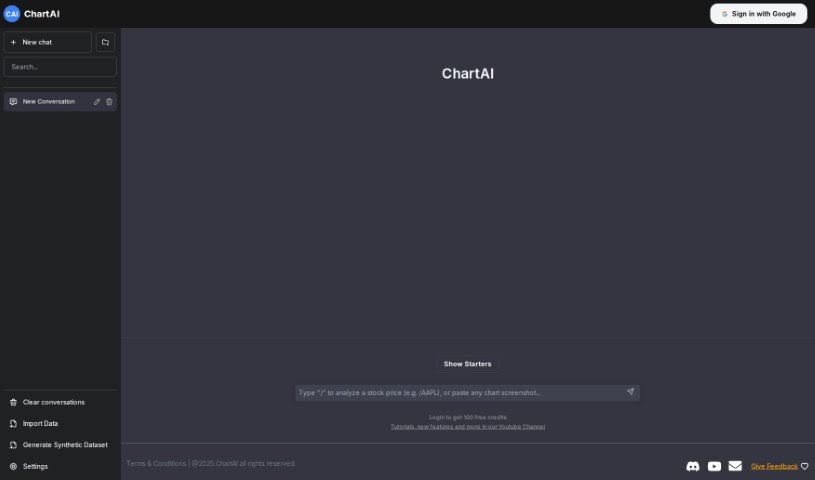
Screenshot of ChartAI

ChartAI

Discover ChartAI in 2025! Learn what this AI-powered tool is, how to use its features effectively, and how it stacks up against other data visualization tools.

Screenshot

What is ChartAI?

ChartAI is a really neat AI tool built specifically for making charts and diagrams. Thanks to its smart technology and easy-to-use design, ChartAI lets you create eye-catching, informative visuals in just minutes. It’s perfect for anyone – whether you’re in business, crunching numbers as a data analyst, or teaching. ChartAI helps you explain complicated stuff clearly. Just pop in your data, pick a chart style you like, and let ChartAI handle the rest. It’ll look at your data and whip up beautiful, accurate charts that you can tweak to perfectly show what you mean.

What makes ChartAI stand out is how versatile it is. You can create all sorts of charts: line graphs, bar charts, pie charts, scatter plots, and many more. Plus, you have lots of options to customize colors, labels, fonts, and other visual bits to match your brand or just your personal taste. But ChartAI isn’t just for static images! It also lets you add interactive elements like tooltips, zooming, panning, and even animations. This makes it fantastic for building interactive dashboards, reports, presentations, and anything you want to share online visually.

On top of that, ChartAI has some serious data analysis smarts. It can handle big chunks of data, do calculations on the fly, and pull out useful insights. You can easily import data from common formats like CSV, Excel, and Google Sheets, so working with data from different places is a breeze. ChartAI really saves you time and effort when you need to create professional-looking charts. Its straightforward interface and user-friendly design mean anyone can use it, no matter their tech skill level. Whether you’re just starting out or you’re a seasoned data pro, ChartAI offers a smooth and efficient way to get your charts made.

Who created ChartAI?

ChartAI was developed by a team of innovators who wanted to create an AI tool that makes generating charts and diagrams super efficient. This tool features an easy-to-use interface powered by advanced technology, and it supports a wide variety of chart types along with plenty of customization options. Beyond just static charts, ChartAI also lets you add interactive features like tooltips and animations. It’s equipped with advanced data analysis capabilities and can import data from various file formats, making it a great choice for users with different levels of technical know-how.

What is ChartAI used for?

  • Making charts and diagrams that look great and clearly show information.
  • Helping you explain complex data in an easy-to-understand way.
  • Supporting a huge range of chart types and styles to fit any need.
  • Letting you customize colors, labels, fonts, and other visual details.
  • Adding interactive features to your charts, like tooltips, zooming, and panning.
  • Building interactive dashboards, reports, presentations, and online visuals.
  • Working with large datasets and doing calculations in real-time.
  • Pulling out meaningful insights from your data.
  • Importing data easily from popular files like CSV, Excel, and Google Sheets.
  • Giving users with all sorts of technical skills a smooth and efficient charting experience.

Who is ChartAI for?

  • Business professionals
  • Data Analysts
  • Teachers

How to use ChartAI?

ChartAI is designed to be super user-friendly, making it effortless to create great-looking charts and diagrams. Here’s a simple guide to get you started:

  1. Input Your Data: First, just put your data into ChartAI. You can easily import it from sources like CSV, Excel, or Google Sheets.
  2. Pick a Chart Type: Choose from the many chart types available – think line charts, bar charts, pie charts, scatter plots, and more – depending on what you want to show.
  3. Customize How It Looks: Make the charts your own by adjusting colors, labels, fonts, and other visual elements. ChartAI offers lots of ways to make your charts look just right.
  4. Add Interactive Touches: Use ChartAI’s interactive features to add things like tooltips, zooming, panning, and animations. This is really helpful for making dashboards and presentations more engaging.
  5. Analyze Your Data: ChartAI has advanced data analysis tools built-in. It can handle large datasets, do calculations as you go, and give you valuable insights from your data.
  6. Generate Your Charts: Let ChartAI do its magic! It will analyze your data and create accurate, customizable, and visually appealing charts that clearly present your information.
  7. Save and Share: Once you’re happy, save your charts for later or share them right from ChartAI. You can use them in reports, presentations, or online.
  8. Enjoy the Easy Experience: ChartAI’s straightforward interface and versatile features are great for everyone, whether you’re new to this or a seasoned data analyst. It makes charting simple and efficient.

By following these easy steps, you can really use ChartAI to create professional charts and diagrams quickly and effectively.

Related AI Tools

Discover more tools in similar categories that might interest you

Stay Updated with AI Tools

Get weekly updates on the latest AI tools, trends, and insights delivered to your inbox

Join 25,000+ AI enthusiasts. No spam, unsubscribe anytime.