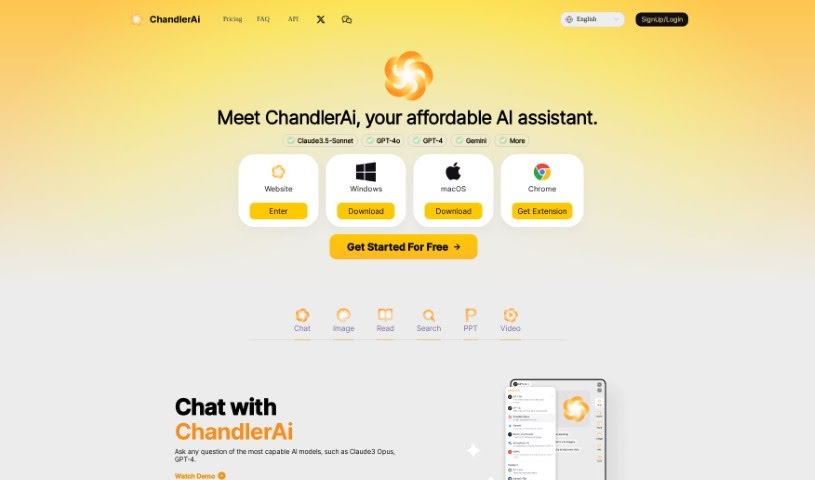
Screenshot of Chandlerai

Chandlerai

Discover what Chandlerai is and how to use it effectively in 2025. We'll explore its features, compare it to other AI assistants, and show you how to get started.

Screenshot

What is Chandlerai?

ChandlerAi is a really affordable AI assistant that packs a punch with a bunch of useful tools. You can generate AI images, use its AI-powered search, create PowerPoint presentations in a flash, and even generate AI videos. It gives you access to top-tier AI models like GPT-4 and Claude 3, and it’s great for searching for information in real-time and getting detailed answers. It costs just $3.99 a month, making it a super cost-effective option. Plus, you don’t need an OpenAI account to use it, and they promise your data is safe – it won’t be leaked or used to train their models.

Who created Chandlerai?

ChandlerAi was actually developed by Claude3.5-Sonnet, and it first launched on January 29, 2024. It’s known for offering a whole suite of AI tools, including GPT-4o, Chat PDF, Web Summary, AI Image Generator, AI Video Generator, AI PPT Generator, and quite a few others. People describe ChandlerAi as a budget-friendly AI assistant, costing only $3.99 per month.

What is Chandlerai used for?

  • Video generation: Bring your ideas to life on screen.
  • AI Image Generation: Turn your imagination into stunning visuals.
  • Quick File & Website Reading: Process documents, PDFs, and websites up to 10 times faster.
  • AI-Powered Search: Get real-time information and comprehensive answers to your questions.
  • Instant PPT Creation: Build presentations with rich content and knowledge in mere seconds.
  • Advanced Web Search: Explore the web with enhanced capabilities.
  • Gemini Access: Utilize Google’s Gemini model.
  • Image Generation & Editing: Create and refine your images.

Who is Chandlerai for?

ChandlerAi is a great tool for a variety of professionals and enthusiasts, including:

  • AI Researchers
  • Data Scientists
  • Content Creators
  • Marketers
  • Software Developers
  • Academic Researchers
  • Chatbot Developers
  • Business Analysts

How to use Chandlerai?

Getting started with ChandlerAi is pretty straightforward. Here’s how:

  1. First, head over to the ChandlerAi website. You can choose to download the tool for Windows, macOS, or grab the Chrome extension.
  2. Once you’ve downloaded it, go ahead and install ChandlerAi on your device or browser.
  3. Now you can start chatting! Just ask questions to the advanced AI models like Claude 3 Opus and GPT-4.
  4. Dive into the features! Try out AI image generation, see how much faster you can read files and websites, use the AI-powered search, whip up quick PPT presentations, or generate AI videos.
  5. You’ll also find other handy features like advanced web search, Gemini access, more PPT creation tools, video generation, image editing, YouTube summarization, and a coding copilot, all for that $3.99 monthly fee.
  6. Just enjoy using ChandlerAi as your affordable AI assistant, with access to multiple platforms and powerful AI models.

Following these steps should get you up and running with ChandlerAi so you can really make the most of everything it offers.

Related AI Tools

Discover more tools in similar categories that might interest you

Stay Updated with AI Tools

Get weekly updates on the latest AI tools, trends, and insights delivered to your inbox

Join 25,000+ AI enthusiasts. No spam, unsubscribe anytime.