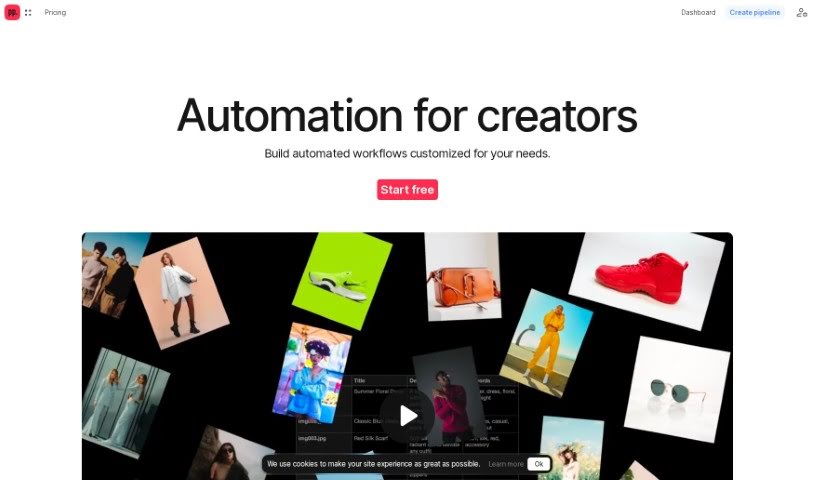
Screenshot of Ceacle Pipeline

Ceacle Pipeline

Discover Ceacle Pipeline in 2025! Learn what this AI-powered tool is, how to use its features effectively, and how it stacks up against other photo editors.

Screenshot

What is Ceacle Pipeline?

Ceacle Pipeline is an AI-driven platform that’s really changing how artists, designers, and creators tackle their creative work. It is a way to automate all those time-consuming, repetitive tasks, so you can spend more time on the actual creative stuff. It’s packed with handy tools like CeacleEffect for quickly adding effects, Mockupc for generating product mockups and scenes, and c. tools for speedy content editing. You can build your own custom workflows pretty fast, automate tasks, and save a ton of time thanks to its AI smarts. Plus, Ceacle Pipeline helps you generate inspiration boards, resize icons for web apps, classify images for e-commerce, vectorize and colorize images, smartly resize images for social media, and even upscale, convert, and compress images. It’s a real game-changer for web designers, photographers, and digital marketers. They offer different pricing plans, too – starting with a free option that gives you some credits, all the way up to enterprise pricing if you need custom solutions, team management, and priority support.

Who created Ceacle Pipeline?

Ceacle Pipeline was actually founded by a team of folks who set out to create an AI-driven platform that would revolutionize creative workflows. Their goal was to help artists, designers, and creators automate tasks, freeing them up to focus more on their creativity. The platform itself offers tools like CeacleEffect for creating effects, Mockupc for generating mockups, and other content editing tools. Users can easily manage their accounts, data, and teams, and they can build custom automated workflows using AI. They’ve also put together a range of pricing plans to suit different user needs.

What is Ceacle Pipeline used for?

  • Image classification: Helps sort and categorize your images.
  • Streamlining workflow: Makes your creative process much smoother.
  • Resizing images for social media: Quickly adjusts images for different platforms.
  • Automated Workflow Templates: Use pre-made or customizable templates to automate tasks.
  • Quick Effects Creation: Rapidly produce visual effects with CeacleEffect.
  • Mockup Generation: Easily create product mockups and scenes with Mockupc.
  • Content Editing with c. tools: Access fast and efficient tools to edit content.
  • Account Management: Directly manage your account, data, and team.
  • Generate Inspiration Boards: Get ideas tailored to your project descriptions.
  • Icon Creation for Web App: Resizes, renames, and compresses icons, plus generates favicons.
  • Image Classification for E-commerce: Organizes images for online stores, supporting CSV or JSON data.
  • Vectorize and Colorize Images: Transforms raster images into vectors and adds color.
  • Smart Resize Images for Social Media: Uses content-aware resizing for perfect social media images.
  • Upscale, Convert, and Compress Images: Optimizes images for web use.
  • Automate time-consuming and repetitive tasks: Saves you valuable time.

Who is Ceacle Pipeline for?

  • Artists
  • Designers
  • Creators

How to use Ceacle Pipeline?

Getting started with Ceacle Pipeline is pretty straightforward. Here’s a quick rundown:

  1. Sign up and Choose a Plan: First, head over to the Ceacle Pipeline website and register for an account. You’ll then pick a plan that fits what you need. They’ve got a free plan to get you started, plus other options.
  2. Access Tools: Once you’re in, you can dive into the various tools. There’s CeacleEffect for creating effects, Mockupc for generating mockups and scenes, and a suite of c. tools for efficient content editing.
  3. Create Custom Pipelines: This is where the AI magic happens! You can build your own custom workflows to match your specific needs. Don’t want to start from scratch? No problem – you can also use their templates and tweak them to automate your tasks.
  4. Generate Various Outputs: Ceacle Pipeline is super helpful for a bunch of things. It can help you generate inspiration boards, create icons for web apps, classify images for e-commerce, vectorize and colorize images, smartly resize images for social media, and even upscale, convert, and compress images.
  5. Stay Updated: Want to know about new features? You can subscribe to email notifications on the Ceacle website to stay in the loop.
  6. Account Management: Managing your account, data, and team is easy and can be done directly through the platform.
  7. Payment Methods: They process payments through Stripe, so you can use credit or debit cards, Google Pay, Apple Pay, and Link. If you’re looking for an Enterprise plan with more custom options, just get in touch.
  8. Cancel Subscription: You’re free to cancel your subscription anytime. If you have extra credits, you can either upgrade to a higher plan or buy more credits.

By following these steps, you’ll be able to effectively use Ceacle Pipeline to automate your creative workflows and make your tasks much smoother.

Related AI Tools

Discover more tools in similar categories that might interest you

123RF AI Image Generator

Creative Image Generation
Learn More

Stay Updated with AI Tools

Get weekly updates on the latest AI tools, trends, and insights delivered to your inbox

Join 25,000+ AI enthusiasts. No spam, unsubscribe anytime.