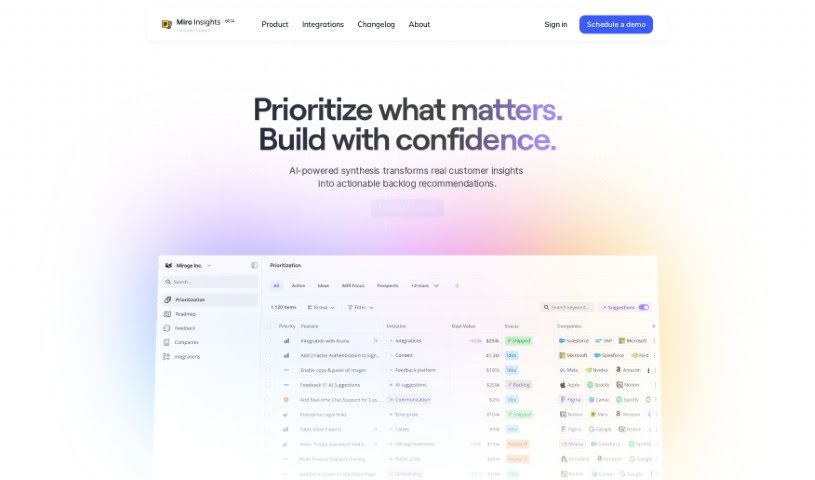
Screenshot of Cardinal

Cardinal

Discover what Cardinal is and how to use it effectively in 2025. Explore its features and see how it stacks up against other Project Management Tools.

Screenshot

What is Cardinal?

Based on the “cardinal.pdf” document, Cardinal is a tool built specifically to help product teams get a clear, big-picture view of their products. It’s designed to make it easier to weave customer feedback directly into how you develop new features. It is a way to really improve your product management and encourage a more data-driven approach to building things. Cardinal offers a bunch of helpful features, like reports that are generated automatically, real-time updates so you can always see your goals and how you’re progressing, and it can connect with all sorts of data sources and services. Plus, it uses AI to help pull out and link customer feedback directly to specific features. Ultimately, Cardinal aims to simplify product management by giving teams a single, shared platform and making it easier for everyone involved to collaborate.

Who created Cardinal?

Cardinal was brought to life by its founders, Nadav Weizmann and Mor Sela. The company officially launched on June 17, 2024. Cardinal itself is a product created to support product teams by offering a comprehensive overview of their products. It’s all about incorporating customer feedback into feature development, enhancing product management practices, and really pushing a data-centric way of thinking about product development. The team behind it, which they affectionately call a “motley crew,” is made up of passionate people from all sorts of backgrounds and places, all dedicated to creating innovative software solutions.

What is Cardinal used for?

  • It automatically generates reports.
  • It helps create a shared platform for teams to work from.
  • It makes data-driven decision-making possible.
  • It allows stakeholders to easily see the results of your work.
  • It manages customer feedback, your backlog, and your roadmap all in one place.
  • It keeps feature statuses and dates in sync.
  • It can identify features mentioned within customer feedback.
  • It assists in placing new features within your overall product strategy.
  • It helps forecast potential revenue for each feature.
  • It serves as a community space for product thinkers.

Who is Cardinal for?

  • Product Owners
  • Builders
  • Leaders

How to use Cardinal?

To really get the most out of Cardinal, here’s a good way to approach it:

  1. Start by connecting Cardinal to your CRM system. Then, import your feedback and feature lists. Syncing these with your task management tool will give you a really clear picture of which features should be prioritized for development.
  2. Take advantage of Cardinal’s AI-powered backlog. It’s designed to help you prioritize features more effectively, considering both customer feedback and the potential revenue each feature might bring.
  3. Use the platform to keep track of your goals and progress in real-time. This ensures everyone on the team, and any stakeholders, have transparency and oversight on projects.
  4. Make sure to use Cardinal’s automated reporting feature. You’ll get timely updates on feature status and progress, which really helps with making informed decisions.
  5. Get involved in discussions and collaborations directly within Cardinal. This keeps stakeholders aligned and can really spark creativity.
  6. Don’t forget to explore the tool’s advanced capabilities. This includes integrating with various data sources like CRM systems, Mixpanel, or Tableau, which can significantly boost your data-driven product development efforts.
  7. If you can’t find an integration you need, just submit a request! This shows how flexible and adaptable the tool is.
  8. Consider joining the beta program. It’s a great way to get early access to new features and provide feedback that helps improve the tool even further.
  9. Explore how Cardinal can extract valuable insights from customer feedback, forecast revenue for individual features, and generally streamline your product strategy.
  10. Think about Cardinal’s different pricing plans, like the Pro and Business options. Choose the one that best fits your team’s needs and your budget.

By following these steps, you can really maximize what Cardinal offers and streamline your product management processes effectively.

Related AI Tools

Discover more tools in similar categories that might interest you

Stay Updated with AI Tools

Get weekly updates on the latest AI tools, trends, and insights delivered to your inbox

Join 25,000+ AI enthusiasts. No spam, unsubscribe anytime.