What is Bulk Rename Utility?
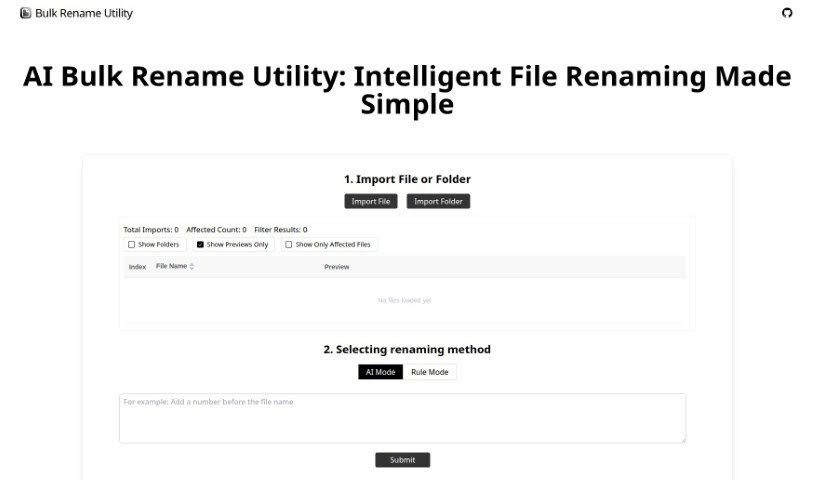
Bulk Rename Utility is a really handy tool that lets you rename files online, and the best part? You don’t need to upload anything or install any software. It offers two main ways to rename your files: an AI Mode and a Rule Mode. With the AI mode, you can simply describe what you want to do with your file names, and the AI figures out how to generate the new names for you. If you prefer more control, the Rule Mode lets you apply all sorts of specific changes. You can swap out characters, add numbers in sequence, set up entirely new naming patterns, or even use custom JavaScript for some really advanced renaming. It’s designed to work right on your computer, only looking at your file directory, name, and size to keep your privacy safe. What makes Bulk Rename Utility stand out is how easy it is to use, the wide range of file operations it supports, and that it works on both Windows and Mac through your Chrome or Edge browser.
Who created Bulk Rename Utility?
Bulk Rename Utility comes from TGRMN Software. They launched this free, online bulk file renaming solution back on January 13, 2024. TGRMN Software is a company that focuses on creating useful utility software, and Bulk Rename Utility is one of their key offerings.
What is Bulk Rename Utility used for?
Here’s a rundown of what makes Bulk Rename Utility so useful:
- It’s completely free to use.
- You can rename files in batches without ever needing to upload them.
- It offers AI-driven renaming: just tell the AI what you need, and it handles the renaming process.
- You can also use Rule-based renaming, which includes a variety of options like deleting or replacing characters, adding new ones, padding sequences with numbers, setting up completely new naming conventions, and even using custom JavaScript for more complex tasks.
- All file operations happen locally on your device, meaning no files are uploaded to the web, which really protects your privacy.
- It’s designed to be accessible to users with different technical skill levels.
- It’s a free and online tool, so there’s no need to download or install anything.
- The user interface is really intuitive, making it easy to get things done.
- It works smoothly with Chrome and Edge browsers.
- You get versatile renaming options, from simple character swaps to advanced regex and custom JavaScript functions.
- It’s compatible with both Windows and Mac systems.
- AI-Powered Renaming is a key feature: just describe what you need, and the AI takes care of the rest.
- Rule-Based Renaming offers a lot of flexibility with rules for character deletion/replacement, adding/inserting characters, sequence padding, creating entirely new naming conventions, using regular expressions, and custom JavaScript functions for advanced renaming.
- Local Operations are a big plus: the tool only reads your file directory, name, and size information, ensuring no files are uploaded.
- It Supports Various File Operations and is compatible with Windows and Mac systems, though it’s best used with Chrome and Edge browsers.
- Advanced Features include unique capabilities like AI renaming, regex support, and custom JavaScript.
- The User-Friendly Interface is designed for both AI and rule-based operations, making it easy to navigate.
- Browsing Compatibility is specifically optimized for Chrome and Edge browsers.
- It integrates Diverse Renaming Rules to cover many scenarios.
- Crucially, there’s No File Upload Required, keeping your data secure.
Who is Bulk Rename Utility for?
This tool is perfect for a wide range of professionals and individuals who deal with lots of files:
- Data Analysts
- Graphic designers
- Photographers
- Musicians
- Researchers
- Business professionals
- Content creators
- Video editors
- Web Developers
- Software developers
- Digital marketers
- Web designers
How to use Bulk Rename Utility?
Using Bulk Rename Utility is pretty straightforward. Just follow these simple steps:
- Select Files or Folders: First, pick the files or folders you want to rename. Remember, the tool works online by reading your directory, name, and size information.
- Choose Your Renaming Method: You have two main options here:
- AI Mode: If you prefer a more hands-off approach, just describe what you want to change in your file names to the AI, and it will make the adjustments instantly.
- Rule Mode: For more control, you can apply various rules. These include deleting or replacing characters, adding new characters, padding sequences with numbers, using regex replacements, or even custom JavaScript for more complex renaming tasks.
- Execute Renaming: Once you’ve set everything up, just run the renaming operation. This will update the names of your local files.
Bulk Rename Utility is a great choice because it’s free and online, offers both AI and rule-based renaming, has a wide variety of renaming rules, and protects your privacy by not requiring file uploads. It supports various file operations, works well with Chrome and Edge browsers, and has an intuitive interface that’s easy for anyone to use, regardless of their technical background.