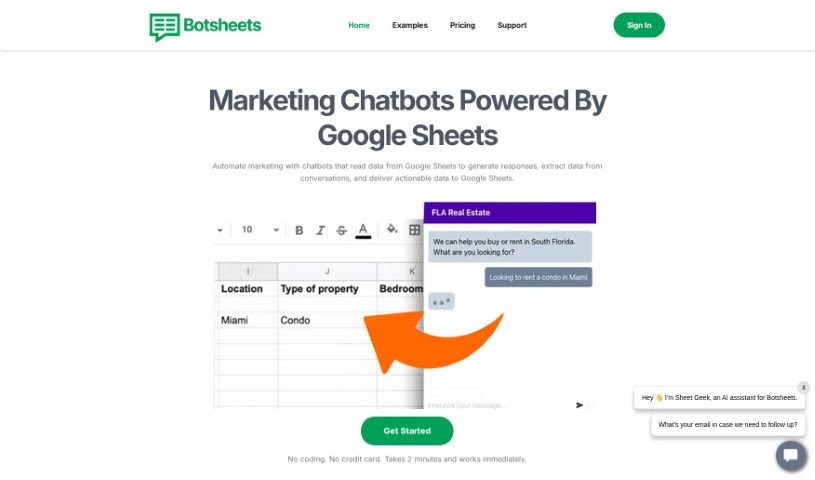
What is Botsheets?
Botsheets is a platform that lets you connect your Google Sheets directly to chatbots. This is super handy for things like analyzing data, collecting leads, and providing customer support. Essentially, it lets you read and write data from your spreadsheets, keeping your AI in sync with any changes you make. Your spreadsheets are a no-code database for your chatbots!
Botsheets comes packed with useful features. You get support for multiple data sources, automatic syncing so your data is always up-to-date, multi-language capabilities, and integrations that are a breeze to set up. Plus, it uses the latest AI, powered by GPT-4o, and lets you customize rules. They also have a strong focus on privacy. The best part? You can create, publish, and keep an eye on your AI chatbots without needing any technical skills at all. They offer a range of pricing plans, starting with a free option and going up to an unlimited plan perfect for agencies.
Who created Botsheets?
Botsheets was actually built by a team that’s been deep in chat automation with Google Sheets since way back in 2019. They’ve helped power thousands of chatbots already, and customers like Suzanne Hawken and Adjunga Nossin have really praised their customer support.
As mentioned, they offer different subscription plans, from a free tier to an unlimited one for agencies. The core idea is to let you connect your Google Sheets to chatbots for analysis, lead generation, and support, all without needing to write a single line of code. You’ll also find features like support for multiple data sources, auto-sync, multi-language options, simple integrations, and customizable rules, all powered by the latest AI technology.
What is Botsheets used for?
Botsheets is incredibly versatile. Here’s a look at what you can do with it:
- Capture leads: Easily collect contact information from your website visitors.
- Add a GPT chatbot to your website: This chatbot can read and capture data directly into your Google Sheets.
- Generate personalized responses: Create tailored replies to messages based on your data.
- Extract data from conversations: Automatically pull information from chats and save it to Google Sheets.
- Generate insights: Analyze your data to create charts, graphs, and even interactive tables.
- Train AI with your data: Use your own business information to help the AI generate better responses.
- Use any dataset as a chatbot database: Your spreadsheets become a powerful resource for your chatbot.
- Connect spreadsheets from any Google Drive: Access data wherever it’s stored.
- Let AI capture user data: Have the AI automatically write user information into a spreadsheet.
- Create data analysis bots: Build bots for internal use or for public access.
- Compare Botsheets to other solutions: See how it stacks up against custom GPT chatbot options.
- Add a GPT chatbot to your website that reads and captures data in Google Sheets. (Yes, this is a big one, so it’s worth repeating!)
- Let AI query your data and generate personalized responses to messages.
- Capture leads by extracting data from conversations and storing it in Google Sheets.
- Generate insights by analyzing data and creating charts, graphs, and interactive tables.
- Train AI to generate responses by adding business data to enable chatbot responses.
- Collect valuable first-party data from website visitors.
- Replace lead generation forms with chatbots.
- Chat privately with data and download visualizations for presentations.
- Easily create, publish, and monitor AI chatbots with zero technical knowledge.
- Connect multiple data sources such as spreadsheets, webpages, and PDF documents to chatbots.
- Read & Capture data in Google Sheets
- Personalize Responses
- Generate Insights with charts and graphs
- Train AI to generate responses from business data
- Collect and write data to a spreadsheet
- Create data analysis bots
- Connect multiple data sources to a chatbot
- Customize chatbot appearance and tone
- Share chatbots via website widgets, direct links, or API
Who is Botsheets for?
Botsheets is a great tool for a variety of people and roles, including:
- Facebook Marketers
- Agency Owners
- Car Dealers
- Customer Support Specialists
- Marketing Professionals
- Agency Owners (again, it’s that useful!)
- Car Dealers (yes, they benefit a lot too)
- Marketers in general
How to use Botsheets?
Using Botsheets is pretty straightforward. Here’s a step-by-step guide to get you going:
- Add a Chatbot to Your Website: First, you’ll want to add a GPT chatbot to your site. This lets you talk to users and, importantly, capture data directly into your Google Sheets.
- Generate Responses: Let the AI look through your data and create personalized replies to messages. This makes the user experience much more tailored.
- Capture Leads: You can have the AI pull data from conversations and save it into your Google Sheets. It’s a smooth way to collect leads.
- Generate Insights: Use the AI to analyze your data. It can create charts, graphs, and other visuals to give you valuable insights.
- Train AI: Feed your business data into the system. This helps the chatbot search through PDFs, websites, and sheets to generate accurate responses.
- Connect Data Sources: Link up different sources like spreadsheets, web pages, and PDFs to your chatbot. This gives it a broad range of information to work with.
- Customize Chatbot: Make the chatbot fit your brand perfectly. You can adjust its appearance, personality, and tone.
- Share Chatbot: Integrate the chatbot onto your website easily, embed it on a specific page, or just share a direct link so people can access it.
- Pay As You Grow: Pick a subscription plan that fits your needs. They have a free plan, and then options with more features, including an unlimited plan for agencies.
- Utilize Additional Features: Take advantage of Botsheets’ other capabilities, like multiple data sources, auto-sync, multi-language support, and easy integrations for a really smooth experience.
With Botsheets, you can easily create, publish, and manage AI chatbots without needing any technical expertise. It’s a fantastic way to boost user engagement and manage your data more effectively right on your website.