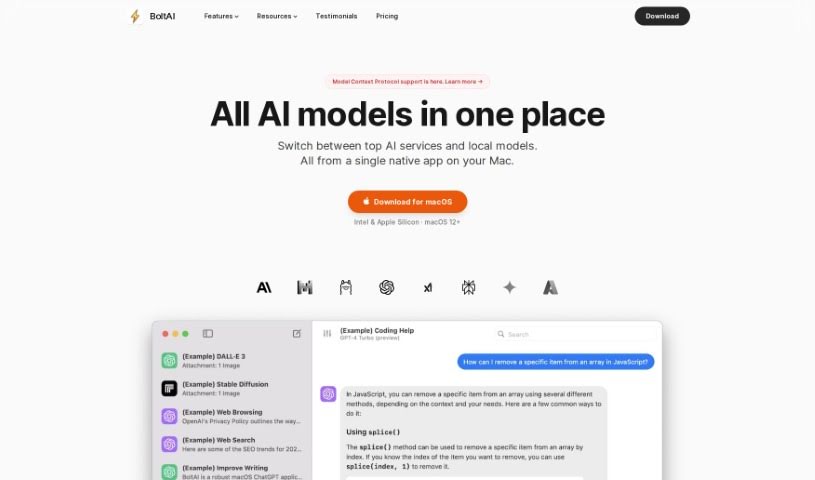
Screenshot of BoltAI

BoltAI

Discover what BoltAI is and how to make the most of it in 2025. We'll cover its features, compare it to other automation tools, and show you how to integrate it into your Mac workflow.

Screenshot

What is BoltAI?

BoltAI is a native Mac application built to bring ChatGPT’s power right into your daily workflow. It’s all about boosting your productivity with AI, but in a way that complements, rather than replaces, human effort. It is a direct line to ChatGPT, complete with a super-easy chat interface, a handy library of AI commands and prompts, and the ability to create your own custom AI assistants. Your security is a big deal, too – API keys are stored safely in your Apple Keychain, and it automatically redacts sensitive data. Just so you know, you’ll need your own OpenAI API key to get started, and the license is perpetual, including a year of free updates.

Who created BoltAI?

BoltAI was developed by a dedicated team, including Mike Cardona, Jim Raptis, Martin Donadieu, Christopher Dengsø, and Christoph Janz. Martin Donadieu, one of the founders, really emphasizes how the app is designed specifically for Mac users. He points out that it seamlessly integrates ChatGPT technology, aiming to boost productivity for people in all sorts of professions.

What is BoltAI used for?

BoltAI can help you with a ton of things:

  • AI Coding Assistant: Get help right inside your IDE.
  • Content Creation: Generate high-quality posts in just minutes.
  • Learning: Grasp new subjects faster with AI assistance.
  • Quick Access: Instantly connect with ChatGPT and Stable Diffusion.
  • App Integration: Use ChatGPT with Apple Mail, Xcode, Apple Notes, and Obsidian.
  • For Developers: Streamline your coding and development tasks.
  • For Content & Marketing: Create engaging content more efficiently.
  • Native macOS App Integration: This means it runs smoothly and efficiently within your Mac’s environment.
  • Intuitive Chat Interface: It offers a user-friendly chat experience, making it easy to communicate with the AI for all sorts of tasks.
  • Built-in AI Commands & Prompt Library: You get a comprehensive collection of prompts and commands to help you get the most out of your AI interactions.
  • Custom AI Assistant Creation: You can tailor the AI’s behavior and create assistants specifically for your unique tasks or roles.
  • Secure & Privacy-Focused Storage in Apple Keychain: Your security is a top priority. API keys are stored securely, and sensitive data is automatically redacted.
  • Boosting Productivity: It enhances productivity across many professions, from writing and development to management and entrepreneurship.
  • Easy Keyboard Shortcuts: You can effortlessly set up your preferred keyboard shortcuts for seamless workflow integration.
  • Secure Key Storage & Data Redaction: Keys are stored securely, and sensitive data is automatically redacted for better security and privacy.
  • Respecting User Privacy: Your data is stored locally, and prompts are sent directly to OpenAI, respecting your privacy.
  • Tailored AI Assistants: Create custom AI assistants to make the AI’s behavior fit your specific tasks or roles.

Who is BoltAI for?

BoltAI is a great tool for:

  • Developers
  • Content creators
  • Students
  • General users
  • Management
  • Entrepreneurs
  • Content & Marketing professionals
  • Basically, anyone! This includes professionals like writers, developers, managers, and entrepreneurs.

How to use BoltAI?

To get the most out of BoltAI on your Mac, just follow these simple steps:

  1. Get Your OpenAI API Key: First, you’ll need to sign up on OpenAI’s website to get your API key.
  2. Download BoltAI: Install the BoltAI application, which is made specifically for Mac users.
  3. Set Up BoltAI: Head to BoltAI’s preferences and enter your OpenAI API key. This will activate AI assistance across various text fields in your macOS apps.
  4. Use AI Assistance: When you’re working on tasks like emails, reports, coding, or brainstorming ideas, just call on BoltAI for AI suggestions.
  5. Customize How the AI Works: You can create your own custom AI Assistants to tailor the AI’s behavior for specific tasks or roles, really boosting your productivity and creativity.
  6. Keep Your Data Safe: BoltAI works locally on your device. This means none of your input or prompts are stored or sent anywhere else. Plus, it has features to automatically redact sensitive data for extra security.
  7. Stay Up-to-Date: Your perpetual license comes with one year of free updates, so be sure to take advantage of them.
  8. Check Out More Features: You can also benefit from Stable Diffusion support, a handy prompt library, and the ability to create custom AI Assistants that fit your unique needs.

Just a reminder, BoltAI is currently only available for macOS devices, and you’ll need a stable internet connection for it to work smoothly. By bringing BoltAI into your workflow, you can easily use the power of ChatGPT for all sorts of professional and creative tasks.

Related AI Tools

Discover more tools in similar categories that might interest you

Stay Updated with AI Tools

Get weekly updates on the latest AI tools, trends, and insights delivered to your inbox

Join 25,000+ AI enthusiasts. No spam, unsubscribe anytime.