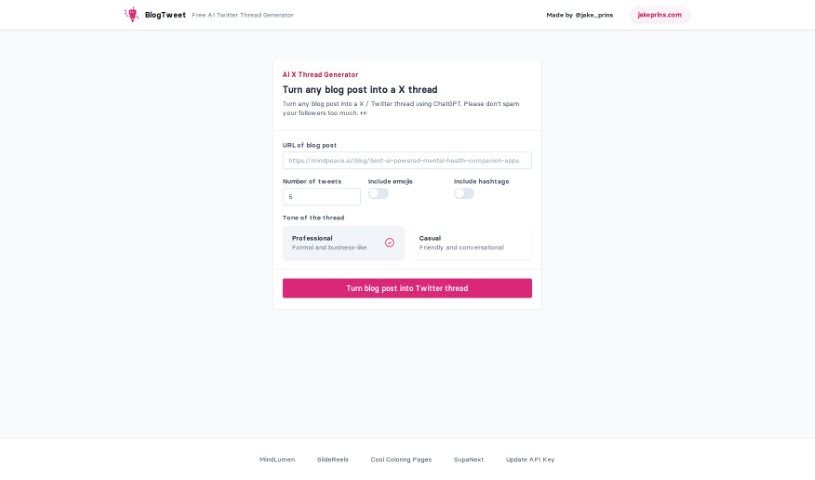
Screenshot of BlogTweet

BlogTweet

Learn what BlogTweet is and how to use it effectively in (2025). Explore its features and how it compares with other Social Media Management Tools.

What is BlogTweet?

BlogTweet is a really neat tool that Jake Prins, who you can find on Twitter as @jake_prins, developed. It’s all about making it super simple to turn your blog posts into engaging Twitter threads. It is a smart assistant that uses AI to help you repurpose your blog content for Twitter. All you have to do is pop in the blog post’s URL and tell it how many tweets you want. This tool is pretty clever; it figures out how to break down your blog post into bite-sized chunks that work perfectly for Twitter, really leaning into that popular “thread bois” style you see on the platform. BlogTweet actually uses AI to do this conversion, it’s got a super easy-to-use interface, it’s smart about how it splits up your posts into tweet-sized pieces, it makes sure not to spam your followers by sending too many tweets at once, and it even supports API key functionality, which is great for getting updates and connecting it with other tools.

Who created BlogTweet?

So, BlogTweet was actually created by Jake Prins. You can spot him on Twitter using the handle @jake_prins. This really innovative tool is powered by smart AI technology, and its main goal is to make it effortless for you to convert your blog posts into those engaging Twitter threads that people love to read. BlogTweet really shines with its user-friendly interface, its smart way of segmenting content so it fits perfectly into tweets, and its features that help limit spam, all while encouraging people to share thoughtfully on the platform. Plus, it’s got support for API key functionality, which is handy for keeping the tool updated and integrating it with other services. Jake Prins has done a fantastic job developing BlogTweet, specifically to tap into that popular “thread bois” trend on Twitter and to really simplify how people repurpose their blog content for the platform.

What is BlogTweet used for?

BlogTweet is really handy for a few key things:

  • It makes it super easy to convert your blog posts into Twitter threads.
  • You can generate Twitter threads just by putting in the blog post’s URL and saying how many tweets you want.
  • It intelligently breaks down your blog posts into sections that are just the right size for tweets.
  • It helps prevent you from spamming your followers with too many tweets.
  • It supports API key functionality, which is great for getting updates and connecting it with other tools.
  • You can convert blog posts into Twitter threads effortlessly.
  • It lets you repurpose your blog content for Twitter with a lot of ease.
  • It’s a great way to get involved in the “thread bois” trend that’s popular on Twitter.
  • You can generate a threaded format that’s just right for Twitter, starting from your blog posts.
  • It encourages you to share thoughtfully without overwhelming your followers on Twitter.
  • It handles spam effectively, making sure your followers aren’t bombarded with too many messages.
  • It supports updates and integration through API Key functionality.
  • You can repurpose blog content for Twitter with ease.
  • It breaks down posts into tweet-sized sections in a smart way.
  • It helps streamline the process of joining the “thread bois” trend on Twitter.
  • It encourages thoughtful sharing on Twitter without overwhelming your followers.
  • It limits spam, ensuring your followers aren’t spammed excessively.
  • You can participate in the Twitter trend of “thread bois.”
  • It intelligently segments blog posts into tweet-sized sections.
  • It encourages thoughtful sharing without overwhelming your followers.
  • It limits spam to ensure followers are not spammed excessively.
  • It allows for updates and integration through API Key functionality.

Who is BlogTweet for?

BlogTweet is a great tool for a variety of people who work with content and social media:

  • Bloggers
  • Content creators
  • Social media managers
  • Digital marketers
  • Public Relations Professionals
  • Marketing professionals
  • Public Relations Specialists
  • Writers

How to use BlogTweet?

Using BlogTweet is a breeze, and it’s a user-friendly tool that Jake Prins, who you can find on Twitter as @jake_prins, created. It’s powered by smart AI technology, and its whole purpose is to make transforming your blog posts into engaging Twitter threads really simple. To get the most out of BlogTweet, just follow these easy steps:

  1. Input URL: First things first, you’ll want to enter the URL of the blog post that you’re looking to convert into a Twitter thread.
  2. Specify Number of Tweets: Next, you’ll need to indicate exactly how many tweets you’d like to generate for the entire thread.
  3. AI-Powered Conversion: The AI technology built into BlogTweet is pretty smart; it intelligently breaks down your blog post into segments that are perfectly sized for Twitter.
  4. Ensure User-Friendly Interface: The tool itself offers a really straightforward interface. You won’t need to do much, just provide the URL and the tweet quantity.
  5. Prevent Spam: BlogTweet is specifically designed to help you avoid overwhelming your followers with too many tweets at once. This ensures a more balanced and enjoyable sharing experience for everyone.
  6. API Key Support: If you’re someone who likes to dig a bit deeper or integrate tools, there’s API key support available. This is really useful for getting updates and connecting BlogTweet with other platforms you might be using.

By simply following these straightforward steps, you can efficiently repurpose all your blog content into really engaging Twitter threads, all thanks to the innovative and super convenient BlogTweet tool.

Related AI Tools

Discover more tools in similar categories that might interest you

Stay Updated with AI Tools

Get weekly updates on the latest AI tools, trends, and insights delivered to your inbox

Join 25,000+ AI enthusiasts. No spam, unsubscribe anytime.