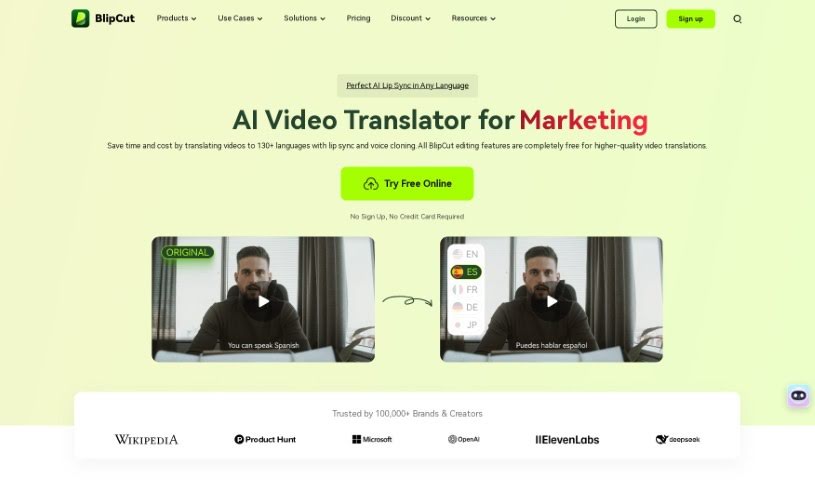
What is Blipcut?
Blipcut is a really neat AI tool that helps you translate videos. It’s packed with features designed to make the whole translation process smoother. You can translate videos into a whopping 95 languages, use AI voices to dub your content, automatically create subtitles, and even clone voices to sound like they’re speaking different languages. Plus, it has a voice changer, supports translating videos for all sorts of uses like YouTube, international marketing, education, news, games, and films. It even works with Eleven Labs for voice cloning and has a Chrome extension that can translate and voice YouTube subtitles.
Basically, Blipcut is super versatile. It’s great for anyone creating content, doing international marketing, teaching, reporting news, making games, or working on films, offering a fast and accurate way to handle multilingual video translation.
Who created Blipcut?
Blipcut was actually developed by Eleven Labs and first launched on January 4, 2024. This platform brings you AI-powered features like translating videos into 95 languages, dubbing them with AI voices, generating subtitles automatically, and cloning voices. They’re also working on lip-sync technology. Blipcut’s main goal is to help people overcome language barriers and provide really efficient solutions for all sorts of video translation needs across different industries.
What is Blipcut used for?
Blipcut is used for a whole bunch of things:
- Voice cloning: Make your voice sound like someone else, or even in another language.
- AI Voice Changer: Alter your voice for creative effects.
- Translate YouTube Videos/Shorts: Reach a wider audience with translated content.
- Translate for International Marketing: Adapt your campaigns for global markets.
- Translate Videos for Education: Make learning materials accessible to more students.
- Translate News Videos: Share important information across language barriers.
- Translate Games Videos: Connect with a global gaming community.
- Translate Movies/Films: Bring your cinematic creations to a worldwide audience.
- AI Translate and Speak Subtitles for YouTube: Automatically generate and voice subtitles.
- Chatbot-powered translation: Get translations through an interactive chatbot.
- Automatic caption generation: Easily create captions for any video.
- Voice and lip movement adaptation: Ensure your dubbed videos look natural.
- Extension supports 100+ voices: A huge variety of voices to choose from.
- Automatic volume and speed adjustments: Fine-tune your audio perfectly.
- Transcribe YouTube videos for a global audience: Make your content searchable and accessible.
- Adapt video content for different channels in international marketing: Tailor your message for various platforms.
- Translate PowerPoint tutorial videos and e-learning videos: Enhance educational content for global learners.
- Automatically generate movie subtitles: Streamline the subtitling process for films.
- Translate Video with AI-Powered Features: Leverage advanced AI for all your translation needs.
- Auto Caption Generator: Quickly add captions to any video.
- AI Voice Cloning: Replicate voices with impressive accuracy.
- Expand gaming community by translating game videos: Connect with players worldwide.
- Engage global audience through film translations: Make your movies accessible to everyone.
- Adapt video content for diverse channels in international marketing: Ensure your marketing resonates globally.
Who is Blipcut for?
Blipcut is a fantastic tool for:
- Content creators for YouTube: To reach a global audience with their videos.
- International marketers: To adapt campaigns for different regions.
- Educators: To make learning materials accessible to students worldwide.
- Journalists: To share news and information across language barriers.
- Media companies: To broaden their reach and impact.
- Gamers: To connect with a global community through translated game content.
- Film distributors: To make movies accessible to a worldwide audience.
How to use Blipcut?
Using BlipCut for video translation is pretty straightforward. Just follow these simple steps:
- Upload Video: You can either upload your video directly or just paste a YouTube link to get started with localization.
- Select Target Language: Next, pick the language you want your video to be translated into.
- Choose Speaker: Then, select the AI speaker you’d like to use for the translated voice.
- Preview and Modify: Take a look at the translated video to see how it turned out. You can make any changes you need to ensure the accuracy and quality are just right.
- Download: Once you’re happy with everything, just download the final translated video.
BlipCut also offers a bunch of other cool features like AI subtitle generation, video dubbing with AI voices, voice cloning, automatic caption generation, a voice changer, and lip-syncing (which is coming soon!). This tool is perfect for educators, marketers, students, content creators, journalists, and media companies, making video translation efficient and really effective. You can use BlipCut to translate YouTube videos, international marketing content, educational videos, news, games, and even movies. It really offers a smooth and easy way to handle all your multilingual video translation needs.