What is BgSub?
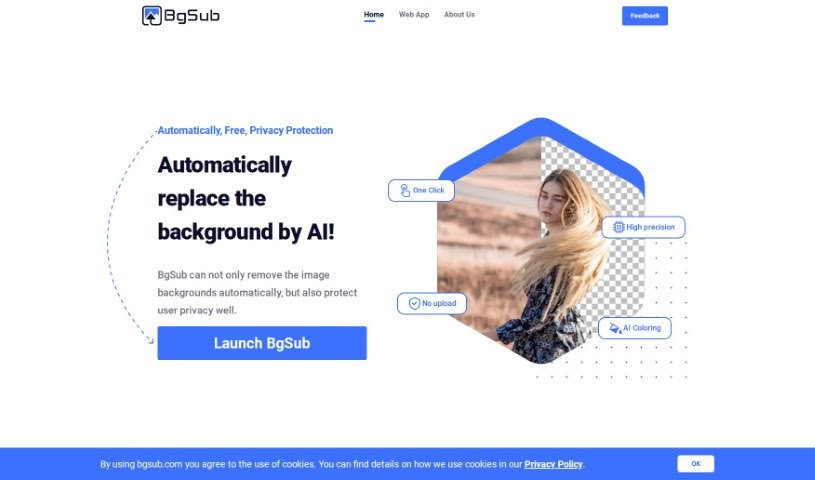
BgSub is a handy web app that uses AI to quickly remove or swap out image backgrounds. It’s pretty neat because it also offers a bunch of cool artistic effects. What’s more, they really care about your privacy – they don’t keep your uploaded images on their servers at all. You’ll love how fast it processes images, and it’s available for commercial use. Plus, it can handle really high resolutions, up to a massive 200 megapixels!
Basically, BgSub is a great tool for anyone who needs to create eye-catching images without a fuss. Whether you’re an individual, a web or app developer, a photographer, running an e-commerce store, working in media, or doing marketing, BgSub makes it simple to make your images pop.
They’ve also built in some really useful features like batch processing for when you have a lot of images to do, and API access if you’re a developer. You can also easily adjust things like size, position, and mirroring, plus play around with those artistic effects. And remember, your privacy is protected because they delete your images right after processing.
Who created BgSub?
An AI team developed BgSub, launching it on June 17, 2024. While the founder and the specific company behind it aren’t detailed in the available information, the core of BgSub is its AI-powered web application. This technology is designed for fast and accurate background removal or replacement, complete with various artistic effects. Importantly, it prioritizes user privacy by not storing any uploaded images.
What is BgSub used for?
BgSub is incredibly versatile and can help a wide range of people and businesses:
- Photographers: It’s a lifesaver for changing backgrounds, especially for portraits where you might not have a green screen.
- E-commerce: You can easily enhance your product photos by giving them more attractive backgrounds, which can really help them stand out to customers.
- Media & Marketing: Need to make a tweet or blog post more engaging? BgSub helps create eye-catching visuals. For marketing, you can swap out backgrounds in ads to grab customer attention.
- Social Media & Individuals: If you’re editing photos for social media or just for fun, BgSub makes it simple to change backgrounds and create unique looks.
- Web/App Developers: You can create beautiful, professional-looking images for your websites or apps, which can really help attract more users.
In short, BgSub is your go-to for making any image more appealing, whether it’s for professional use or personal sharing.
Who is BgSub for?
BgSub is designed for a broad audience, including:
- Individuals who want to edit social media photos or personal pictures.
- Web/App Developers needing professional-looking graphics for their projects.
- Photographers looking for quick and easy background manipulation, even without a green screen.
- E-commerce Platforms aiming to improve product presentation.
- Media Outlets wanting to create engaging visuals for content.
- Marketers seeking to make advertisements more eye-catching.
Essentially, if you work with images and want to improve them easily, BgSub is likely a great fit for you.
How to use BgSub?
Using BgSub is straightforward. Just follow these simple steps:
- Get Started: Head over to the BgSub website to launch the application.
- Upload Your Image: Simply upload the photo you want to work on. The AI is smart enough to automatically detect the background for you.
- Remove the Background: If you just want the background gone, click the “Remove background” button. It’s an automatic process.
- Swap the Background: Want something new? Choose the “Replace background” option. You can pick a solid color, a gradient, or even another image to put in its place.
- Add Color with AI: Give your image a quick color boost with the AI Coloring feature – it’s a one-click way to get artistic effects.
- Fine-Tune Your Image: You’ve got free adjustment tools to resize, reposition, or mirror your image until it looks just right.
- Save Your Work: Once you’re happy with how everything looks, just save or download your edited image.
Here are a few more helpful points:
- Commercial Use: You can use BgSub for commercial purposes without any issues. It’s great for individuals, developers, photographers, e-commerce, media, and marketers alike.
- High-Quality Output: BgSub supports images up to 200 megapixels, so you can work with very high-resolution photos.
- Privacy First: Your privacy is important. BgSub doesn’t store your uploaded images; they’re removed from the servers once processing is complete.
- Advanced Options: If you need to process many images at once or integrate BgSub into your own workflows, you can use batch processing or API access.
- Who Benefits: Photographers can change character backgrounds easily, e-commerce sites can make products more attractive, developers can create beautiful app images, and marketers can design eye-catching ads. It’s a tool that helps everyone create better visuals.
By following these steps, you can easily and effectively use BgSub to edit your images.