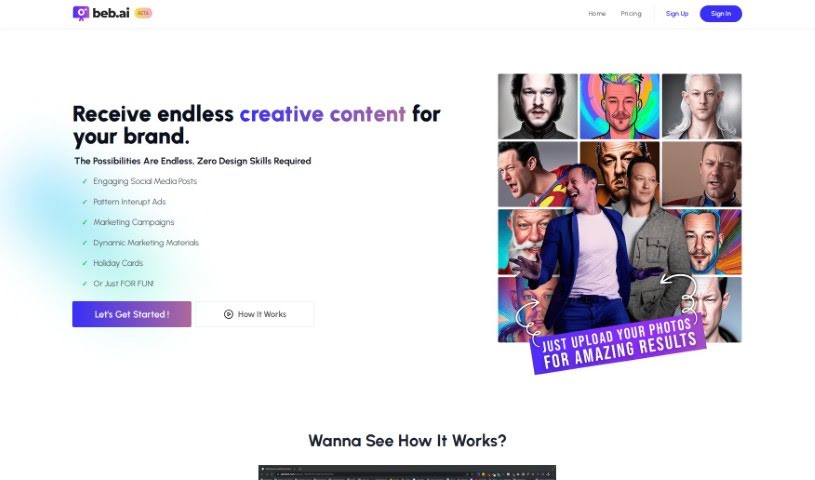
Screenshot of Beb AI

Beb AI

Discover what Beb AI is and how to make the most of it in 2025. We'll dive into its features, compare it to other image generators, and show you exactly how to use it.

Screenshot

What is Beb AI?

Beb AI is a software tool that comes with its own set of advantages and disadvantages. Let’s break down some of the cool things it can do:

  • It generates 72 brand-new photos for you every week, spread across nine different themes. That’s a lot of fresh content!
  • You don’t need any fancy design skills to use it. Seriously, it’s designed for everyone.
  • It’s great for creating social media posts, eye-catching pattern interrupt ads, engaging marketing campaigns, and dynamic marketing materials that grab attention.
  • Beb AI can even help you create holiday cards and supports product photography with designs that are easy for anyone to use, no matter their skill level.
  • The software offers a thorough training process to get you up to speed. You can input 20-30 of your own photos, upload a variety of images, and it helps automate your content creation.

However, like any tool, Beb AI has a few limitations to keep in mind:

  • There’s a cap on the number of photos you can use, limited to 30.
  • It doesn’t generate content in real-time; you’re limited to those 72 photos per week across the nine themes.
  • If you’re waiting for new themes, there’s a one-week waiting period.
  • Currently, there aren’t options for highly personalized content customizations beyond the themes.
  • It also doesn’t offer automation features for other tasks, support for video content, or integration options with other tools you might use.

These details should give you a good idea of what Beb AI offers and where it might fall short for some users.

Who created Beb AI?

Beb AI was actually created by Ryan Heenan, who’s a serial entrepreneur. The company officially launched on June 14, 2024. People often mention Beb AI for its user-friendly design. It’s known for generating 72 new photos each week across nine different themes, and you really don’t need any design skills to use it. It’s suitable for all skill levels. Some of its standout features include automated content creation, the ability to generate holiday cards, and support for product photography. On the flip side, some limitations to be aware of are the 30-photo cap, the lack of real-time content generation, and no support for video content.

What is Beb AI used for?

Beb AI is a versatile tool that can be used for a variety of marketing and creative tasks:

  • Pattern interrupt ads generation: Create ads that immediately catch the eye.
  • Creates engaging marketing campaigns: Develop campaigns that resonate with your audience.
  • Generates dynamic marketing materials: Produce materials that are lively and impactful.
  • Creates holiday cards: Design custom cards for special occasions.
  • Provides brand presentation: Help showcase your brand visually.
  • Supports product photography: Generate images for your products.
  • Facilitates image processing: Streamline how you work with images.
  • Accessible to all skill levels: Easy for beginners and experienced users alike.
  • Creates social media posts: Quickly generate content for your social channels.
  • Automated content creation: Speed up your content production process.

Who is Beb AI for?

Beb AI is particularly useful for:

  • Real Estate Investors: To create compelling visuals for properties.
  • Entrepreneurs: To quickly generate marketing assets for their ventures.
  • Marketing professionals: To enhance campaigns and social media presence.

How to use Beb AI?

Getting started with Beb AI is pretty straightforward. Just follow these steps:

  1. Sign Up: First things first, create your account on the Beb AI platform. You’ll just need to sign up with your email address and set a password.
  2. Access Features: Once you’re logged in, take some time to explore everything it offers. You can generate those 72 new photos weekly, check out the different themes and backgrounds, and start creating social media posts, marketing campaigns, holiday cards, and much more.
  3. Input Photos: To get the AI generating creative content, you’ll want to start by uploading 20-30 of your own photos. This gives it the material to work with.
  4. Theme Selection: Next, choose from the nine available themes. This helps guide the AI so it can create designs that match your specific preferences.
  5. Customization: Use the user-friendly design interface to tweak and fine-tune the content the AI generates. You can make it just right for your needs.
  6. Download or Share: When you’re happy with the design Beb AI has created, you can download the image to use wherever you like, or share it straight to your social media platforms.
  7. Training & Support: Don’t forget to take advantage of the comprehensive training process Beb AI provides. It’s there to help you get the most out of the platform’s capabilities.
  8. Explore Membership Options: If you’re looking for more, consider upgrading to their premium plans. These unlock extra features like more prompts, live coaching calls, and access to a community.
  9. Feedback & Future Development: Your input is valuable! Provide direct feedback on what features you’d like to see in the future to help improve the platform continuously.

By following these steps, you’ll be able to effectively use Beb AI to create engaging visual content for all your personal and professional needs.

Related AI Tools

Discover more tools in similar categories that might interest you

123RF AI Image Generator

Creative Image Generation
Learn More

Stay Updated with AI Tools

Get weekly updates on the latest AI tools, trends, and insights delivered to your inbox

Join 25,000+ AI enthusiasts. No spam, unsubscribe anytime.