What is Avanty?
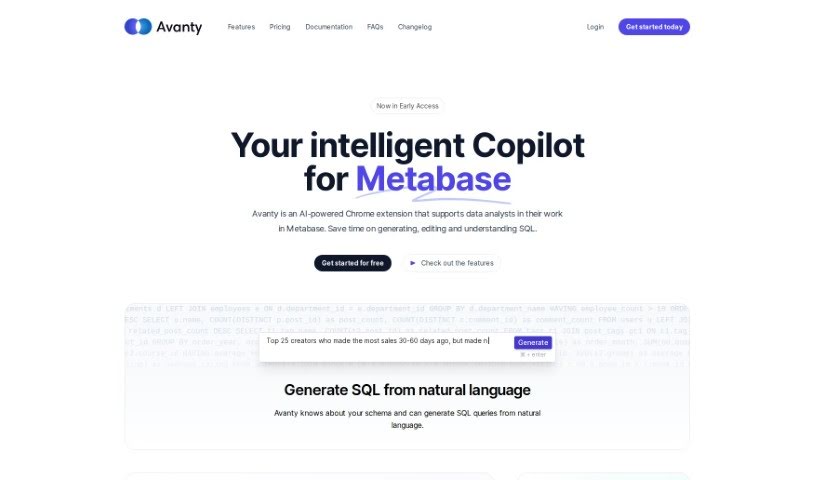
Avanty is a handy Chrome extension that works with Metabase, adding some really useful features to help you write, edit, understand, and comment on your SQL queries. It automatically spots SQL queries when you’re using Metabase, then makes the whole process smoother with things like generating SQL from plain English, fixing errors, and automatically editing and formatting your code. It works with both Metabase you host yourself and Metabase Cloud, and it’s designed to handle metadata securely without ever looking at your actual customer data. Plus, it’s a great tool for learning SQL, as it can generate queries for you and explain them step-by-step.
If you’re curious to give Avanty a try, there’s a free 14-day trial available. It lets you edit and generate up to 50 queries. While it’s not perfect 100% of the time when generating SQL, its accuracy is quite high, meaning it can save you a lot of time, and you’ll likely only need to make small tweaks most of the time. For paying customers, Avanty offers support via email and Slack, promising a response within 24 hours.
For anyone looking to really boost their Metabase workflow, Avanty also has an Early Access plan. This plan includes smart AI explanations for tricky queries, automatically adds comments to your SQL code, formats it nicely, and even suggests chart titles. The Early Access plan costs $19 per month. If you’re in a team, the Team Plan is available for at least 3 users at $15 per user. Support is readily available, and Avanty works with any Metabase setup, whether it’s self-hosted or Metabase Cloud.
Who created Avanty?
Jan Senko is the person behind Avanty. His company offers this AI-powered Chrome extension specifically to make life easier for data analysts who use Metabase. Avanty brings features like generating SQL from natural language, smart error debugging, and automated editing and formatting, which are great for both individuals and teams. It’s built to handle metadata securely and provides solid support through email and Slack, with a commitment to responding within 24 hours.
What is Avanty used for?
- Turning plain English into SQL queries: Just tell it what you need in plain language, and Avanty writes the SQL for you.
- Smart error fixing: It uses machine learning to help you catch and fix common SQL mistakes.
- Automatic editing and formatting: Saves you time by automatically cleaning up and formatting your SQL code, making it easier to read.
- Easy-to-use extensions: It’s designed to work smoothly within your Chrome browser, tailored specifically for Metabase users.
- Secure and compatible: It handles metadata safely and works with different Metabase setups.
- Making SQL code look good: It automatically edits and formats your SQL queries so they’re much clearer.
- Catching SQL errors with AI: Uses smart tools powered by machine learning to help you avoid common SQL problems.
- Handy extensions for Metabase: These are built to make your experience with Metabase even better.
- Improving how data analysts and teams work: It’s all about making your daily tasks more efficient.
- Keeping your data safe: It handles metadata securely, meaning it never accesses your sensitive customer data.
- Learning SQL with AI: You can generate queries using AI and get step-by-step explanations to help you learn.
- Suggesting chart titles: When you save a chart, it can automatically suggest a good title for it.
- Explaining complex queries: It provides AI-powered explanations to help you understand those really complicated queries.
- Slack integration: This feature is coming soon!
- Generating SQL from commands: It can automatically create SQL queries based on your natural language instructions.
- Debugging SQL errors smartly: Helps you fix those common SQL mistakes.
- Seamless Chrome extensions: Designed to work effortlessly in your browser.
- Metabase platform compatibility: Works well with various Metabase setups.
- Fixing common SQL errors: Specifically targets and helps you resolve typical SQL issues.
- Better SQL readability: Automatically formats and edits your SQL code.
- Tailored for Metabase users: Extensions designed with your Metabase experience in mind.
- Boosting efficiency: Helps data analysts and teams get more done.
- Works with different Metabase versions: Supports both self-hosted and cloud-based Metabase instances.
- Helpful chart title suggestions: Makes saving charts easier with automatic title ideas.
- AI explanations for tough queries: Understand complex queries better with AI-driven insights.
- Learning SQL made easy: Uses AI query generation and step-by-step guides.
Who is Avanty for?
- Data Analysts
- Larger teams
- Individual Data Analysts
- People who are part of a larger team
- Members of larger teams
How to use Avanty?
To get the most out of Avanty with Metabase, just follow these simple steps:
- Install it: Add Avanty as a Chrome extension. It works with both Metabase instances you host yourself and those on the cloud.
- See what it can do:
- Natural Language SQL Generation: Just type what you want in plain English, and Avanty will turn it into SQL queries for you.
- Smart Error Debugging: Use its machine learning tools to help you find and fix common SQL errors.
- Automated Editing and Formatting: Save time with SQL queries that are automatically edited and formatted, making them much easier to read.
- Intuitive Extensions: Avanty is designed to be easy to use right in your Chrome browser, specifically for Metabase.
- Security and Compatibility: You can trust that it accesses metadata securely and works across different Metabase platforms.
- How it works day-to-day:
- Avanty automatically detects when you’re working with SQL queries in Metabase. This makes writing, editing, understanding, and adding comments to your queries much quicker and simpler.
- Language support:
- Right now, Avanty works best with natural language commands in English. We’re always working to improve its support for other languages, though.
- Keeping your data safe:
- Your data in Metabase stays secure. Avanty only uses SQL queries and the Metabase API to access metadata. It never accesses your customer data directly or runs SQL on its own.
- Free trial and pricing:
- You can try Avanty for free for 14 days, which includes 50 query edits and generations. After the trial, you can choose the Early Access plan for $19/month or the Team Plan for $15/user (you need at least 3 users for this plan).
- Need help?
- If you’re a paying subscriber, we offer support via email and Slack, and we guarantee a response within 24 hours.
- Any limits?
- There’s a daily limit of 60 queries for features that require more resources, like editing and generating SQL.
By following these steps, you can really improve your workflow with Avanty, making your SQL query tasks more efficient and helping you avoid errors.