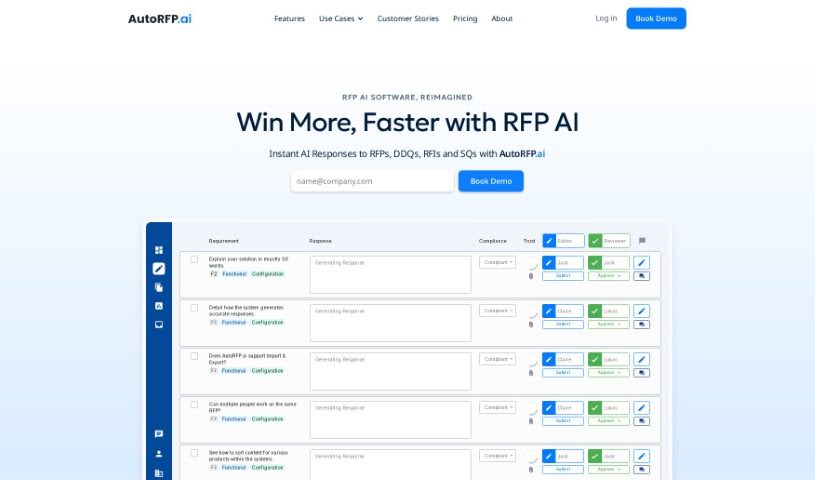
What is Autorfp?
AutoRFP.ai is an AI-powered software designed to help you respond to security and product questionnaires for Requests for Proposal (RFPs). It is a smart assistant that streamlines the whole process of creating those responses. It uses Generative AI to whip up accurate and persuasive answers really quickly. You can upload your existing content, create new projects, get suggestions for improving your answers, collaborate with others, search for information easily, and rest assured that everything is kept private and secure.
Basically, AutoRFP.ai takes away all the tedious, repetitive work involved in answering RFPs or security questionnaires. This means you get to spend more time on the really important stuff. If your business deals with RFPs regularly, this tool can seriously boost how efficiently you handle proposal requests. Plus, its AI can even review your answers and suggest ways to make them even better, ensuring top-notch quality.
The way it works is pretty straightforward: you upload your past RFP or Security Questionnaire documents (in various formats, no less!), and the software quickly generates initial drafts. Then, you can review these drafts and even assign specific sections to subject matter experts for editing and final approval. AutoRFP.ai also makes collaboration a breeze, letting multiple people work on a response at the same time in a secure environment, keeping your data confidential.
Who created Autorfp?
Autorfp was actually created by Jake Phillpot, who is also the CEO of Workforce.com. It first launched on August 30, 2023. As we mentioned, AutoRFP.ai is an AI RFP Response Automation Software. Its main job is to help generate responses for those security and product questionnaires that come with RFPs. By using Generative AI, it can quickly and efficiently put together compelling answers. The platform offers a bunch of helpful features, including uploading your own content, setting up new projects, reviewing responses with AI-powered suggestions for improvement, enabling team collaboration, providing smart search capabilities, and maintaining a private, secure environment for your sensitive data.
What is Autorfp used for?
- Speedy Responses: Get first drafts ready in about 60 seconds.
- Automation: It automates the entire process of responding to RFPs and Security Questionnaires.
- Task Elimination: Say goodbye to repetitive, time-consuming tasks.
- Teamwork: It really promotes collaboration among users.
- Smart Search: Find the content you need instantly with its smart search feature.
- Security First: Your data and responses are kept in a secure environment.
- Real-Time Collaboration: Work together with your team in real-time.
- Multilingual Support: Generates responses in over 30 languages and localizations.
- Easy Setup: The setup process is designed to be easy and fast.
- Trusted by Leaders: It’s a tool trusted by many successful companies.
- Better Answers: It helps you create better, more persuasive responses.
- More Deals: By responding faster and better, you can participate in more deals.
- RFP Participation: It actively supports your participation in RFPs.
- Quality Boost: It helps improve the overall quality of your responses.
- Competitive Edge: Enhances your company’s competitiveness in the market.
- Resource Efficiency: Reduces the underutilization of your resources.
- Increased Deal Flow: Helps boost your company’s deal flow.
- Productivity Gains: Facilitates increased productivity across your team.
- Deadline Management: Helps you meet those tight deadlines for RFP submissions.
- More Wins: Ultimately, it helps increase your business wins.
- Streamlined Process: Automates the entire process of responding to RFPs or Security Questionnaires.
- Task Reduction: Eliminates repetitive tasks specifically related to responding to RFPs.
- Automated Questionnaires: Generates responses automatically for security questionnaires.
- Team Synergy: Promotes collaboration among team members for better outcomes.
- Time Savings: Significantly reduces the time it takes to respond.
- Deadline Adherence: Helps businesses meet tight deadlines for RFP submissions effectively.
- Quality & Competitiveness: Improves response quality and enhances overall competitiveness.
- Revenue Growth: Increases company deal flow and, consequently, revenue.
- Productivity & Wins: Enhances productivity and leads to more business wins.
- Deal Participation: Facilitates increased participation in RFPs and deals.
- Sector Specific Use: It’s used in the Health Tech sector, among others.
- Fast Drafting: Enables fast draft generation for proposals.
- Instant Content Retrieval: Helps you find content instantly when you need it.
Who is Autorfp for?
- All Businesses: It’s suitable for businesses of all types.
- Regular RFP Participants: Especially beneficial for businesses that regularly engage in RFP processes.
How to use Autorfp?
To get the most out of AutoRFP.ai, here’s a simple step-by-step guide:
- Upload Your Content: Start by uploading your previous RFP or Security Questionnaire documents. You can use formats like Excel, Word, PDF, or even pull content directly from a web link.
- Import Your Project: Next, import a new project. You can do this from Word, Excel, or a web portal to begin the process within AutoRFP.ai.
- Automatic Response Generation: AutoRFP.ai will then quickly generate the first draft of your responses. It uses your uploaded content, along with your preferred tone and structure, to do this.
- Review and Edit: Take time to review the automatically generated response. You’ll see suggested improvements, and you can also assign specific parts of the response to Subject Matter Experts for their editing and review.
- Collaborate in Real-Time: Make sure to use the collaboration feature! It lets multiple users work together at the same time, making it much easier to assign experts for editing and reviewing different sections.
- Utilize Smart Search: The AI-powered smart search is a real time-saver. It helps you find the content you need instantly, making the whole search experience much more efficient.
- High Level of Security: You can feel confident using AutoRFP.ai because it provides a secure environment. The infrastructure is managed to ensure your content is kept extra secure.
By following these steps, you can really use AutoRFP.ai to streamline how you respond to RFPs or Security Questionnaires, making the whole process efficient and effective.