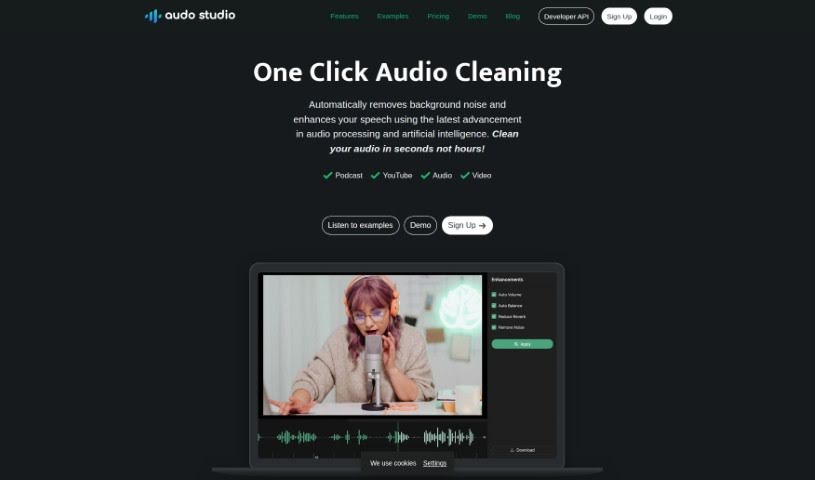
Screenshot of Audo Studio

Audo Studio

Discover what Audo Studio is and how to get the most out of it in 2025. We'll dive into its features and see how it stacks up against other audio tools.

Screenshot

What is Audo Studio?

Audo Studio is a really handy tool for anyone creating content, like YouTubers and podcasters, who wants to make their audio sound much better. It’s packed with features that make audio cleaning a breeze, including a simple one-click option for cleaning up your sound, plus more advanced tools for removing background noise. They’re even working on an echo reduction feature! Basically, this AI-powered platform works to give you crystal clear audio by cutting out distracting background noise, reducing echoes, and making sure your volume levels are just right. Since it’s all done through your web browser, you can use it on any computer, no matter the operating system. The goal is to give you professional-sounding audio quickly and easily.

Who created Audo Studio?

Audo Studio was brought to life by a team who wanted to completely change how content creators, such as YouTubers and Podcasters, clean up their audio. They built a powerful AI platform that makes this process much simpler. You can access it right from your browser, and it comes with advanced noise removal, echo reduction features, and it even adjusts volume automatically to ensure your audio is crystal clear. What’s great is that Audo Studio offers pricing that works for everyone, including a free starter plan. This makes professional audio enhancements accessible to a much wider range of creators.

What is Audo Studio used for?

  • It uses AI to automatically get rid of background noise and make speech clearer.
  • It helps you record in pretty much any environment by cutting out distracting sounds.
  • It can reduce echoes in your recordings, which might mean you don’t need to buy acoustic foam.
  • It automatically balances your audio levels, so it’s always pleasant to listen to.
  • It’s designed to give you professional audio improvements quickly and without fuss.
  • It automatically removes background noise from your audio recordings.
  • It enhances speech using AI technology.
  • It offers advanced noise removal, perfect for recording in any setting.
  • There’s an upcoming feature for echo reduction that could eliminate the need for acoustic foam.
  • It automatically adjusts volume levels for a more enjoyable listening experience.
  • It provides quick and easy professional audio enhancements.
  • It’s ideal for content creators like YouTubers and Podcasters.
  • The pricing is accessible, with a starter plan and discounted Creator plans available.
  • It’s a browser-based tool that works on Mac, Windows, and Linux.
  • Its high-quality audio processing capabilities are clearly shown in the demos and examples.

Who is Audo Studio for?

  • Podcasters
  • YouTubers

How to use Audo Studio?

Using Audo Studio is pretty straightforward. Just follow these simple steps:

  1. Accessing Audo Studio:

    • First, open up your preferred web browser and head over to the Audo Studio website.
    • If you haven’t already, you’ll need to sign up for an account.
  2. Uploading Your Audio:

    • Once you’re logged in, look for the option to upload your audio file.
    • Use that feature to add your recording to the platform.
  3. Selecting Enhancement Options:

    • Now, pick the specific improvements you want. This could be noise reduction, echo reduction (if it’s available yet), or the auto volume adjustment.
  4. Initiating Audio Processing:

    • Find and click the “Process” button (or whatever it’s called) to let the AI start working its magic on your audio.
  5. Reviewing the Enhanced Audio:

    • Once the processing is done, give the enhanced audio a listen. Make sure it sounds just how you want it.
  6. Downloading or Saving the Enhanced Audio:

    • If you’re happy with the result, you can download the improved audio file to your computer or save it directly within Audo Studio.
  7. Additional Features and Resources:

    • Don’t forget to check out other features, like the more advanced noise removal options and that upcoming echo reduction. It’s also a good idea to look at the demos and examples they provide to really get a feel for the audio quality Audo Studio can deliver.
  8. Pricing and Plans:

    • It’s worth taking a look at the different pricing options on their website to find the plan that best suits your needs. Remember, they have that starter plan and also discounted Creator plans, which can be quite cost-effective.

By following these steps, you’ll be able to use Audo Studio effectively to boost the quality of your audio recordings, whether they’re for podcasts, videos, or anything else.

Related AI Tools

Discover more tools in similar categories that might interest you

Stay Updated with AI Tools

Get weekly updates on the latest AI tools, trends, and insights delivered to your inbox

Join 25,000+ AI enthusiasts. No spam, unsubscribe anytime.