What is Audiotranscription?
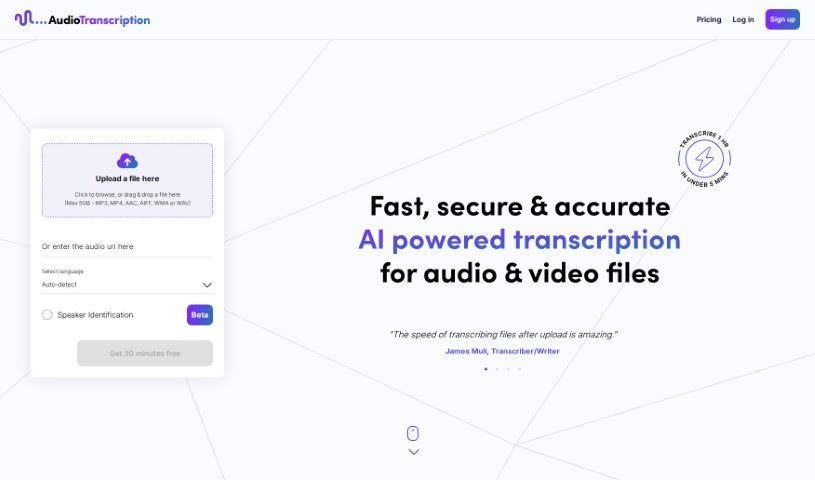
AudioTranscription.ai is a smart transcription tool powered by AI. It’s designed to be fast, accurate, and secure, handling all your audio and video files. Imagine transcribing an hour of audio in less than five minutes – that’s what it can do! It supports a wide range of file types, including MP3, MP4, AAC, AIFF, WMA, and WAV, and can even handle files up to 5GB. You can select the language, get punctuation included in your transcripts, and it’s good at understanding non-native accents. Plus, it can even identify different speakers for you. You’ll find it easy to keep track of all your transcriptions on a handy dashboard, and you can download them in various formats.
Silicon Rhino is the company behind this tool, and professionals have been giving it great feedback, especially about how quick, accurate, and efficient it is.
Who created Audiotranscription?
AudioTranscription.ai was developed by Silicon Rhino and first launched on June 8, 2024. It’s an AI-driven transcription service that delivers fast, secure, and accurate transcriptions for both audio and video. You can transcribe files in over 70 languages, and it offers helpful features like speaker identification and a dashboard that makes managing your transcriptions a breeze.
What is Audiotranscription used for?
Here’s a look at what you can do with AudioTranscription:
- Get accurate transcriptions: It handles multiple languages within a single audio or video file, ensuring you get precise language transcriptions.
- Transcribe in many languages: You can transcribe content in over 70 different languages.
- Identify speakers: Use the Speaker Identification feature to accurately label who is speaking in your audio and video files.
- Easy management: Keep all your transcriptions organized in one place with the user-friendly dashboard.
- Flexible uploads and downloads: Upload files in popular formats and download your transcripts in various layouts, including options with timestamps.
- API Access: For straightforward and hassle-free transcriptions or captions, you can use the API.
- Save time: Upload your audio or video files and get the transcript back quickly in different formats, significantly reducing the time you spend transcribing.
- Secure storage: Your transcriptions are stored securely on the dashboard, making them easy to access whenever you need them.
- Improve accessibility and efficiency: Automatically transcribe text and video content to make it more accessible and streamline your workflow.
- Lightning-fast transcriptions: Transcribe an hour of audio or video in under five minutes.
- Precise speaker labeling: The Speaker Identification feature is great for accurately labeling speakers in audios and videos.
- Centralized management: Easily manage all your transcriptions from a single dashboard.
- Customizable formatting (Coming soon): A text editor will soon be available for custom transcription formatting.
- Convenient API: Access the API for easy transcription and captioning.
- Reduce transcription time: Upload files in any language, select Speaker Identification for speaker labeling, and speed up the process.
- Secure dashboard management: Download transcripts in various formats and manage them securely on your dashboard.
- Join a community: Become part of a community of creators, professionals, and learners who use AudioTranscription for efficient transcriptions.
- Dashboard feature: Easily manage all your transcriptions in one place.
- Hassle-free API: Get straightforward and hassle-free transcriptions or captions through API access.
- Fast service: Benefit from a fast transcription service.
- Accurate results: Rely on accurate transcription services.
- Secure data: Your user data is handled securely.
- Format support: It supports various file formats.
- Any language: Transcribe in any language you need, with support for over 70 languages.
- One dashboard: Easily manage transcriptions in a single dashboard.
- Flexible downloads: Upload files in popular formats and download transcripts in various layouts.
- API for needs: API Access is available for straightforward and hassle-free transcription needs.
- Time-saving features: Reduce transcription time using features like Speaker Identification and the Editor.
- Confidentiality: Securely store and manage transcriptions with confidentiality.
- Community participation: Join a community of creators, professionals, and learners.
- Positive feedback: Receive positive feedback from professionals like journalists and writers.
Who is Audiotranscription for?
This tool is perfect for:
- Transcribers
- Writers
- Journalists
- Program designers
How to use Audiotranscription?
Using AudioTranscription.ai is straightforward. Just follow these simple steps:
- Upload Your File: Pick the file you need transcribed. You can choose from over 100 languages, and you can even turn on Speaker Identification to get precise speaker labels during the transcription process.
- Download Your Transcript: Once the transcription is ready, you can download it in different formats. You can also preview how it looks, and if you used speaker identification, those labels will be included. Your completed transcriptions will be sent directly to your email.
- Manage Your Transcriptions: All your transcriptions are stored securely, so your data stays confidential. You can easily manage them on your dashboard – view them, re-download them in different formats, or delete them as needed.
AudioTranscription.ai really shines with features like lightning-fast transcriptions (getting an hour done in under 5 minutes!), support for over 70 languages, speaker identification, a user-friendly dashboard, and the upcoming text editor for custom formatting. The tool also provides API access, keeps your uploads secure, and simplifies the whole process from start to finish.
It’s an excellent choice for transcribers, writers, journalists, and program designers because it delivers accurate, fast transcriptions. It handles various file formats and offers strong security for your data. Users often mention how well it transcribes non-native accents and includes punctuation like ellipses, which is great for capturing pauses or changes in thought.
Ready to get started? Just head over to AudioTranscription.ai. You can easily upload your files, pick your language, and enjoy efficient, accurate transcriptions that will really help streamline your work. Come join the community and experience a truly hassle-free transcription process with AudioTranscription.ai.