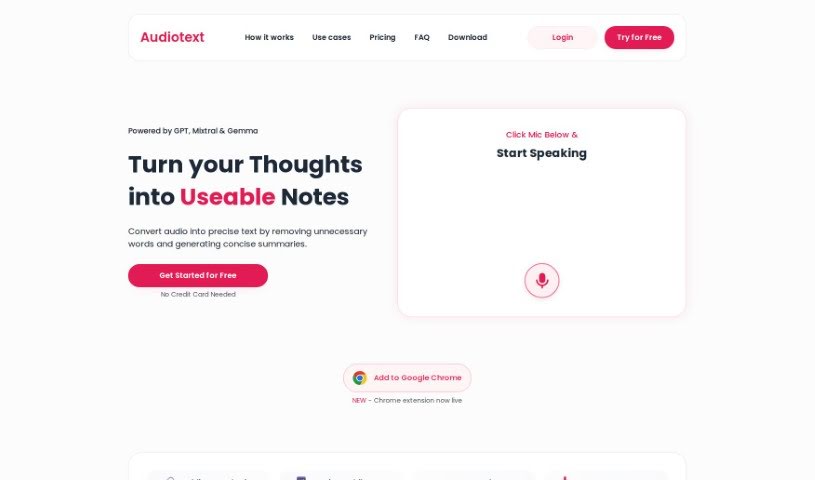
Screenshot of Audiotext Ai

Audiotext Ai

Discover what Audiotext AI is and how to use it effectively in 2025. We'll explore its features and see how it stacks up against other transcription tools.

Screenshot

What is Audiotext Ai?

Audiotext Ai is a handy tool designed to make note-taking much smoother. Essentially, it turns spoken words into written text. It is your personal assistant for transcribing thoughts, ideas, or even lectures, so you can ditch the traditional pen and paper. It’s great for bloggers, YouTubers, and writers who need to dictate content – the tool handles the transcription automatically. You’ll find features like audio transcription, a neat ‘rewrite’ option to make your notes more concise and easier to read, various transcription styles to pick from, a simple ‘share’ feature for unique links, and options to export your data as CSV files. Plus, Audiotext Ai is available everywhere – on the web, iOS, and Android – making it super versatile for students studying, content creators, and businesses that need to quickly capture and organize information from meetings or discussions.

Who created Audiotext Ai?

Audiotext AI was developed by an artificial intelligence company. It first launched on February 13, 2024, with a clear goal: to simplify note-taking by converting speech into text. This means you can easily transcribe your thoughts, ideas, and lectures without needing to write them down manually. It’s a real time-saver for content creators like bloggers, YouTubers, and writers who can simply dictate their material, and Audiotext AI takes care of the rest. The tool comes with several useful features, including different transcription styles, a ‘share’ function that creates unique links for your notes, and the ability to export data in CSV format. You can access Audiotext AI on the web, as well as on iOS and Android devices.

What is Audiotext Ai used for?

  • Capture key details from business meetings, team chats, or conference sessions.
  • Keep a personal voice diary to record your thoughts or feelings.
  • Get your notes in different writing styles to suit your needs.
  • Easily export your notes in CSV format.
  • Convert spoken words into text using smart AI technology.
  • Streamline your content creation by simply dictating your ideas.
  • Rewrite notes quickly to make them more concise and readable.
  • Share your notes easily with unique links across the web and social media.
  • Use it on multiple platforms – web, iOS, and Android.
  • Help students learn better by turning lectures into easy-to-read notes.
  • Extract crucial information from meetings, discussions, or conferences.
  • Maintain a personal voice diary by recording thoughts or feelings and transcribing them.
  • Choose from various transcription styles for your notes.
  • Share notes conveniently via unique links on the web and social media.
  • Export notes in CSV format for easy data management.
  • Streamline content creation by dictating thoughts for automatic transcription.
  • Rewrite notes to be more concise and readable with a single click.
  • Handle messy speech by accurately transcribing it into text.
  • Use Audiotext Ai in educational settings for lecture transcriptions and note-taking.
  • Assist content creators like YouTubers, bloggers, and writers by transcribing their dictated content.

Who is Audiotext Ai for?

  • Students
  • YouTubers
  • Bloggers
  • Writers
  • Business professionals

How to use Audiotext Ai?

Using Audiotext AI is pretty straightforward. Just follow these simple steps:

  1. Audio Transcription:
    • Start by recording your voice or uploading an audio file.
    • Audiotext AI then uses advanced artificial intelligence to convert that spoken content into text.
  2. Text Editing:
    • Once transcribed, you can easily edit the text to make your notes just right.
  3. Choose Transcription Style:
    • Audiotext AI offers different styles for your transcriptions, so you can pick the one you like best.
  4. Share Notes:
    • Want to share? Use the ‘share’ feature to create a unique link for your notes, making it simple to post them online or on social media.
  5. Export Notes:
    • You can export your notes in CSV format, which you can download on various platforms like the web, iOS, and Android.
  6. Content Creation:
    • Make content creation easier by dictating your thoughts instead of typing them out – it saves a lot of time and effort!
  7. Concise Note Rewriting:
    • Need your notes shorter and clearer? Use the one-click rewrite feature to get them just right.
  8. Personal Voice Diary:
    • You can keep a voice diary by recording your thoughts or feelings and then transcribing them into a concise text format.
  9. Cross-Platform Usage:
    • Access Audiotext AI wherever you are, on your computer via the web, or on your phone with the iOS and Android apps.
  10. Business Applications:
    • In a business setting, Audiotext AI is great for pulling out key information from meetings, discussions, or conferences. It helps with efficient note-taking and sharing information among team members.

Overall, Audiotext AI really helps with note-taking by turning speech into text and offering lots of editing and sharing options. It’s a genuinely useful tool for students, content creators, and businesses alike.

Related AI Tools

Discover more tools in similar categories that might interest you

Stay Updated with AI Tools

Get weekly updates on the latest AI tools, trends, and insights delivered to your inbox

Join 25,000+ AI enthusiasts. No spam, unsubscribe anytime.