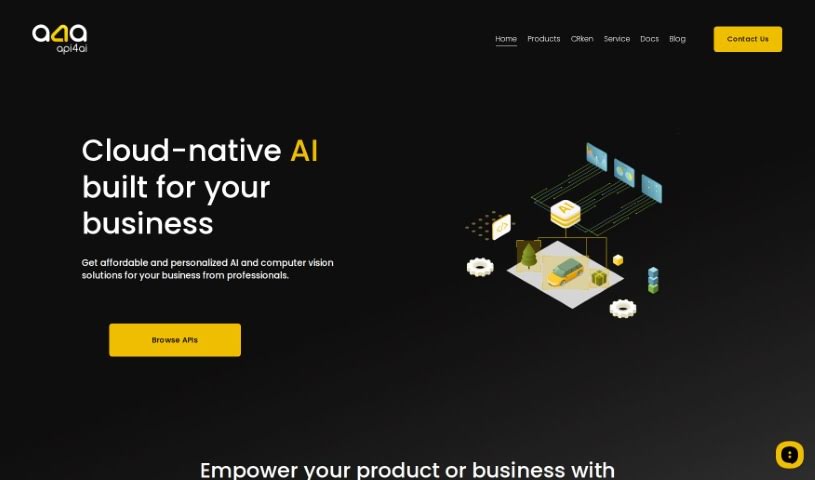
Screenshot of api4ai

api4ai

Discover what api4ai is and how to use it effectively in 2025. We'll explore its features and compare it with other Photo Editors.

Screenshot

What is api4ai?

Api4ai is a cloud-based AI and computer vision service that provides affordable, personalized solutions designed to boost your products or business. It offers a broad spectrum of image processing technologies. Think background removal, checking for NSFW content, optical character recognition (OCR), image labeling, object detection, and even face recognition. It’s a great fit for businesses of all sizes – from large enterprises to new startups and individual developers – who want to easily weave advanced machine learning into what they already do. What makes api4ai stand out is its ability to be personalized for your specific business needs, its wide range of computer vision capabilities, and the fact that you can access it from anywhere. Plus, it’s super easy to integrate with your current products or workflows, serving many different sectors. The API itself is designed to be user-friendly and intuitive, offering services for a vast array of domains and industries. Essentially, it lets you analyze images and videos effortlessly through a single HTTP API connection to the internet.

Who created api4ai?

Api4Ai was actually built by a team of professionals who specialize in offering personalized AI and computer vision solutions for businesses. Their focus is on cloud-native AI services, covering everything from image processing like background removal and OCR to object detection and face recognition. Api4Ai’s goal is to help enterprises, startups, and developers easily integrate advanced machine learning into their operations. They aim to make AI accessible, versatile, and simple to connect with existing products or business workflows.

What is api4ai used for?

Api4ai has a ton of practical uses across different industries:

  • Retail & Marketing:
    • Monitor and analyze foot traffic in public places to understand customer behavior.
    • Integrate Wine Recognition for easy product identification.
    • Assess brand appearance for marketing purposes to ensure consistent branding.
    • Automate apparel recognition for efficient inventory management.
    • Strip car images of backgrounds, even adding natural shadow effects, for eye-catching advertisements.
    • Estimate brand appearance and alignment for marketing efforts.
  • Image Editing & Content Creation:
    • Implement Background Removal for various image editing applications.
    • Implement Background Removal algorithms for image processing applications and collages.
  • Production & Quality Control:
    • Automate quality inspection and sorting in production pipelines.
    • Detect, count, and analyze items in production pipelines.
  • Safety & Compliance:
    • Ensure employee compliance with safety regulations, especially in hazardous environments.
    • Ensure safety compliance of employees in hazardous environments.
  • Data Analysis & Automation:
    • Extract information from data for enterprises to reduce expenses and automate business processes.
    • Extract information from large volumes of data for expense reduction and business automation.
    • Extract information to reduce expenses and automate business operations.
  • Startup Growth:
    • Provide AI solutions for startups to achieve their Minimum Viable Product (MVP) faster and grow rapidly.
    • Empower startups with AI solutions for faster growth.
    • Empower startups to grow fast with AI solutions.
    • Empower startups with state-of-the-art AI solutions.
  • Developer Tools:
    • Enhance projects with ready-to-use APIs for developers.

Essentially, api4ai helps businesses automate processes, gain insights from images, and improve their products and services.

Who is api4ai for?

  • Enterprises
  • Startups
  • Developers

How to use api4ai?

Using Api4Ai is pretty straightforward. Here’s how you can get started:

  1. Access the API: Begin by connecting to the HTTP API. This is your gateway to analyzing images and videos and getting predictions from any platform, as long as it’s connected to the internet. The API is designed with a RESTful structure, making it really user-friendly and intuitive to work with.
  2. Use the Python Function: For predictions, you can utilize the provided Python function, a4a_predict(image_url). When you call this function, it sends a POST request to the API endpoint, including the image URL you want analyzed right in the payload.
  3. Customize for Your Needs: You can tailor the API for all sorts of purposes. Whether you need to monitor foot traffic in public spots, use wine recognition or background removal algorithms, check how your brand looks for marketing, automate quality checks, or implement apparel and car image recognition, api4ai can handle it.
  4. Leverage for Business Benefits: Api4Ai offers distinct advantages for different users. Enterprises can extract valuable insights from their data, startups can significantly accelerate their growth, and developers can enhance their projects efficiently by using these ready-to-use APIs.
  5. Enjoy Cloud-Native AI: Take advantage of api4ai’s cloud-native AI capabilities. They offer affordable and personalized AI and computer vision solutions that can really empower your business. Just send your data to Api4Ai, and let the system do the heavy lifting.

By following these steps, you’ll be able to effectively use Api4Ai for a wide range of AI and computer vision tasks that are tailored to your specific business requirements.

Related AI Tools

Discover more tools in similar categories that might interest you

123RF AI Image Generator

Creative Image Generation
Learn More

Stay Updated with AI Tools

Get weekly updates on the latest AI tools, trends, and insights delivered to your inbox

Join 25,000+ AI enthusiasts. No spam, unsubscribe anytime.