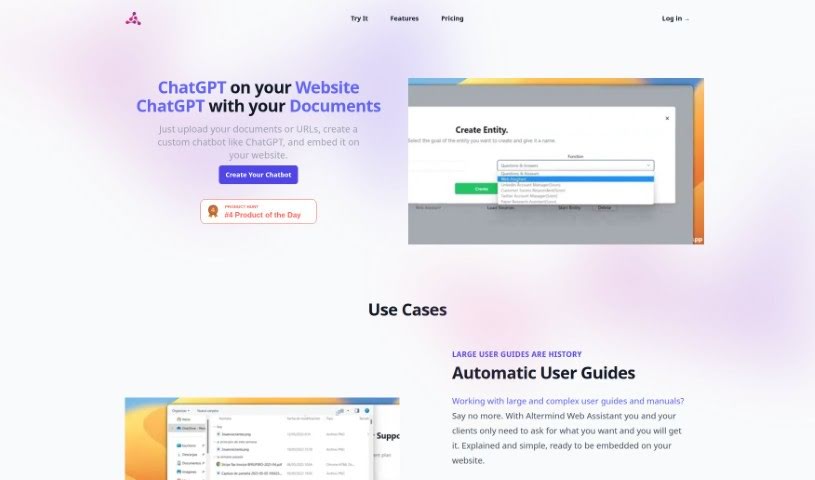
Screenshot of Altermind

Altermind

Discover what Altermind is and how to use it effectively in 2025. We'll explore its features and see how it stacks up against other Customer Service Tools.

Screenshot

What is Altermind?

Altermind: Built by Humans, for Humans

Altermind is a really neat AI Solution Builder that makes it super easy for anyone to create their own AI models, perfectly tuned for whatever job you need done. It is a way to build smart AI helpers. You can then pop these AI helpers onto your website or into your apps. They’re great for handling specific tasks related to your business, chatting with customers, or even digging through data. What makes Altermind special is how simple it is to use – you don’t need any coding skills at all! Plus, it supports tons of languages, and they’ve got solid security to keep your data safe, always. They also offer plenty of ways to tweak things, a 7-day free trial so you can test it out, and different pricing options to fit what you’re looking for.

Who created Altermind?

Edull Villar is the person behind Altermind, launching it on June 18, 2024. Altermind itself is a no-code platform designed for building custom AI models that can tackle specific tasks. It’s packed with features like easy website integration, handling specialized tasks, a user-friendly interface, free trials, and support for many languages. They really focus on data security, too, making sure all customer data is encrypted, whether it’s stored or being sent.

What is Altermind used for?

  • Instant Responses: Get quick answers to customer questions.
  • Your Own AI Expert: Create a GPT-like AI expert from your own documents in less than 3 minutes.
  • Get Information Easily: Ask for summaries, explanations, or detailed steps on anything.
  • AI on Your Site: Add AI helpers directly to your website or apps for users to interact with.
  • Social Media Help: Automate your social media tasks.
  • Simplify Text: Get concise summaries of text to make it easier to understand.
  • Automated Guides: Create user guides that are easy to follow.
  • Process Documents: Load your documents for the AI to work with.
  • Website Integration: Easily add AI to your website.
  • Custom Business Solutions: Build AI tailored specifically for your business needs.

Who is Altermind for?

  • Customer Service teams
  • Social Media Managers
  • Anyone looking to improve business processes
  • People building AI assistants
  • Customer service representatives
  • Website administrators
  • Technical Writers
  • Business owners
  • Social media managers

How to use Altermind?

Getting started with Altermind is straightforward. Here’s a quick rundown:

  1. Load Your Information: Just upload your files to the platform. It’s simple to organize and process them.
  2. Train Your AI: You can build a GPT-like AI expert from your documents in under 3 minutes. It’s surprisingly fast!
  3. Ask What You Need: Need a summary, an explanation, or detailed steps? Just ask your AI.
  4. Add AIs to Your Website: Once your AI is ready, click ‘Add to website’. You can embed it using a widget or iframe. Plus, you can easily change the colors to match your site through ‘Edit Interface’.
  5. Try It Out: All plans come with a 7-day free trial, so you can really explore the features and see if it’s the right fit for you.
  6. Tailored Solutions: If you need something very specific, the business plan is designed to create custom solutions just for you.
  7. Multilingual Support: Altermind AI speaks 85 languages! It can provide direct translations, making it easy to connect with a global audience.
  8. Data Security: Your data is safe with Altermind. They encrypt everything, both when it’s stored and when it’s being sent, and they only use it to handle your API requests.
  9. Key Benefits: You get easy web integration, AI that handles your specific tasks, no-code setup, a user-friendly interface, and a whole lot more.
  10. Pricing: Pick the plan that works best: Standard ($12/month), Pro ($49/month), or Business (starting at $349/month). Each offers different features.
  11. Text Summarization: Train the AI on your documents to get concise summaries that are easy to understand.
  12. Customer Service: Altermind AI can handle customer interactions, manage lots of support requests, and keep users engaged.
  13. Interface Customization: Make your AI look just right by customizing its interface to match your brand.
  14. Social Media Management: During the beta phase, you can enjoy automatic social media management, which really helps streamline your efforts.
  15. Optimize Business Processes: Altermind’s AI assistants can make your operations smoother by simplifying guides, giving quick answers, and handling data efficiently.

Altermind’s easy-to-use interface, the ability to customize it, its strong data security, and all its different features really make it a powerful tool. It’s perfect for building and adding AI solutions that are just right for your specific business needs.

Related AI Tools

Discover more tools in similar categories that might interest you

Stay Updated with AI Tools

Get weekly updates on the latest AI tools, trends, and insights delivered to your inbox

Join 25,000+ AI enthusiasts. No spam, unsubscribe anytime.