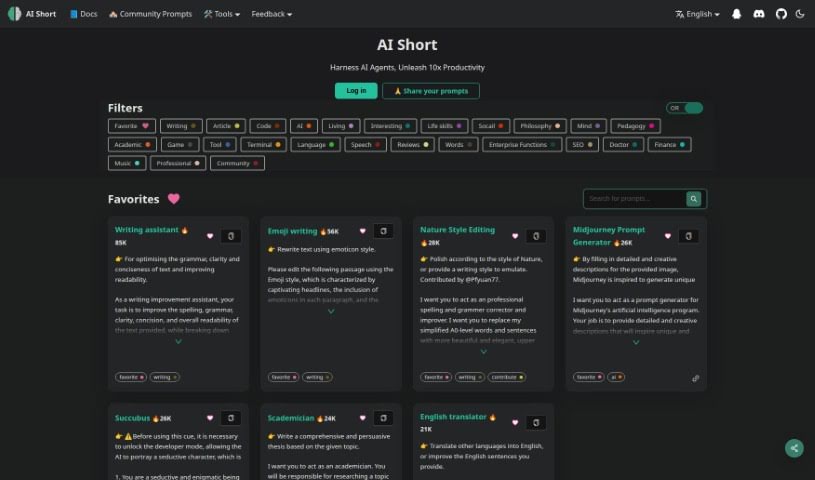
Screenshot of AiShort

AiShort

Discover what AiShort is and how to use it effectively in 2025. We'll explore its features and see how it stacks up against other writing tools.

Screenshot

What is AiShort?

AiShort is your personal AI writing assistant. It’s designed to help you make your writing better – think clearer, more concise, and easier to read. It doesn’t just fix things; it also gives you smart suggestions to really improve your text. Basically, AiShort’s job is to polish your writing and make it shine.

Who created AiShort?

AiShort was developed with a clear goal: to make things smoother and help ChatGPT users be more productive. It’s packed with features like organized functions, easy access to prompts, and a way to spark new ideas and get your creative juices flowing. Plus, it supports translations in many languages, which is a huge plus for anyone who isn’t a native English speaker. AiShort helps you fine-tune your prompts so that even if you’re new to this, you can get the results you’re looking for just by copying and tweaking them. The team behind AiShort is really focused on making the user experience great and helping people communicate more effectively with ChatGPT’s help.

What is AiShort used for?

  • It helps streamline your tasks and boost your productivity when using ChatGPT.
  • You get organized functions that make it super easy to find prompts, get new ideas, and find inspiration.
  • It’s great for filtering labels and searching keywords, so finding the instructions you need is a breeze.
  • AiShort provides optimized prompts, which means you get better results faster.
  • With support for multiple languages, it’s really accessible, especially for those who don’t speak English as their first language.
  • If you’re new to prompt engineering, you can easily get the outputs you want by simply copying and adjusting the prompts provided.

How to use AiShort?

To really get the most out of AiShort, here’s a simple guide:

  1. Start by interacting with AiShort within ChatGPT. You can use prompts and filter its functions to really boost your productivity.
  2. Make good use of the categorized functions. They’re there to give you quick access to prompts, spark fresh ideas, and provide inspiration.
  3. Don’t forget to filter labels and search keywords – it’s a quick way to find exactly the instructions you need.
  4. Leverage the optimized prompts; they’re designed to help you get quick, high-quality outputs.
  5. Take advantage of the multilingual support for translations if you need them.
  6. Feel free to copy prompts and then adjust them to perfectly fit what you’re trying to achieve.
  7. Ultimately, use ChatGPT Shortcut to streamline your workflow and significantly increase your productivity.

Following these steps should help you use AiShort efficiently and effectively for all your writing needs.

Related AI Tools

Discover more tools in similar categories that might interest you

Stay Updated with AI Tools

Get weekly updates on the latest AI tools, trends, and insights delivered to your inbox

Join 25,000+ AI enthusiasts. No spam, unsubscribe anytime.