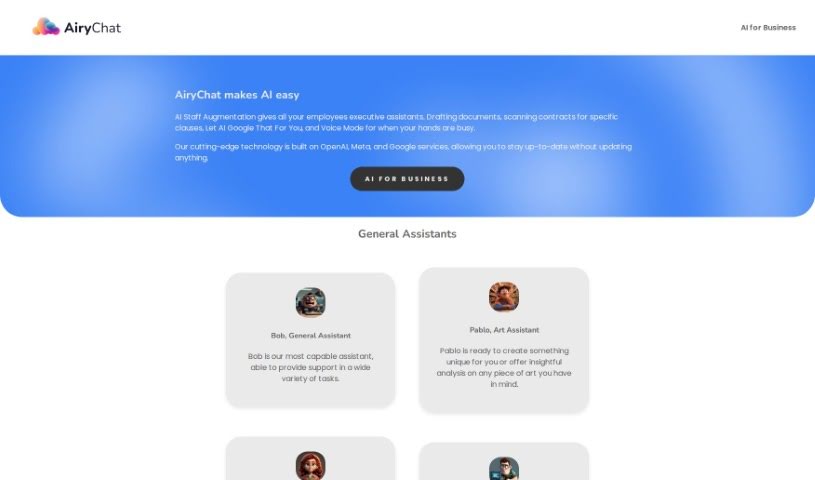
Screenshot of AiryChat

AiryChat

Discover what AiryChat is and how to use it effectively in 2025. We'll explore its features and see how it stacks up against other chatbots.

Screenshot

What is AiryChat?

AiryChat is a really helpful AI tool that gives you nine different specialized assistants for all sorts of things – work, studying, or just everyday life. You’ve got Bob for general stuff, Linus who’s great with complex software projects, Jess for marketing ideas, Bert for making flow charts, Lisa for UX/UI design, Dwight for digging into data, and even Bernard if you need cooking advice. Each one is an expert in their own field, ready to offer specific help.

What’s cool about AiryChat is what it can do. It can handle PDF, CSV, and DOCX files, remember things over time, process large amounts of data, and work with unlimited context. Plus, it can search the web, generate images, and even let you talk to it using voice mode. And the best part? It’s free to use, and they’re always adding new features and improvements, like an iOS app, presentation tools, code execution, and more web search capabilities.

The GPT-4 pro assistant really makes a difference by giving these bots distinct personalities. This makes interacting with them feel more natural and often leads to better results. Looking ahead, AiryChat plans to let you integrate these bots into your own websites, develop a standalone Windows app, and improve its search engine connections. The whole idea is to offer a wide range of AI help for pretty much anything you need.

Who created AiryChat?

AiryChat was actually built by Linus, a senior developer who leads complex software projects. The company behind it uses top-tier technology from OpenAI, Meta, and Google to power its variety of AI assistants for business. It first launched on April 5, 2023, offering those nine specialized assistants for everything from software development and UI design to art and marketing.

What is AiryChat used for?

  • Analyzing data
  • Handling general tasks
  • Developing complex software projects
  • Creating marketing campaigns
  • Making flow charts
  • Supporting UX/UI design
  • Getting cooking guidance
  • Analyzing CSV files
  • Recognizing and working with code blocks
  • Using a speech-to-text feature
  • General Assistance: Bob is your go-to for everyday tasks.
  • Software Projects: Linus excels at complex software development.
  • Marketing: Jess is your expert for marketing campaigns.
  • Flow Charts: Bert can help you create flow charts.
  • UX/UI Design: Lisa provides support for UX/UI design.
  • Data Analysis: Dwight is your go-to for data analysis.
  • Cooking: Bernard offers cooking guidance.
  • Speech to Text: A handy feature for converting speech to text.

Who is AiryChat for?

  • Anyone needing help with General Tasks.
  • Professionals working on Complex Software Projects.
  • Marketers creating Marketing Campaigns.
  • Individuals needing help with Flow Chart Creation.
  • Designers focused on UX/UI Design.
  • Analysts performing Data Analysis.
  • Home cooks looking for Cooking Guidance.
  • Artists seeking Art Assistance.
  • General Task Assistant: Bob is perfect for everyday needs.
  • Software Developers: Linus is your specialized assistant.
  • Marketing Specialists: Jess can boost your campaigns.
  • Flow Chart Creators: Bert simplifies chart creation.
  • UX/UI Designers: Lisa offers tailored design support.
  • Data Analysts: Dwight helps with your data needs.
  • Chefs: Bernard provides cooking guidance.

How to use AiryChat?

Getting started with AiryChat is pretty straightforward:

  1. Start Using It for Free: Just open the app and log in. You can immediately begin using the various skilled assistants for your work, studies, or personal projects.
  2. Pick Your Assistant: You’ve got nine specialized assistants to choose from, covering everything from general tasks and software development to marketing and data analysis.
  3. Chat with the Experts: Feel free to interact with specific assistants like Bob, Linus, Jess, Bert, Lisa, Dwight, and Bernard, depending on the type of support you need.
  4. Make Use of the Features: Take advantage of features like code recognition, speech-to-text, memory functions, CSV file analysis, and even planned additions like PDF and text file reading.
  5. See What’s Coming: Keep an eye out for future updates! They’re planning an iOS app, ways to integrate bots into your own websites, code execution, web search capabilities, and a standalone Windows app.
  6. Explore Unlimited Context: You can process unlimited context, use web search indexing, generate images, and communicate via voice-to-voice.
  7. Get Specialized Help: Need art help? Pablo’s your guy. For software development or UI/UX projects, Linus and Lisa are excellent choices.
  8. Stay in the Loop: Check for updates regularly to get new capabilities, like AI staff augmentation for businesses or enhanced long-term memory for Bob.

By following these steps, you’ll be able to get the most out of AiryChat and all its different assistant features.

Related AI Tools

Discover more tools in similar categories that might interest you

Stay Updated with AI Tools

Get weekly updates on the latest AI tools, trends, and insights delivered to your inbox

Join 25,000+ AI enthusiasts. No spam, unsubscribe anytime.