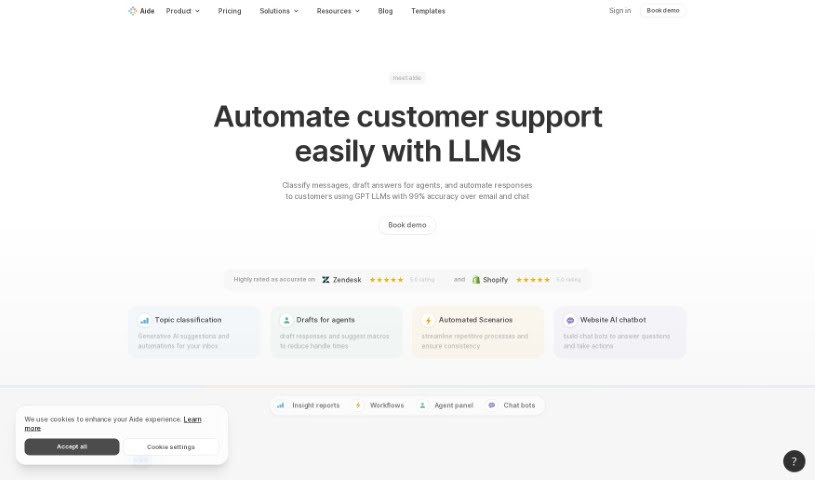
Screenshot of Aide

Aide

Discover Aide, your AI integration tool for customer support. Learn how it categorizes inquiries, automates tasks, generates responses, and builds bots to boost efficiency and customer satisfaction in 2025. See how it stacks up against other Customer Service Tools.

Screenshot

What is Aide?

Aide is an AI integration tool designed to really boost your customer support operations. It gives you valuable insights into customer interactions, sorts questions into different topics, automates those repetitive tasks, and even suggests AI-generated responses for your agents. These suggestions are based on past tickets or your help articles. Plus, Aide brings all your knowledge bases together for consistent support, lets you create bots to handle common questions right away, and makes sure hand-offs to human agents are smooth when they’re needed. By using automation and smart suggestions, Aide makes customer support workflows much simpler, leading to quicker problem-solving and happier customers.

Who created Aide?

The founder who created Aide isn’t specifically named in the information we have. What we do know is that Aide is recognized for its powerful AI integration tool, which is a big help for customer support. It offers features like automatically categorizing customer questions, automating workflows, providing AI-generated responses, and using bots to instantly answer common questions. The whole idea behind the platform is to improve customer service by using smart automation and offering really useful insights into customer interactions.

What is Aide used for?

  • Generate accurate AI responses
  • Make sure everything aligns with your defined SOPs
  • Handle common questions instantly
  • Add to your Knowledge Base
  • Ensure bots are trained thoroughly
  • Keep customers happy with smooth hand-offs
  • Retrieve data for better context
  • Automate repetitive workflows
  • Get a blueprint for automation
  • Boost your team’s efficiency

Who is Aide for?

  • Customer Support Agents
  • Customer service representatives

How to use Aide?

To get the most out of Aide for your customer support, here’s a simple guide:

  1. Understand Customer Interactions: Aide dives into all your customer conversations. It categorizes questions by topic, giving you a clear picture of what’s happening.
  2. Pinpoint Areas for Improvement: Use Aide to summarize and analyze conversations. This helps you spot customer pain points and smooth out any friction.
  3. Monitor Trends: Keep an eye on how category volumes change over time. This is a great way to see if your improvements are working and to catch new issues as they pop up.
  4. Automate Workflows: Save valuable time. Aide can spot issues that are ripe for automation and help you build workflows to handle them automatically, all based on your customer data.
  5. Boost Team Efficiency: Aide identifies ticket topics and guides your agents. This cuts down on the time they spend figuring out context and lets them offer more personalized recommendations.
  6. Reduce Repetition: Automate the tagging of tickets with the right topics. Aide can also suggest accurate responses to agents, making sure everything follows your Standard Operating Procedures (SOPs).
  7. Utilize Bots: Build bots to handle common questions right away. You can train them using past tickets and your knowledge articles. Make sure they’re trained thoroughly by using a simulated testing environment.
  8. Smooth Customer Hand-offs: When conversations get complicated, Aide bots can seamlessly pass them over to human agents. This ensures customers stay satisfied.
  9. Retrieve Data for Context: Let your bots make API calls to grab relevant customer information. This leads to much more personalized and effective conversations.
  10. Pricing Structure: Aide’s pricing is based on how many conversations you have. Their plans include unlimited team members and all features. You can try it out for 14 days with consistent monthly pricing.
  11. Continuous Improvement: Aide uses machine learning technology that learns from every interaction. This helps it personalize responses, offer tailored suggestions, and get better over time.

By following these steps, you can really make Aide work for you. It’ll help streamline your customer support, make your customers happier, and give your team a boost with AI-driven insights and automation.

Related AI Tools

Discover more tools in similar categories that might interest you

Stay Updated with AI Tools

Get weekly updates on the latest AI tools, trends, and insights delivered to your inbox

Join 25,000+ AI enthusiasts. No spam, unsubscribe anytime.