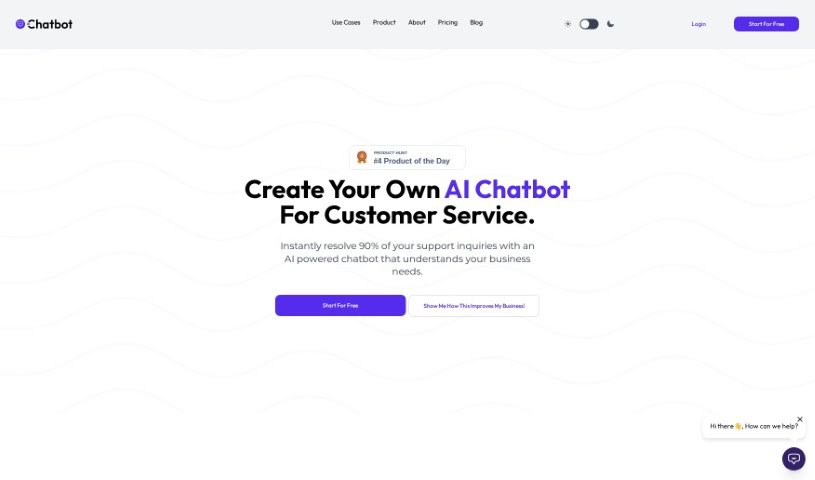
Screenshot of Aichatbot

Aichatbot

Discover what AIChatbot is and learn how to use it to boost your customer service in 2025. We'll compare its features against other customer service tools.

Screenshot

What Exactly is AIChatbot?

AIChatbot is a smart tool that lets you build your own AI-powered chatbots for customer service. It is a platform where you can create custom GPT chatbots, and the neat part is, you train them using your own information. You can simply upload your website’s URLs, PDF documents, or even your sitemap. Once set up, this chatbot can chat with your customers in many different languages. You can also easily embed it right onto your website. It’s designed to handle customer questions automatically, help with lead generation, and connect with various communication channels, streamlining your customer interactions. AIChatbot offers different pricing options, each with specific features like a set number of message credits each month, ways to customize your chatbot, and support for various AI models. Essentially, this platform makes AI in customer service more accessible to everyone, including smaller businesses, by using AI technology efficiently.

Who’s Behind AIChatbot?

AIChatbot was developed by Pelrio Analytica. This company is independent and has grown without outside investment, which means they really focus on what their users need and what their mission is, rather than bowing to investor demands. They have a dedicated, diverse team that works remotely, all committed to delivering excellent service. Their main goal with AIChatbot is to make AI in customer service widely available, ensuring businesses of any size can benefit from it.

What Can You Do with AIChatbot?

Here’s a look at what AIChatbot is great for:

  • Generating Leads: It helps capture potential customer information.
  • Customer Service Chatbot: Provides instant support to your website visitors.
  • Drafting Email Responses: Assists in writing replies to customer emails.
  • Multi-channel Integrations: Connects with various platforms for seamless communication.
  • Creating Custom GPT Chatbots: You can build unique chatbots trained on your specific data.
  • Responding in Multiple Languages: Offers support to a global audience.
  • Website Embedding: Easily add a chatbot widget directly to your site.
  • Automating Responses: Handles text and email queries automatically.
  • Drafting Email Replies: Helps craft responses for email inquiries.
  • Processing Leads: Streamlines the lead generation process.
  • Multilingual Support: Caters to customers in various languages.
  • Capturing Leads: Efficiently gathers potential customer information.
  • Website Builder Integration: Works smoothly with major website platforms.
  • Handling Complex Queries: Manages intricate customer questions with ease.

Who Should Use AIChatbot?

This tool is particularly useful for:

  • Customer Support Specialists
  • Marketing Professionals
  • Sales Representatives
  • Small Business Owners
  • Entrepreneurs

How to Get the Most Out of AIChatbot?

Here’s a simple guide to using AIChatbot effectively:

  1. Start with a Free Trial: You can sign up for a 7-day free trial. The best part? No credit card is needed to get started.
  2. Train Your AI: To get your chatbot ready, upload your data. You can use your website’s URL, specific PDF files, or your sitemap. This helps the AI model learn to provide custom answers in different languages.
  3. Explore the Features: Take advantage of what AIChatbot offers, like automatically drafting email responses, capturing leads, and integrating with multiple channels to improve how you interact with customers.
  4. Pick the Right Plan: Once your trial ends, choose a pricing plan that fits your business needs. The plans differ in things like monthly message credits, how much data each bot can store, and the number of web pages you can include.
  5. Personalize Your Chatbot: Make the chatbot feel like a part of your brand. You can customize its responses and adjust settings to match your specific requirements.
  6. Get Support When Needed: If you have technical questions or need help with something specific, feel free to reach out to their customer service team via email at [email protected].
  7. Keep an Eye on Message Credits: Track how many messages you use each month. If you’re nearing your limit, you might consider upgrading your plan, waiting for your quota to refresh, or buying extra credits.
  8. Billing and Flexibility: Understand your billing cycle. You can cancel, upgrade, or downgrade your subscription anytime without being locked into a long-term contract. Plus, signing up for longer subscriptions usually comes with discounts.
  9. Advanced Plans: If you’re on the Elite Plan, you get a generous 40,000 message credits. You can also integrate your own OpenAI API key, which can be a more cost-effective way to handle messages once you go over your plan’s limit.
  10. See the AI’s Advantages: Experience how AIChatbot learns and adapts. It offers language support and even understands emotional context, which is a big step up from older, rule-based systems.

By following these steps, you can really make AIChatbot work for you, improving your customer service and lead generation efforts.

Related AI Tools

Discover more tools in similar categories that might interest you

Stay Updated with AI Tools

Get weekly updates on the latest AI tools, trends, and insights delivered to your inbox

Join 25,000+ AI enthusiasts. No spam, unsubscribe anytime.