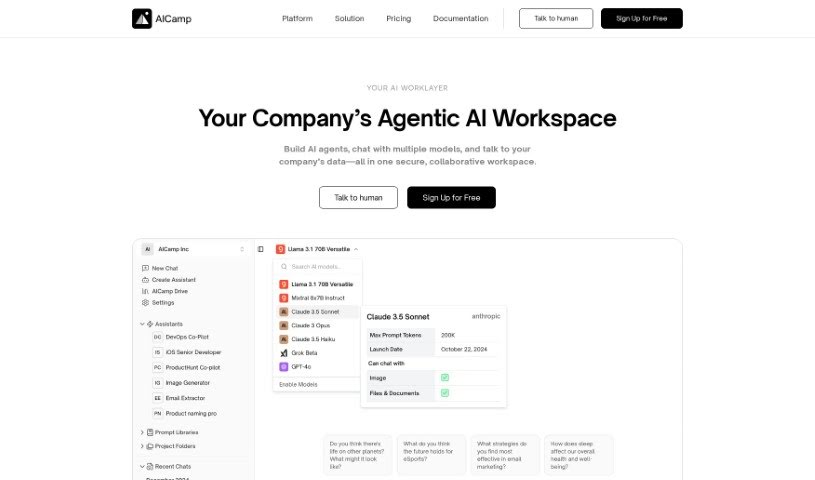
Screenshot of Aicamp

Aicamp

Discover what Aicamp is and how to use it effectively in 2025. We'll explore its features and see how it stacks up against other Project Management Tools.

Screenshot

What is Aicamp?

Aicamp is a really neat platform designed for teams to work together with AI. It lets you bring several different AI models into one dashboard, which is super handy. You can organize your prompts, share them, and even refine them with your teammates. It supports popular Large Language Models (LLMs) like GPT-4, Bard, Claude, and Llama 2, making your AI interactions smoother and boosting productivity for everyone on the team. Plus, Aicamp takes data privacy seriously, following GDPR rules. They also offer ways to automate your workflows and access a growing library of useful information.

The folks behind Aicamp want to make it simple for businesses to integrate AI into their daily operations. Their goal is to help companies make better decisions and drive innovation using AI. Aicamp provides affordable options, a user-friendly interface, and a strong focus on teamwork, which makes it a great fit for businesses of any size, from startups to larger companies. By emphasizing collaboration, shared prompt libraries, and clear documentation for AI prompts, they’re making advanced AI tools more accessible and budget-friendly.

Who created Aicamp?

Shreya and Nishchit, two tech enthusiasts with a passion for making AI accessible and affordable for businesses, are the creators of Aicamp. They launched it on December 14, 2023. Their main aim is to simplify AI integration for businesses, making it a crucial part of how they operate to improve decision-making and foster innovation through AI.

What is Aicamp used for?

  • Making Decisions Based on Data: Use AI to help guide your choices.
  • Finding Great Prompts: Discover which prompts work best for your needs.
  • Accessing a Knowledge Base: Tap into a repository of valuable intelligence.
  • Automating Workflows: Set up custom processes to save time.
  • Working Together Effectively: Enhance team collaboration.
  • Connecting to Internal Knowledge: Link Aicamp to your company’s own information.
  • Personal Prompt Library: Keep your favorite prompts organized for yourself.
  • Using Your Own API Keys: Connect your keys for OpenAI, Anthropic, and Gemini models.
  • Company-Wide Model Access: Choose models from Aicamp’s ModelHub for everyone in the company to use.
  • Connecting Your APIs: Integrate your own API connections.
  • Better Results for Specific Needs: Improve outcomes for your unique use cases.
  • Ready-to-Use Prompts: Get started quickly with pre-made prompts.
  • Sharing Prompt Refinements: Collaborate with others to make prompts even better.
  • Simple Dialogues: Conversations with AI require less explanation.
  • Advanced Chat Features: Extend RAG-style chats with image generation, web searches, and more.
  • Shared Chats: Collaborate on conversations with your team.
  • Shared Assistants: Make AI assistants available to all users.
  • Building Custom Apps: Create your own external applications.
  • Organizing Prompts Efficiently: Keep your prompt collection neat and tidy.
  • Collaborative Workspaces: Work together in shared project spaces.
  • Team Prompt Refinement: Improve prompts as a group.

Who is Aicamp for?

  • Employees: Anyone looking to work more efficiently with Large Language Models (LLMs).
  • Teams: Groups that want to use their internal knowledge, speed up their workflows, and build custom AI assistants.
  • AI Experts: Professionals who work with AI.
  • Team Members Without Technical Skills: Individuals who want to leverage AI without needing deep technical knowledge.

How to use Aicamp?

Here’s a simple guide to using Aicamp:

  1. Creating AI Prompts:
    • Develop specific prompts with clear inputs to get the best responses from the AI.
    • Work with your team on the platform to create, refine, and improve these prompts together.
  2. Documentation:
    • Create thorough documentation for your AI prompts, explaining their purpose, how to use them, and their settings.
  3. User-Friendly Interface:
    • Aicamp is designed to be easy to use, even if you don’t have a lot of technical experience, thanks to its intuitive design.
  4. Key Features:
    • You can use a variety of Large Language Models (LLMs), including GPT-4, Bard, Claude, and Llama 2.
    • Take advantage of collaborative workspaces, central prompt libraries, and documentation for AI tools.
    • Share AI prompts easily with your team.
    • Manage your prompt libraries securely with access controls and IP protection.
  5. Customization:
    • Add your own API keys to personalize your AI experience.
    • Adjust models and add features like RAG-style chat conversations that include image generation and web search.
  6. Collaboration:
    • Work with your team to collectively improve AI prompts.
    • Use shared chats, workspaces, and prompt libraries for seamless teamwork.
  7. Data Security:
    • Keep your stored prompts safe by using access control and IP protection features.
  8. Analytics:
    • Review usage analytics to see how prompts are performing and to help plan your future AI strategies.
  9. Affordability:
    • Aicamp is cost-effective, offering a range of AI features at affordable prices to help your operations stay within budget.
  10. Customization and Workflow Automation:
    • Tailor your workflows, build custom assistants, and connect to your knowledge sources to boost productivity.

By following these steps, you can effectively use Aicamp’s AI capabilities to improve how your team collaborates and boost productivity, all while making your AI interactions better.

Related AI Tools

Discover more tools in similar categories that might interest you

Stay Updated with AI Tools

Get weekly updates on the latest AI tools, trends, and insights delivered to your inbox

Join 25,000+ AI enthusiasts. No spam, unsubscribe anytime.