What is AI Spend?
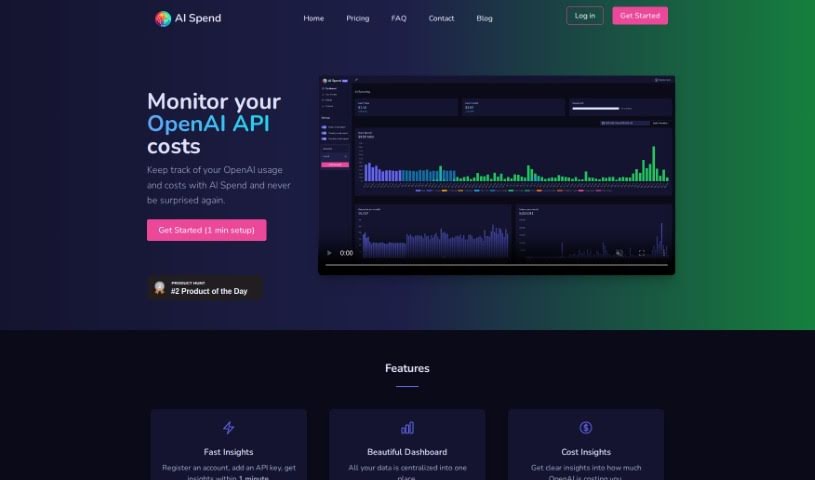
AI Spend is a really handy tool for anyone using the OpenAI API, whether you’re an individual or part of an organization. It’s designed to help you keep a close eye on how you’re using the API and manage those expenses without any surprises. It is your personal assistant for OpenAI costs. It offers several useful features: you get ‘Fast Insights’ for quick setup and immediate access to information, a ‘Beautiful Dashboard’ that puts all your data in one easy-to-see place, ‘Cost Insights’ specifically to track your OpenAI spending, ‘Be Notified’ so you get alerts about your usage, and ‘Usage Analytics’ to really dig into your trends over time. Plus, AI Spend takes transparency and security seriously. Your API keys are stored securely with encryption, and you can delete your data, including your usage history, whenever you want. The pricing is straightforward – no hidden fees – and getting your usage history through OpenAI’s API is actually free.
Who created AI Spend?
AI Spend was developed because people using the OpenAI API needed a better way to manage their expenses. The founders themselves experienced the challenge of unexpected costs and wanted to create a straightforward solution for tracking and controlling OpenAI API usage. The company is built on principles of transparency, security, and simple pricing, aiming to give users clear, actionable insights into their OpenAI expenditures.
What is AI Spend used for?
AI Spend helps you with a variety of tasks related to your OpenAI API usage:
- Fast Insights: Get up and running quickly. Just register, add your API key, and you’ll have insights in about a minute.
- Beautiful Dashboard: See all your data in one place, making it easy to view your usage and spending.
- Cost Insights: Get clear information about your OpenAI costs so you can understand and manage your budget better.
- Be Notified: Stay on top of your spending with notifications sent daily, weekly, and monthly.
- Usage Analytics: Dive deep into your usage and cost trends over time to make smarter decisions.
- Models & Tokens: Easily see which OpenAI models you’re using and how many tokens they consume.
Essentially, AI Spend is used for:
- Keeping a close watch on your OpenAI API costs.
- Tracking how you use and spend with the OpenAI API.
- Avoiding those unexpected bills related to OpenAI usage.
- Getting a clear picture of your OpenAI spending.
- Receiving regular updates on your usage and spending data.
- Managing your budget effectively with clear cost insights.
- Getting timely notifications about your daily, weekly, and monthly spending.
- Analyzing your AI spending trends over time.
- Understanding which OpenAI models and how many tokens you’re using.
- Making the process of monitoring AI spending much simpler for easier budgeting.
- Monitoring OpenAI API costs.
- Tracking your OpenAI usage and associated costs.
- Preventing unexpected expenses from your OpenAI API usage.
- Receiving notifications about your spending on a daily, weekly, and monthly basis.
- Analyzing trends in your AI spending over time.
- Understanding and managing your budget through detailed Cost Insights.
- Ensuring your AI spending monitoring is both transparent and secure.
- Accessing clear, easy-to-understand insights into your OpenAI costs.
- Centralizing all your usage and spending data for straightforward viewing.
- Discovering exactly which OpenAI models and how many tokens are being used.
Who is AI Spend for?
- Anyone using the OpenAI API, whether you’re an individual or part of an organization.
How to use AI Spend?
Using AI Spend to keep track of your OpenAI API costs is pretty straightforward. Just follow these simple steps:
- Setup: First, you’ll need to register for an account with AI Spend. Then, add your API key. This whole setup process should only take about a minute.
- Fast Insights: Once you’re set up, you can start getting insights right away by adding your API key. You’ll have access to valuable information about your OpenAI usage within just a few minutes.
- Beautiful Dashboard: All your data is neatly organized in a visually appealing dashboard. This gives you a clear overview of your OpenAI usage and spending.
- Cost Insights: Get detailed breakdowns of the costs associated with your OpenAI usage. This feature really helps you understand and manage your budget more effectively.
- Be Notified: You can stay informed about your spending habits with notifications sent daily, weekly, and monthly. It’s a proactive way to help you track and control your OpenAI expenses.
- Usage Analytics: Use the Usage Analytics feature to analyze your usage and cost trends over time. This information is key to making smart decisions about your AI spending.
- Models & Tokens: Find out which OpenAI models you’re using and how many tokens they’re consuming. This feature brings transparency to your AI operations.
AI Spend is designed with simple pricing, secure storage for your API keys, and the ability to remove your data, including your usage history, at any time for your privacy. By following these steps and using AI Spend’s main features, you can effectively monitor and manage your AI spending with ease and accuracy.