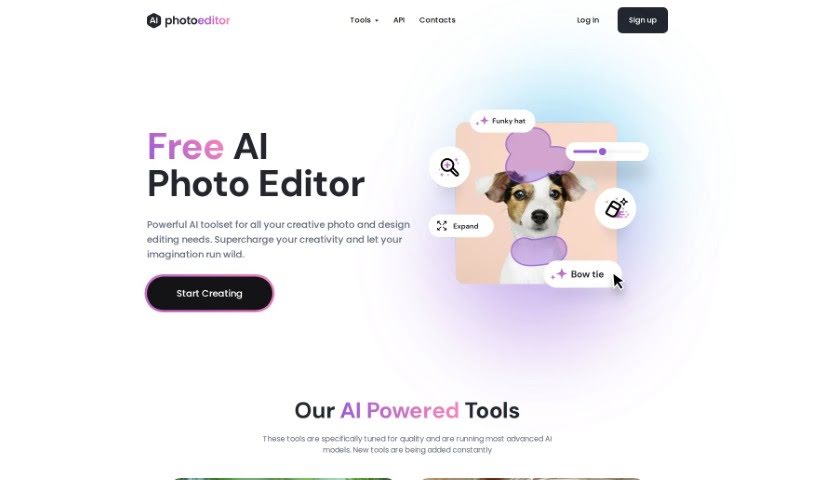
Screenshot of AI Photo Editor

AI Photo Editor

Discover what an AI Photo Editor is and how to use it effectively in 2025. We'll explore its features and compare it to other photo editing tools.

Screenshot

What is AI Photo Editor?

An AI Photo Editor, like PhotoEditor.ai, is a super smart visual platform that uses Artificial Intelligence to completely change how we edit photos. It’s a big step up from the old ways. This technology makes it really easy for anyone to clean up their pictures. You can effortlessly remove things you don’t want – like objects, text, or even people. Plus, you can add new elements using generative fill, or sharpen blurry images with tools like Upscale and Unblur. The results you get are often as good as, or even better than, what you’d achieve with traditional methods. PhotoEditor.ai is a bit like Photoshop, but it’s designed to be much simpler to use while still delivering top-notch results. This is all thanks to its advanced AI and Machine Learning. You’ll really notice a difference in how you edit photos once you start using these AI-powered tools.

Who created AI Photo Editor?

An innovative company called PhotoEditor.ai developed the AI Photo Editor. They’re powered by advanced Artificial Intelligence algorithms and Machine Learning, which is how they create these cutting-edge image editing tools. Their in-house AI engineers have fine-tuned these tools to deliver exceptional results across various areas, including graphics editing, reinforcement learning, unsupervised learning, and evolution. Compared to traditional tools like Photoshop, PhotoEditor.ai offers a unique and much more efficient way for people to enhance and manipulate their images.

What is AI Photo Editor used for?

Here’s a look at what you can do with an AI Photo Editor:

  • Clean up photos: Easily remove unwanted objects, whether they’re in the foreground or background.
  • Remove text and watermarks: Get rid of text overlays, watermarks, prints, or captions you don’t want.
  • Improve portraits: Enhance facial features by removing blemishes, wrinkles, and other imperfections.
  • Edit anywhere: Work on your photos seamlessly whether you’re using a web browser or a mobile device.
  • Free high-res downloads: Get your edited images in 1024px resolution at no cost.
  • Boost business efficiency: Automate image editing tasks for industries like Real Estate, eCommerce, Marketing, or Automotive.
  • Save time: Speed up your image editing workflow with these integrated AI tools.
  • Professional results, easily: Achieve high-quality editing results with very little effort.
  • Simplify complex tasks: Make tricky image editing jobs simple and even fun.
  • Protect your privacy: Your images are deleted within an hour and are never reused or sold to third parties.
  • Edit on the go: Whether you’re at home, in the office, or traveling, you can edit photos on web and mobile devices.
  • Effortless editing: Get professional editing results with minimal effort, even if you’re not a designer.
  • User-friendly: The interface is simple and intuitive, meaning you don’t need any design skills.
  • Keep it private: All images are deleted within one hour and are not reused or resold.
  • Streamline your workflow: Automate business tasks across various sectors like Real Estate, eCommerce, Marketing, and Automotive.
  • Edit like a pro: Use AI assistance to make your images look like they were edited by a professional designer.
  • Fun and simple: Enjoy image editing without needing any special design skills.

Who is AI Photo Editor for?

This tool is perfect for a wide range of users, including:

  • Photographers
  • Graphic designers
  • Marketing professionals
  • Social media managers
  • Fine artists
  • Real Estate agents
  • E-commerce sellers
  • Content creators
  • Bloggers
  • Event planners

How to use AI Photo Editor?

Here’s a straightforward, step-by-step guide to using the AI Photo Editor tool:

  1. Upload Your Image: Start by uploading the photo or image you want to edit. You can use common formats like JPG, PNG, HEIC, or WEBP. The tool can handle files up to 15mb.
  2. Select Tool & Edit: Once your image is uploaded, pick the tool that best suits the editing task you have in mind. Then, go ahead and make your edits. The tool will automatically start processing them.
  3. Download the Edited Image: After you’re happy with your edits, you can download the finished image right away. Just click the download button, and it will save to your device.

By following these three simple steps – uploading, choosing your tools, editing, and downloading – you can easily use the AI Photo Editor to make your photos look great. This tool offers a user-friendly interface and plenty of editing options, helping you get professional-looking results quickly without needing advanced design skills or extra software.

Related AI Tools

Discover more tools in similar categories that might interest you

123RF AI Image Generator

Creative Image Generation
Learn More

Stay Updated with AI Tools

Get weekly updates on the latest AI tools, trends, and insights delivered to your inbox

Join 25,000+ AI enthusiasts. No spam, unsubscribe anytime.