What is AeroMegh?
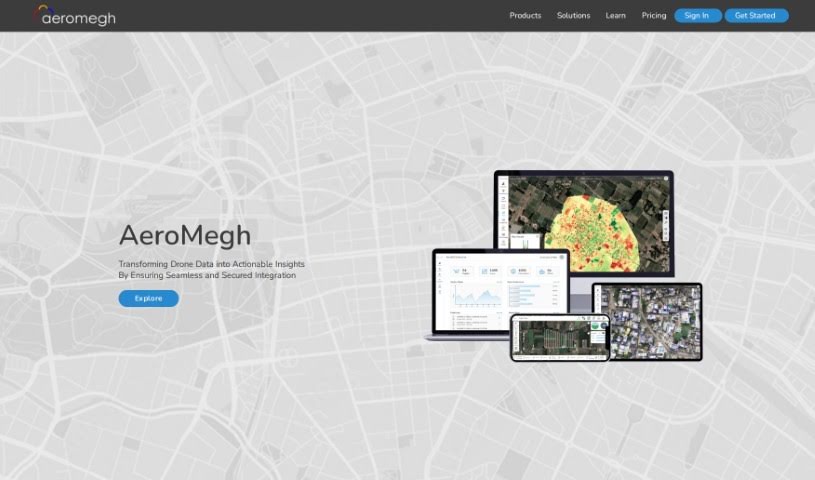
AeroMegh is a tool designed to make aerial image analysis for drone users much simpler. It is a way to streamline everything from taking pictures with your drone to processing all that data. It lets you bring your own data, train custom detectors, and analyze everything yourself. You can easily get your image datasets ready, whether they’re from past projects or your local computer, and then upload and label images right as you’re working. Plus, AeroMegh lets you create flight plans using AeroGCS KEA and pick exactly what kind of analysis you want done on your cloud-based images. You can even keep an eye on your drone’s progress during the flight and see the images live in the cloud. All the results? They show up neatly on the AeroMegh Dashboard, ready for you to explore. You can also download and share these results via email, making aerial image analysis efficient and effective for anyone using drones.
Who created AeroMegh?
AeroMegh, the tool that simplifies aerial image analysis for drone users, was actually created by a company called AeroMegh. They launched it specifically to make the whole process easier, helping drone users reach their aerial intelligence goals without a hassle. AeroMegh takes care of everything, from capturing the images to processing the data. It also helps you prepare your image datasets for analysis and even train machine learning models for spotting objects. The company itself is based in Nashik, India.
What is AeroMegh used for?
- Automating aerial image analysis for drone users.
- Managing the entire process, from capturing images to processing the data.
- Training custom detectors and analyzing data independently.
- Getting image datasets ready for analysis, whether from past projects or local drives.
- Uploading and annotating images in real-time.
- Training machine learning models to speed up object detection.
- Creating flight plans with AeroGCS KEA.
- Running analysis tasks on images stored in the cloud.
- Viewing results directly on the AeroMegh Dashboard.
- Downloading and sharing results in various formats through email.
- Making aerial image analysis simple for drone users.
- Handling the whole workflow, from taking pictures to processing them.
- Allowing users to use their own data, train detectors, and analyze it themselves.
- Creating personalized workflows for specific needs.
- Designing flight plans using AeroGCS KEA and choosing analysis tasks for cloud images.
- Tracking progress and seeing live images during flights.
- Displaying analysis results on the AeroMegh Dashboard for interaction and sharing via email.
- Automating aerial image analysis for drone users.
- Managing the entire workflow from capturing images to processing the data.
- Enabling users to bring their own data, train detectors, and analyze data independently.
- Preparing image datasets from previous projects or local drives for analysis.
- Allowing users to upload and annotate images in real-time.
- Enabling users to train their own machine learning models for object detection.
- Creating flight plans using AeroGCS KEA and selecting analysis tasks to be done on cloud-based images.
- Tracking the progress during flight and viewing images live on the cloud.
- Displaying analysis results on the user’s AeroMegh Dashboard for viewing and interaction.
- Providing the option to download and share results in various formats via email.
- Preparing image datasets for analysis from previous projects or local drives.
- Creating customized workflows for analysis tasks.
- Creating flight plans and selecting analysis tasks for cloud-based images.
- Viewing and interacting with analysis results on the AeroMegh Dashboard.
- Simplifying the aerial image analytics process to efficiently achieve aerial intelligence goals.
- Preparing image datasets for analysis.
- Uploading and annotating images in real-time.
- Training machine learning models for object detection.
- Creating flight plans using AeroGCS KEA.
- Analyzing images and viewing results on the AeroMegh Dashboard.
- Downloading and sharing analysis results.
- Simplifying the aerial image analytics process for drone users.
- Achieving aerial intelligence goals efficiently.
- Handling the workflow from image capture to data processing.
- Preparation of image datasets for analysis.
- Training machine learning models for object detection.
- Creating customized workflows for object detection.
- Analyzing images on the cloud.
- Viewing and interacting with analysis results on the AeroMegh Dashboard.
Who is AeroMegh for?
How to use AeroMegh?
To get started with AeroMegh for your drone’s aerial image analysis, just follow these simple steps:
- Fly and Capture Data: Use AeroGCS KEA to fly your drones and capture the data you need. It makes the process efficient.
- Process Data: Upload the drone data you’ve captured. You can then process it using DroneNaksha to create outputs like orthomosaic and elevation models, essentially building 2D/3D photogrammetry views.
- Analyze Images: Now, use AeroMegh to analyze these processed images. You can set up specific analytics tasks and even build your own machine learning models for object detection.
- Prepare Datasets: Getting your image datasets ready for analysis is easy. You can pull them from past projects or your local drives.
- Train and Analyze: Go ahead and train your detectors, then analyze the data independently. You even have the flexibility to create custom workflows tailored to your needs.
- Create Flight Plans: Design your flight plans using AeroGCS KEA. You can also select the specific analysis tasks you want to run on images that will be processed in the cloud.
- Track Progress: Keep an eye on how your flight is going. You can view images live as they come in from the cloud and see your results conveniently displayed on the AeroMegh Dashboard.
- Download and Share Results: Once you have your analysis results, you can download them in various formats or share them via email. This makes it easy to use them for further work or to collaborate with others.
Basically, AeroMegh makes aerial image analytics much simpler by automating the whole workflow, from capturing data to analyzing it. It offers a user-friendly interface and the tools you need to create your own machine learning models and effectively analyze the images your drone captures.