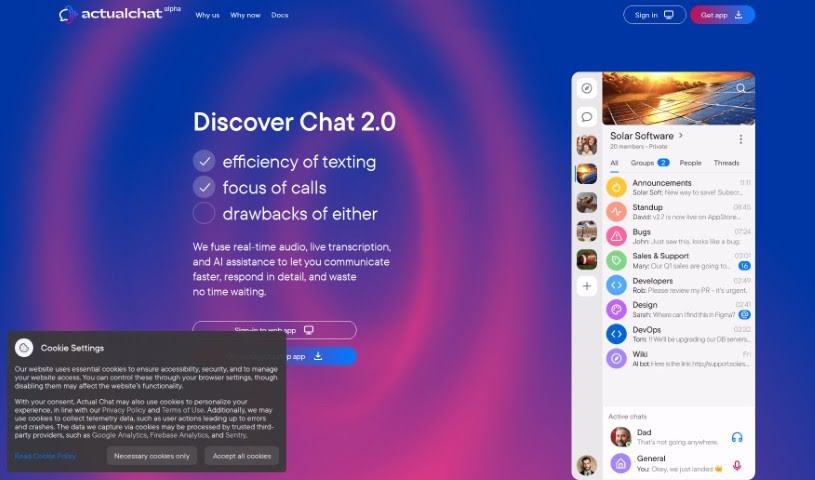
Screenshot of Actual Chat

Actual Chat

Discover what Actual Chat is and how to use it effectively in 2025. We'll explore its features, compare it to other transcription tools, and show you how it can improve your communication.

Screenshot

What is Actual Chat?

Actual Chat is a handy communication tool that brings together real-time audio, live transcription, and AI assistance. It is your go-to for clear conversations, whether you’re chatting with family, friends, or colleagues. It provides live transcriptions of spoken words, which is great for understanding everything that’s said. Plus, it offers anonymity if you prefer, helps you work on your speech clarity, and lets you choose whether you want to listen to the audio or just read the transcription. It’s super useful for all sorts of situations – from casual family or friend chats to more formal settings like remote team meetings, webinars, online classes, and even customer support. You can grab the app for both Android and iOS, and it works well even in noisy places. The whole idea behind Actual Chat is to make communication more inclusive, less stressful, and to help everyone communicate a bit better.

Who created Actual Chat?

An unnamed founder developed Actual Chat, launching it on December 8, 2023. While specific company details or information about the founder aren’t readily available, we know Actual Chat is designed to really boost communication experiences. It smoothly combines real-time audio with live transcription and AI help. Key features include instant text from voice, streaming voice and text, options for anonymity, and even suppression of background noise. You get to pick between listening to the audio or reading the transcriptions, making it a versatile tool for everything from family and friend chats to work, webinars, online classes, and customer support.

What is Actual Chat used for?

Here are some of the great ways people use Actual Chat:

  • Webinars and online classes: Keep up with lectures and discussions easily.
  • Mobile application availability: Chat on the go with its handy app.
  • Remote team communication efficiency: Ensure everyone on your team stays connected and informed.
  • Customer support tool: Provide clear and accessible support to your clients.
  • Conversation playback for users: Review past chats to catch important details.
  • Heavily populated group chats: Manage and follow conversations even in large groups.
  • Anonymity feature: Communicate privately when needed.
  • Speech perfection tool: Get instant feedback to improve how you speak.
  • Loud environment usability: Hear and be heard, even in noisy settings.
  • Family, friend, and work communication enhancement: Make all your conversations clearer and more effective.

Who is Actual Chat for?

Actual Chat is a fantastic tool for a wide range of users and situations:

  • Customer support teams: Offer clear, transcribed communication to clients.
  • Webinars, Online Classes, and Presentations: Ensure all participants can follow along, regardless of audio quality or background noise.
  • At Work: Perfect for remote teams needing seamless communication or onsite crews who might be in noisy environments.
  • Friend, Classmate Chats: Keep up with conversations and share information easily.
  • Family Chats: Stay connected and ensure everyone understands each other, no matter where they are.

How to use Actual Chat?

Using Actual Chat is pretty straightforward. Just follow these simple steps:

  1. Sign Up or Log In: First, you’ll need to create an account on the Actual Chat platform, or if you’re already a member, just log in.
  2. Start a Conversation:
    • You can either start a brand new conversation or join an existing one.
    • As you chat, you’ll have the choice to listen to the audio directly or read the live transcription as it happens.
    • It’s all about flexibility – communicate however you prefer, whether that’s through voice or text.
  3. Benefit from Features:
    • Make the most of the real-time audio and live transcription features to really boost your communication.
    • If you value your privacy, you can use the anonymity option to keep your conversations private.
    • The instant transcriptions can actually help you improve your speech clarity by making you more aware of how you enunciate and how often you use filler words.
  4. Enhance Communication:
    • Connect more effectively with your family, friends, classmates, or coworkers using Actual Chat.
    • It’s also a great way to support hearing-impaired users by providing them with live transcriptions.
    • You can use this tool in all sorts of settings, including busy work environments, during webinars, in online classes, and for customer support.
  5. Access Across Devices:
    • Need to chat on the go? Just download the Actual Chat application onto your mobile devices.
    • You can also use the platform on Windows and iOS, and there’s a web app available too.
  6. Revisit Conversations:
    • Ever need to catch up on what was said? You can replay the audio or read the text from any past conversations.
    • It’s handy to keep a record of your chat history for future reference.
  7. Engage in Various Scenarios:
    • Actual Chat is perfect for those loud environments or any situation where listening might be tricky.
    • Whether you’re in a packed group chat or a quiet one with just a few friends, the features are designed to suit different settings.

By following these steps, you’ll be able to use Actual Chat effectively for smooth and inclusive communication in all sorts of online interactions.

Related AI Tools

Discover more tools in similar categories that might interest you

Stay Updated with AI Tools

Get weekly updates on the latest AI tools, trends, and insights delivered to your inbox

Join 25,000+ AI enthusiasts. No spam, unsubscribe anytime.