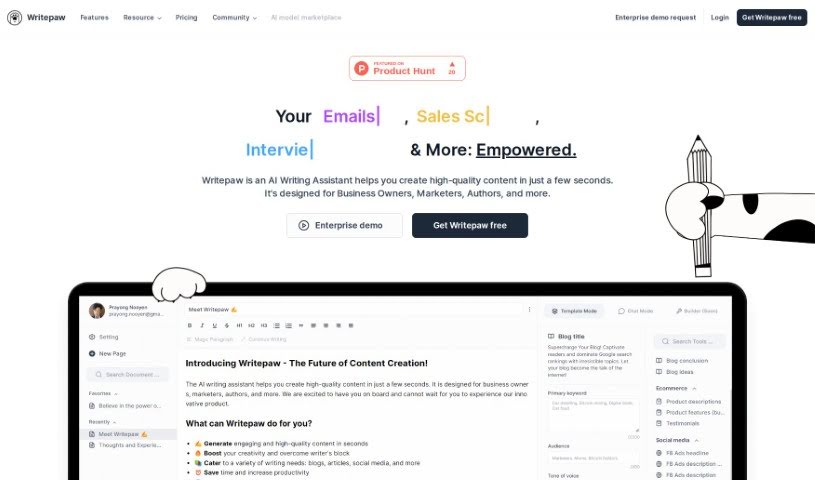
Screenshot of Writepaw

Writepaw

Discover what Writepaw is and how to use it effectively in 2025. We'll explore its features and see how it stacks up against other content writing tools.

Screenshot

What is Writepaw?

Writepaw is essentially an AI writing assistant designed to help you create great content, and do it fast. It is your go-to tool for brainstorming unique content ideas with its AI prompt templates, whipping up SEO-friendly product descriptions, and even getting suggestions for social media posts. What’s really neat is that you can also create your own custom templates. Plus, they offer a free plan, affordable paid options, support for many languages, and a community for premium users. It’s a fantastic resource for business owners, marketers, authors, and pretty much anyone who needs to create content.

When it comes to pricing, Writepaw has a free plan that gives you up to 10,000 characters each month. If you need more, their Saver Plan starts at just $12 a month and bumps your limit up to 300,000 characters. For even more power, the Value Plan is $32 a month, giving you a massive 1,200,000 characters. Because of these flexible pricing tiers and the range of features it offers for different content needs, many people find Writepaw to be a really economical choice.

All in all, Writepaw is all about making content creation smoother, faster, and more creative. They provide tools like AI prompt templates, both pre-built and custom ones, and they’re even launching a ‘writing governance’ feature soon. The goal is to simplify content creation, boost efficiency, and spark creativity for professionals across many different fields.

Who created Writepaw?

Writepaw was actually created by an AI Writing Assistant back in 2023. Its main purpose is to help users generate high-quality content efficiently. The platform was built with professionals like business owners, marketers, and authors in mind. Writepaw offers AI prompt templates that are great for coming up with unique content ideas, crafting SEO-optimized product descriptions, and suggesting social media posts. You’ll also find pre-built and custom templates, and they’re planning to add ‘writing governance’ features soon. This new feature will let you customize your content based on what’s performing best and your specific brand guidelines.

What is Writepaw used for?

Writepaw is a versatile tool that can help you with a lot of different content tasks:

  • It supports multiple languages, so you can create content in the language you need.
  • You can generate unique content ideas to keep your inspiration flowing.
  • It helps create SEO-optimized descriptions to improve your search engine rankings.
  • You can craft social media post suggestions to engage your audience.
  • It allows you to design custom templates for your specific needs.
  • You can also use their handy pre-built templates.
  • It assists in creating SEO-optimized product descriptions that convert.
  • Writepaw offers content prompts specifically for generating unique ideas.
  • It helps facilitate the creation of compelling product descriptions that grab attention.
  • You can enhance your creativity in content creation with its AI-powered tools.
  • It allows for customization based on your top-performing content and brand guidelines, ensuring consistency.
  • You can report bugs to help improve the platform.
  • Ultimately, it’s designed for high-quality content creation.
  • It helps you generate high-quality content quickly, saving you valuable time.
  • It’s great for creating SEO-optimized descriptions that work.
  • You can easily use pre-built templates to get started right away.
  • It enhances content creation with its upcoming writing governance feature.
  • You can request new features you’d like to see added.
  • Reporting bugs is straightforward, helping to refine the tool.
  • It generates unique content ideas to spark your creativity.
  • You get social media post suggestions to keep your online presence active.
  • Custom template creation lets you tailor the tool to your workflow.
  • Pre-built templates offer quick solutions for common content needs.
  • Access premium prompts for even more specialized content generation.
  • Look forward to future writing governance customization options.

Who is Writepaw for?

Writepaw is a great tool for:

  • Business owners
  • Marketers
  • Authors

…and anyone else who needs to create content efficiently!

How to use Writepaw?

To really get the most out of Writepaw, here’s a simple step-by-step guide:

  1. Sign Up and Choose Your Plan: First things first, sign up for Writepaw. You’ll need to pick a plan that fits what you do. You have three choices: the free plan, which gives you 10,000 characters each month; the Saver Plan for $12/month, offering 300,000 characters; or the Value Plan at $32/month, which provides a generous 1,200,000 characters.
  2. Generate Content with AI: Jump into using the AI prompt templates. They’re fantastic for quickly generating unique ideas. Writepaw is also a big help when it comes to creating SEO-optimized product descriptions, making your content easier to read, and crafting engaging social media content.
  3. Create Your Own Custom Templates: Don’t hesitate to design specific templates that are perfectly tailored to what you need, whether it’s for newsletters, emails, content marketing, or anything else.
  4. Explore Premium Features: If you opt for a paid plan, you’ll unlock extra goodies like premium prompts, the ability to chat directly with Writepaw, create your own custom prompts, and even get email support.
  5. Keep an Eye on Writing Governance (Coming Soon!): They’re launching a writing governance feature soon. This will let you customize your content based on what’s already performing well for you and your specific brand guidelines.
  6. Request Features and Report Bugs: You can actively help improve Writepaw by requesting new features you’d like to see or reporting any bugs you encounter through their designated forms. This really helps enhance your experience.
  7. Connect with the Premium Community: If you’re on a premium plan, make sure to access the community. It’s a great place to connect with other users, collaborate, and share insights.
  8. Boost Your Creativity: Use Writepaw to really spark your creativity. By leveraging the AI prompt templates, pre-built templates, and custom templates, you can streamline your entire content creation process.
  9. Save Both Time and Money: Remember, Writepaw is a really cost-effective tool. It helps you create content efficiently, which means you save both time and money in the long run.

By following these steps, you’ll be well on your way to making the most of Writepaw’s features and creating high-quality content with ease.

Related AI Tools

Discover more tools in similar categories that might interest you

Stay Updated with AI Tools

Get weekly updates on the latest AI tools, trends, and insights delivered to your inbox

Join 25,000+ AI enthusiasts. No spam, unsubscribe anytime.