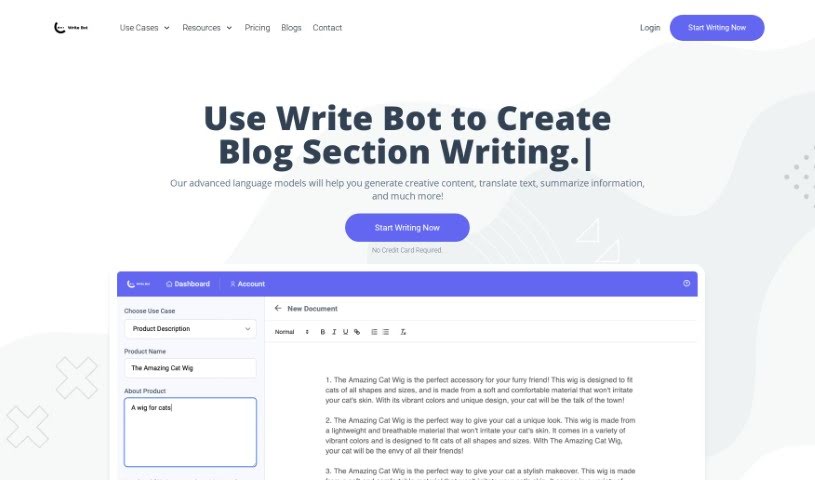
Screenshot of Writebot

Writebot

Discover what Writebot is and how to use it effectively in 2025. We'll explore its features, compare it to other content writing tools, and show you exactly how to get the most out of it.

Screenshot

What is Writebot?

Writebot is an AI tool designed to help you generate all sorts of written content. It is your AI writing assistant! It can help you brainstorm blog ideas and outlines, write entire blog sections, come up with business ideas, draft cover letters, create social media ads for platforms like Facebook and Twitter, and even generate post and caption ideas. Plus, it can whip up SEO-friendly meta descriptions and titles, product descriptions, and video descriptions. Need to translate something or get a quick summary of a long text? Writebot can do that too. It uses smart machine learning and natural language processing to keep your brand’s voice and message consistent. You can always tweak and refine what Writebot creates to make sure it’s just right for you. The main goal? To save you time by automating much of the content creation process.

When it comes to pricing, Writebot offers a Premium Plan for $14.99 a month. This plan gives you a massive 1,000,000 AI Words every month, access to over 12 different use-cases, and priority support via email and chat. If you want to try it out first, there’s a free trial that lets you generate 100 AI Words per month, with access to all the same use-cases and priority email and chat support.

Who created Writebot?

Writebot was developed by an AI company called Write Bot. They launched the platform on December 31, 2023. The idea behind it was to help people create various types of written content quickly and efficiently, using machine learning algorithms and natural language processing. Write Bot’s focus is on providing tools that make content creation easier, whether you need blog ideas, full articles, business concepts, cover letters, social media ads, SEO meta descriptions and titles, product descriptions, or video descriptions. Their aim is to help users save time, reduce common human errors in writing, and offer content that can be customized through a user-friendly interface.

What is Writebot used for?

Writebot is a versatile tool that can help you with a wide range of writing tasks:

  • High-Quality Content Generation: It produces well-written content across various formats.
  • Product Descriptions: Craft compelling descriptions for your products.
  • Blog Idea & Outline: Get creative ideas and structured outlines for your blog posts.
  • Blog Section Writing: Write specific sections of your blog articles.
  • Business Ideas: Brainstorm new business concepts.
  • Cover Letters: Draft professional cover letters.
  • Facebook, Twitter Ads: Create effective ad copy for social media.
  • Post & Caption Ideas: Generate engaging ideas for social media posts and captions.
  • SEO Meta Description: Write descriptions that help your content rank.
  • SEO Meta Title: Create optimized titles for search engines.
  • Video Description: Craft descriptions for your video content.
  • Brand Voice Consistency: It helps ensure your writing stays true to your brand’s tone.
  • Text Translation: Translate your texts into different languages.
  • Information Summarization: Condense longer pieces of text into key points.
  • Creative Content: Generate imaginative and original content.
  • Blog Post Ideas: Get a stream of fresh ideas for your blog.
  • Business Ideas: Explore new avenues for your business.
  • Cover Letters: Write personalized and effective cover letters.
  • Social Media Ads: Compose attention-grabbing ads for social platforms.
  • Post and Caption Ideas: Develop engaging captions and post concepts.

Who is Writebot for?

Writebot is a great tool for anyone who writes regularly or needs help with content creation. This includes:

  • Bloggers: To brainstorm topics and draft posts.
  • Content Creators: For generating a variety of content across platforms.
  • Business Professionals: To help with reports, proposals, and internal communications.
  • Social Media Marketers: To create engaging posts and ad copy.
  • Marketing Professionals: For campaign materials and content strategy.
  • Social Media Managers: To keep social feeds active and engaging.
  • SEO Specialists: To optimize website content for search engines.
  • Video Creators: To write descriptions and promotional copy.
  • Video Content Creators: Specifically for those focused on video content production.

How to use Writebot?

Using Writebot is pretty straightforward. Just follow these simple steps:

  1. Choose Your Use Case: First, decide what kind of content you need. Whether it’s blog ideas, business concepts, social media ads, or something else, just pick the relevant option.
  2. Fill in the Blanks: You’ll be prompted to provide some details. Enter the information you have, or leave fields blank if you want Writebot to generate content based on partial input. The more context you give, the better the output will likely be.
  3. Let Writebot Generate Content: Once you’ve provided your input, Writebot will process it using its AI. After a short wait, it will present you with the generated content.
  4. Edit and Refine: Take a look at what Writebot has created. If it’s not quite perfect, you can easily edit it using the built-in text editing tools to make sure it perfectly matches your needs and style.
  5. Publish or Use the Content: When you’re happy with the final result, you’re all set! You can then publish it, share it, or use it however you intended.

Writebot uses machine learning and natural language processing to mimic human writing, which really speeds up content creation and makes it more efficient. It offers a bunch of helpful features, like generating blog post ideas, cover letters, social media ads, and SEO-friendly content. Plus, it’s a great time-saver because it automates so much of the writing process, and you get user-friendly editing options to customize everything just the way you like it.

Related AI Tools

Discover more tools in similar categories that might interest you

Stay Updated with AI Tools

Get weekly updates on the latest AI tools, trends, and insights delivered to your inbox

Join 25,000+ AI enthusiasts. No spam, unsubscribe anytime.