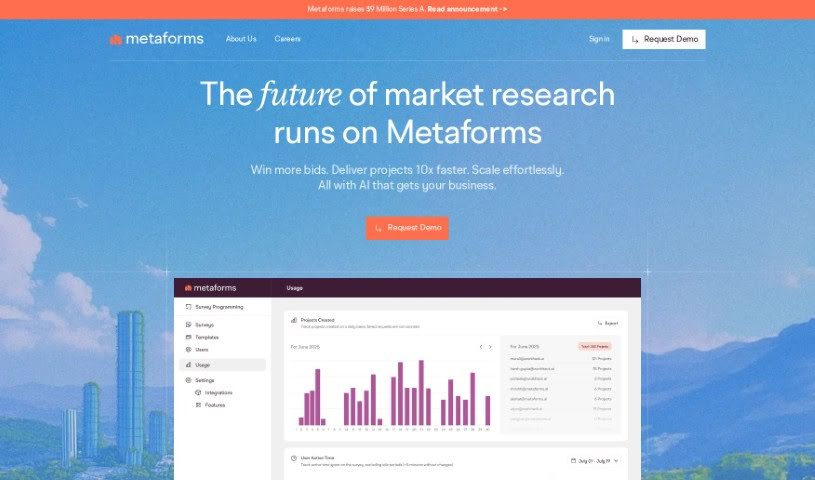
Screenshot of Workhack Forms

Workhack Forms

Discover Workhack Forms in 2025: learn what it is, how to use its features for hyper-personalized forms, and how it stacks up against other marketing tools. We'll cover its pros and cons.

Screenshot

What is Workhack Forms?

Workhack Forms is a tool designed to create highly personalized forms. It offers features like real-time validation, custom rules for how responses are handled, and the ability to group respondents based on their answers. What’s really neat is that you can even keep the conversation going with people after they’ve finished filling out your form. It also connects with popular tools like Calendly, WhatsApp, and HubSpot. You can share your forms easily through a simple link or by embedding them directly onto your website. Plus, it includes capabilities for tracking ad performance and ensures your data is transferred securely.

However, it’s not without its drawbacks. Currently, it’s limited to HubSpot integration, meaning it doesn’t work with other CRM or marketing platforms. There’s also no dedicated mobile app, and it doesn’t support offline use. Customer support could be more robust, and the tool primarily focuses on lead generation. It also lacks specific details on data privacy features and doesn’t offer much support for other third-party tools. Essentially, it’s confined to digital platforms and doesn’t provide real-time analytics.

Who created Workhack Forms?

Ian Hastings is the creator behind Workhack Forms. The platform officially launched on May 15, 2023. Workhack Forms aims to provide a more engaging way to collect information through hyper-personalized forms, offering features like real-time validation and custom response rules. It integrates smoothly with Calendly, WhatsApp, and HubSpot, all while emphasizing secure data transfer and clear privacy policies.

What is Workhack Forms used for?

Workhack Forms is a versatile tool that can be used for a variety of research and evaluation purposes:

  • Market research: Understanding customer needs and market trends.
  • User research: Gathering feedback on products or services.
  • Program evaluation: Assessing the effectiveness of programs.
  • Organizational research: Studying internal processes and employee satisfaction.
  • Policy research: Collecting data to inform policy decisions.
  • Academic evaluation: Supporting research and data collection for academic studies.

Who is Workhack Forms for?

This tool is particularly useful for professionals involved in data collection and analysis across different fields:

  • Policy researchers
  • Academic evaluators
  • Market Researchers
  • User researchers
  • Program evaluators
  • Organizational researchers

Essentially, anyone conducting market research, user research, program evaluation, or organizational research, especially within an academic or policy context, will find Workhack Forms beneficial.

How to use Workhack Forms?

To get the most out of Workhack Forms, here’s a straightforward approach:

  1. Craft Personalized Forms: Start by building forms that feel unique to each respondent. You can set up real-time validation to catch errors instantly and create custom rules to guide the flow of questions based on previous answers.
  2. Keep Respondents Engaged: Make your forms more interactive. Use predetermined answer cohorts to segment your audience, and take advantage of the feature that allows you to continue the conversation even after they’ve submitted the form, keeping them engaged.
  3. Integrate and Share Easily: Connect Workhack Forms with tools you already use, like Calendly for scheduling or WhatsApp for communication. Sharing is simple too – just generate a link or embed the form directly onto your website.
  4. Prioritize Data Security: Feel confident knowing your data is transferred securely. The platform also includes ad tracking capabilities, which helps maintain transparency in your privacy policies.
  5. Leverage HubSpot Integration: If you use HubSpot, you’ll appreciate the seamless integration that helps keep your data organized and workflows smooth.
  6. Understand the Limitations: It’s important to be aware of what Workhack Forms doesn’t do. Currently, it doesn’t support mobile applications or offline mode, and it’s limited to HubSpot for integrations. Customer support is also an area where it could be improved, and it’s primarily focused on lead generation rather than broader analytics or third-party tool support.

By following these steps, you can effectively use Workhack Forms for your research and data collection needs, making sure to leverage its strengths while being mindful of its current limitations.

Related AI Tools

Discover more tools in similar categories that might interest you

Stay Updated with AI Tools

Get weekly updates on the latest AI tools, trends, and insights delivered to your inbox

Join 25,000+ AI enthusiasts. No spam, unsubscribe anytime.