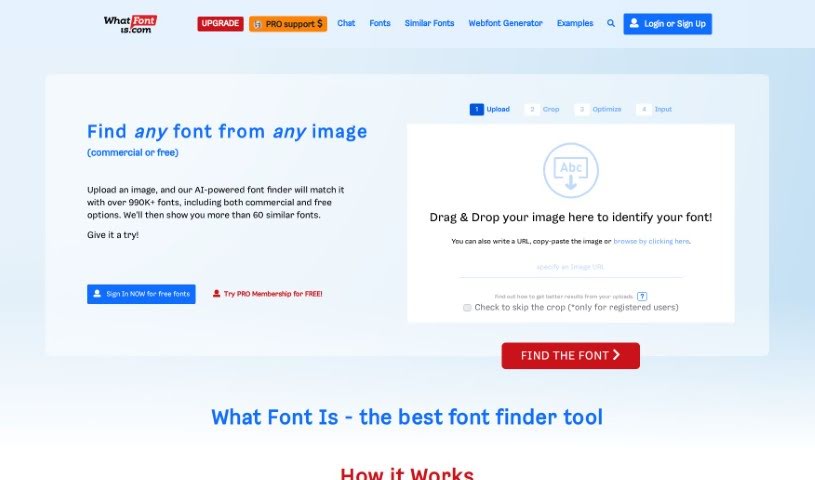
Screenshot of What Font Is

What Font Is

Discover What Font Is, a powerful AI-powered tool for identifying fonts in images. Learn how to use its features, explore its massive font library, and compare it with other professional design tools in 2025.

Screenshot

What is What Font Is?

What Font Is is a really handy tool for finding fonts. You just upload an image that has the font you’re looking for, and this system uses smart AI to figure it out. Most of the time, it nails it! Plus, it’ll show you over 60 similar fonts, complete with links so you can download or buy them. They’ve got a massive collection – over 990,000 fonts, both free and for sale. It makes finding fonts super simple with a straightforward four-step process: Upload, Crop, Optimize, and Input. You can start using it for free, or if you want more perks, there’s a PRO membership available.

Who created What Font Is?

Alex Bigman is the founder behind What Font Is. This company offers a font finder that uses advanced AI technology to identify fonts directly from your images. With a library boasting over 990,000 fonts, it’s easy for users to find and match the exact fonts they need for any project. The platform features both free and commercial fonts, and its user-friendly four-step system makes the whole process a breeze. Signing up for a PRO membership unlocks even more support and features.

What is What Font Is used for?

Here’s what you can do with What Font Is:

  • Pinpoint Fonts: Accurately identify fonts from images using advanced artificial intelligence.
  • Vast Font Library: Access a huge collection of over 990,000 fonts to find the closest match for your needs.
  • Simple Process: Use a straightforward 4-step procedure to upload and identify fonts quickly.
  • Premium Experience: Get extra support and benefits by signing up for a PRO membership for a top-notch font-finding experience.
  • High Success Rate: Achieve font identification in about 90% of cases, especially when you upload high-quality images.
  • Identify Fonts from Images: Simply upload a picture to find out what font is being used.
  • Match Client Fonts: Easily match fonts from assets provided by your clients.
  • Explore Typography: Browse and discover a wide range of stylish fonts.
  • Enhance Your Workflow: Improve your font-finding experience and save time.
  • Find Missing Fonts: Locate a specific font that might be missing from the files a client sent you.
  • Identify Nice Fonts: Find out the name of a font you’ve seen and liked, even if you don’t have a specific project in mind.
  • Simplify Font Discovery: Make the process of finding the right font much easier.
  • Access Free & Commercial Options: Choose from both free and commercial fonts available in their extensive catalog.
  • Accurate AI Identification: Rely on advanced artificial intelligence to accurately identify fonts.
  • User-Friendly Steps: Follow a simple 4-step system for uploading and identifying fonts.
  • High-Quality Results: Get reliable font identification, especially with good quality uploads.
  • Font Detector Tool: Use it as a go-to tool for exploring and identifying fonts.

Who is What Font Is for?

This tool is perfect for:

  • Graphic designers
  • Typographers
  • Font enthusiasts
  • Artists
  • Web designers
  • Branding designers
  • Creative agencies
  • Printers
  • Branding specialists
  • Branding experts
  • Advertisers

How to use What Font Is?

Using What Font Is to identify fonts is pretty straightforward. Just follow these steps:

  1. Upload Your Image: Start by uploading a clear picture that shows the font you want to identify. The system uses advanced AI and is usually successful about 90% of the time with good quality images.
  2. Image Analysis: The tool will try to automatically separate the letters for you. If you’re working with a cursive font, you might need to manually separate each letter using the built-in image editor.
  3. Font Selection: After the analysis, What Font Is will show you more than 60 fonts that look very similar to the one in your image. You’ll find links for each suggested font to download or buy it. Remember to always respect the font creators’ rights and use fonts according to their license terms, whether they’re free or commercial.
  4. Results and Next Steps: Once you’ve found the font you’re looking for, you can easily get to similar fonts and their sources. Plus, the tool offers a huge catalog with over 990,000 fonts, both free and commercial, so you can explore and pick out new favorites.
  5. Consider PRO Membership: If you’d like extra support and more benefits, think about upgrading to a PRO membership. It can really enhance your font identification experience.

By following these steps, you can effectively use What Font Is to identify fonts from images with both accuracy and convenience. Happy font hunting!

Related AI Tools

Discover more tools in similar categories that might interest you

Stay Updated with AI Tools

Get weekly updates on the latest AI tools, trends, and insights delivered to your inbox

Join 25,000+ AI enthusiasts. No spam, unsubscribe anytime.