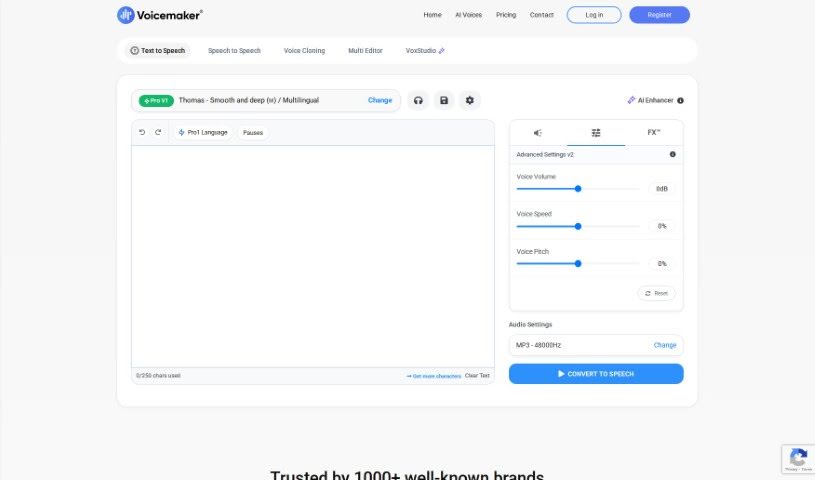
Screenshot of Voicemaker

Voicemaker

Discover what Voicemaker is and how to use it effectively in 2025. We'll explore its features and see how it stacks up against other voice generators.

Screenshot

What is Voicemaker?

Voicemaker is an online tool that turns text into speech. It uses really advanced AI to create voices that sound incredibly human and natural. You’ve got a huge selection here – over 1000 AI voices across 130 languages! This makes it super handy for all sorts of audio projects, whether you’re making voiceovers for videos, narrating audiobooks, or something else entirely. You can pick voices from different languages and styles, and then download your audio as MP3 or WAV files. This makes it easy to pop them right into your multimedia projects. Voicemaker is designed for everyone, from individuals to businesses, offering high-quality AI voices that are crafted to sound like real people, complete with natural speech patterns and emotions. It really aims to give you an authentic listening experience.

Who created Voicemaker?

Voicemaker was developed by Voicemaker Technologies Pvt. Ltd. This platform is all about using advanced AI technology to create natural-sounding voices for all sorts of audio projects. With more than 1000 AI voices available in 130 languages, it’s a great resource for both individuals and businesses. You can use it for things like video voiceovers, audiobooks, and a whole lot more.

What is Voicemaker used for?

Voicemaker is incredibly versatile. Here are just some of the ways people use it:

  • For commercial projects
  • Creating audiobooks and podcasts
  • Producing YouTube videos
  • Developing e-learning materials
  • Making sales and social media videos
  • Public use and broadcasting
  • Building web and mobile applications
  • Setting up call centers and IVR systems
  • Crafting engaging audio content
  • Offering multilingual voice solutions for businesses
  • Creating engaging audio content for organizations
  • Pro AI Voice Cloning
  • As a Developer API Platform

Who is Voicemaker for?

Voicemaker is a fantastic tool for a wide range of users:

  • Audiobook and podcast creators
  • YouTube video creators
  • E-learning content creators
  • Sales and social media video creators
  • Web and mobile application developers
  • Call center and IVR system managers
  • Audiobook narrators
  • Podcast creators
  • Sales and social media video producers
  • Web and mobile application developers
  • Call center and IVR system operators
  • Content creators in general
  • Media Production Companies
  • E-Learning Platforms
  • Customer Support Centers
  • Audiobook creators
  • Audiobook narrators
  • Podcasters
  • YouTubers
  • E-learning content creators
  • Customer Support Agents
  • Salespeople
  • Social Media Marketers
  • Web and mobile application developers
  • Call center operators
  • YouTube content creators
  • E-Learning professionals
  • Sales and social media professionals
  • Call center operators
  • IVR system operators

How to use Voicemaker?

Using Voicemaker is pretty straightforward. Just follow these simple steps:

  1. First, you’ll need to sign up for an account on the Voicemaker platform. It’s quick and easy.
  2. Next, pick a plan that fits what you need. They have options like Free, Basic, Premium, Business, or the Pro AI Voice Cloning plan.
  3. Now, type in the text you want to turn into audio using the text-to-speech tool.
  4. From the huge collection, choose the AI voice you like best. Remember, there are over 1000 voices in 130 languages to pick from!
  5. You can also tweak the voice settings. Adjust things like speed, pitch, volume, and even add voice effects to get it just right.
  6. Once you’ve generated the audio, take a listen. If you need to make any changes, now’s the time.
  7. Finally, download your finished audio file. You can choose between MP3 or WAV formats.
  8. After that, you’re free to share your audio wherever you like, for commercial or personal use.

Voicemaker offers different plans with varying character limits and features, so there’s something for individual users, businesses, and developers alike. If you’re a developer, you can even integrate the text-to-speech engine into your own applications using their RESTful API. For payments, they accept major credit and debit cards, and they also provide dedicated support if you ever need it.

All in all, Voicemaker really changes the game for text-to-speech. With its advanced AI voices, support for many languages, and an easy-to-use interface, it’s a super flexible tool for creating high-quality audio content for pretty much any purpose.

Related AI Tools

Discover more tools in similar categories that might interest you

Stay Updated with AI Tools

Get weekly updates on the latest AI tools, trends, and insights delivered to your inbox

Join 25,000+ AI enthusiasts. No spam, unsubscribe anytime.