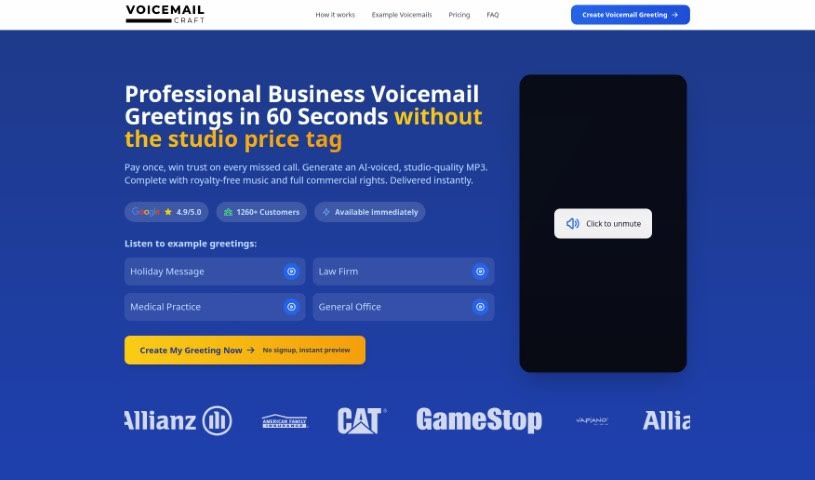
Screenshot of Voicemailcraft

Voicemailcraft

Discover what Voicemailcraft is and how to use it effectively in 2025. Explore its features and see how it stacks up against other voice generators.

Screenshot

What is Voicemailcraft?

VoiceMailCraft is a platform that lets you create custom voicemail greetings with a personal touch, perfect for both individuals and businesses. You’ll find handy features like an easy-to-use voicemail maker, text-to-speech conversion, male voice options, and AI-generated greetings. Basically, it’s all about giving you professional, tailored voicemail messages.

VoiceMailCraft really aims to change how we do voicemail communication. It mixes technology with a human feel, so you can create messages that truly sound like you or your brand. The platform is all about new ideas, being flexible, keeping things affordable, and building a community. They invite everyone to come up with unique voice messages and help redefine what voicemail can be.

Who created Voicemailcraft?

Tobias is the person behind Voicemailcraft. He started the platform because he wanted to make voicemail communication better by using AI technology. The company officially launched in 2022 with a clear mission: to help people and businesses communicate more effectively. They do this by creating personalized voicemails using the latest AI technology.

Tobias has a background in IT and Marketing, and he saw a real opportunity to combine technology with that essential human touch in voicemail. The company is committed to always improving and engaging with its users. Their goal is to offer top-notch communication tools that are easy for everyone to use.

What is Voicemailcraft used for?

Voicemailcraft is super versatile! Here’s a look at what you can do with it:

  • Personalized Greetings: Craft unique voicemail greetings for yourself or your business.
  • Professional Messages: Create polished automated voice messages for your voicemail or even for on-hold music in business calls.
  • Boost Your Image: Make your company look more professional with clear, high-quality audio messages in your voicemail greetings.
  • Ready-Made Scripts: Use pre-made scripts and templates for all sorts of situations, like letting people know you’re out of office, on vacation, or have special instructions.
  • Add Music: Make your voicemails more engaging by adding background music.
  • Global Reach: It supports a wide variety of languages, making it easy to create greetings for anyone, anywhere.
  • Accent Variety: You can choose from different voice options and accents to really personalize your greetings. Think British, Australian, English-Swedish, English-Italian, and even American-Southern accents!
  • Test Before You Download: You can preview your voicemail recordings to make sure they’re just right before you download them for your phone system.
  • Edit Until It’s Perfect: The platform offers flexibility, letting you edit your voicemail greetings multiple times until they meet your exact specifications.

Essentially, you can use it to create both personal and professional voicemail greetings, automated messages for business, clear and engaging customer messages, voicemails with background music, and greetings for specific situations like vacations or after business hours. You can download them instantly, and it supports many languages and accents. Plus, you get those helpful pre-created scripts and templates, making it easy to edit and preview everything. It really empowers individuals and businesses to communicate effectively.

Who is Voicemailcraft for?

Voicemailcraft is a great tool for a wide range of professionals and industries:

  • Medical professionals
  • Legal professionals
  • Retail Professionals
  • Travel industry professionals
  • Technical support professionals
  • Customer service representatives
  • Lawyers
  • Retailers
  • Travel agencies
  • Technical Support Providers
  • Business Communication Professionals
  • Travel agents
  • Customer service professionals
  • Travel Agency Professionals

If you need to communicate professionally and personally via voicemail, this tool is likely for you!

How to use Voicemailcraft?

Using VoicemailCraft is pretty straightforward. Just follow these simple steps:

  1. Head to the Website: Go to the VoicemailCraft website. You’ll see a text box right on the user interface where you can type in the message you want for your voicemail greeting.
  2. Pick Your Voice: Choose the voice you like best. You can select from different accents like British, Australian, and American-Southern to really make it your own.
  3. Preview and Check: Listen to your recording before you download it. This way, you can make sure it sounds exactly how you want it before you put it into your phone system.
  4. Language Options: VoicemailCraft supports many languages, including English, Japanese, German, Spanish, and more, so you can create greetings in the language that suits you best.
  5. Add Some Music: Want to add a little extra flair? You can choose background music from the variety of options VoicemailCraft offers to make your voicemail message even more dynamic.
  6. Use Ready-Made Scripts: If you’re not sure what to say, use the pre-created scripts. They’re perfect for common situations like being out of the office, on vacation, or letting people know your business hours.
  7. Download Instantly: Once you’re happy with the greeting you’ve created, you can download it right away. Then, just add it to your phone system.
  8. Edit as Needed: The platform makes it easy to edit your voicemail greeting. You can tweak it as many times as you need until it perfectly matches what you’re looking for.

By following these steps, you’ll be able to use VoicemailCraft effectively to create personalized and professional voicemail greetings for all your communication needs.

Related AI Tools

Discover more tools in similar categories that might interest you

Stay Updated with AI Tools

Get weekly updates on the latest AI tools, trends, and insights delivered to your inbox

Join 25,000+ AI enthusiasts. No spam, unsubscribe anytime.