Voice Changer | Audio AI Tool
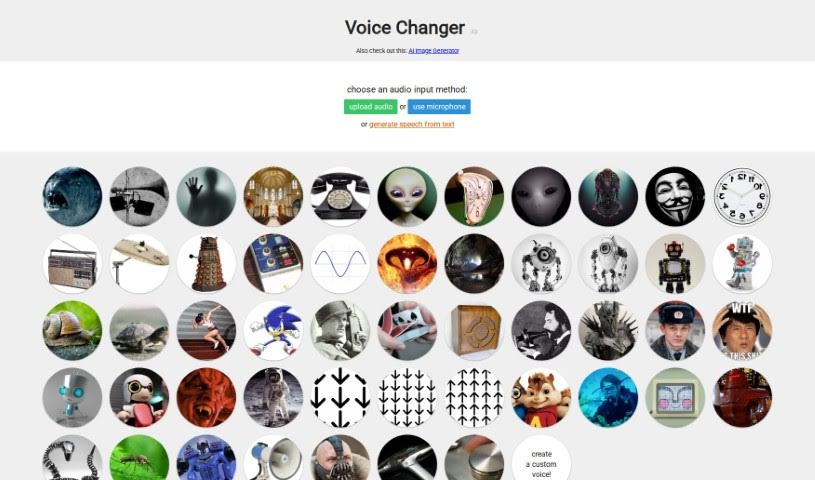
Screenshot of Voice Changer

Voice Changer

Voice Changer is a free tool for altering your voice with effects like robot, echo, and telephone, in real time or on recorded audio.

Screenshot

What is Voice Changer?

Voice Changer (Voice Changer.io) is a free tool that alters your voice with a range of effects. You can make your voice deeper, sound like a different gender, or distort it to hide your identity. Effects include robot voices, echoes, telephone-style audio, reversed audio, anonymous voice distortion, spooky demon effects, old radio sounds, and a wobbling alien effect. You can change your voice in real time using a microphone, or process audio clips you’ve already recorded.

Who created Voice Changer?

Voice Changer.io was made by one person who notes on the site that it’s mostly a hobby project and won’t be updated very often. All of its voice effects and transformations are available completely for free.

What is Voice Changer used for?

Some of the things you can do with Voice Changer:

  • Make your voice sound like a troll or monster.
  • Simulate a PA speaker voice.
  • Create a reverse reverb effect.
  • Add an echo, as if you’re in a huge room.
  • Remove high and low frequencies to imitate a telephone transmission.
  • Add a wobbling effect, like an alien having trouble speaking.
  • Oscillate between high and low pitches for a time-distortion effect.
  • Distort your voice to sound like a menacing alien or robot.
  • Apply slight distortion for an anonymous or hacker-like feel.
  • Reverse your voice audio.

Who is Voice Changer for?

The tool suits voice actors, singers, content creators, radio hosts, podcasters, voiceover artists, and entertainers.

How to use Voice Changer?

  1. Visit the Voice Changer.io website and browse the available effects, such as monster, PA speaker, echo, telephone, and alien.
  2. Pick the effect you want to apply.
  3. Adjust how you speak to get the best result — for example, speaking slowly helps echo effects come through clearly, and matching an accent helps if you’re going for a voice like Bane or the Daleks.
  4. Try the text-to-speech feature to hear synthesized articulation, or use the real-time modification option with your microphone for live changes.
  5. Play back your modified voice or download it when you’re happy with the result.

Related

Related AI Tools

Discover more tools in similar categories

New tools, in your inbox.

Weekly picks of the best AI tools we've researched and added — no spam, unsubscribe anytime.

Join 25,000+ AI enthusiasts. No spam, unsubscribe anytime.