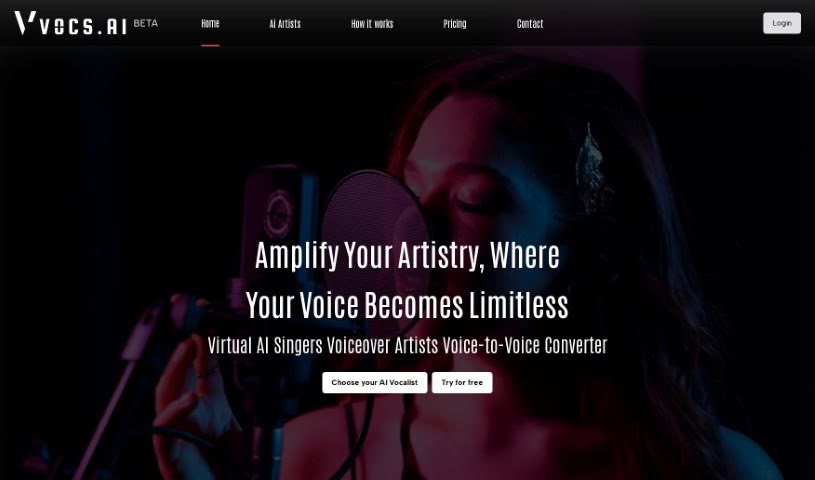
Screenshot of Vocs AI

Vocs AI

Discover what Vocs AI is and learn how to use it effectively in 2025. We'll explore its features and see how it stacks up against other voice generators.

Screenshot

What is Vocs AI?

Vocs AI is a cool tool that lets you turn your own voice into the voices of AI singers and rappers. You just upload your clean acapella vocals, either as a WAV or MP3 file. Then, you pick one of the talented AI artists available, and the tool transforms your original singing or rapping into that chosen AI vocalist’s sound. What’s really neat about Vocs AI is that you get to control how your AI vocalist sounds – you can adjust the emotions, pitch, tone, and overall feel. This means you can create something really personal and expressive. Plus, Vocs AI has a bunch of royalty-free artists you can use for commercial projects. This includes singers, people for commercial voiceovers, narrators, podcasters, and even characters for animation. To help you finish your music projects, Vocs AI also offers a wide selection of original instrumental tracks and music loops across different genres. They have various pricing plans, starting with a free option that gives you access to three AI artists. The paid plans offer more, like higher quality voice conversions, more downloads, and access to even more AI artists.

Who created Vocs AI?

Vocs.ai was developed by the same team behind another popular AI voice generator tool. It officially launched on August 11, 2023. This tool is designed to let users transform their own voices into those of AI singers and rappers. You have the ability to fine-tune the emotions and the overall sound of the AI vocals. The process involves uploading your clean acapella vocals, selecting from a variety of AI artists, and then downloading the converted AI vocals for your use. Vocs.ai also makes royalty-free artists available for commercial purposes, and they provide a selection of original instrumental tracks and music loops, which are great for creating songs.

What is Vocs AI used for?

  • Turning your own voice into AI singers and rappers.
  • Customizing and controlling the emotions, pitch, tone, and overall feel of AI vocals.
  • Getting access to royalty-free artists for commercial projects.
  • Creating voiceovers for commercials.
  • Producing narrations for different kinds of projects.
  • Making podcasts using AI-generated voices.
  • Developing voices for animated characters.
  • Accessing over 50 original instrumental tracks.
  • Using more than 1000 music loops from various genres.
  • Finishing hit songs with high-quality audio tracks.

Who is Vocs AI for?

  • Singers
  • Commercial Voiceover Artists
  • Narrators
  • Podcasters
  • Creators of Animated Characters

How to use Vocs AI?

Vocs AI is designed to be really easy to use, offering a smooth experience for turning your voice into AI singers and rappers. Here’s a simple step-by-step guide to get you started with Vocs.ai:

  1. Upload Clean Acapella Vocals: First, upload your clean acapella vocals. You can use WAV or MP3 files. It’s best if the audio doesn’t have any reverb or delay, as this helps ensure the best results.
  2. Choose an AI Artist: Next, pick an AI artist from the wide selection of talented options Vocs AI offers. Each AI artist has a unique vocal style that you can experiment with.
  3. Convert Your Voice: After you’ve uploaded your vocals and chosen an AI artist, you can go ahead and convert your original voice into the selected AI vocalist. The tool uses advanced AI technology to transform your vocals.
  4. Control Emotions and Sound: One of the really great things about Vocs AI is that you can control the emotions, pitch, tone, and overall feeling of your AI vocalist. This level of customization lets you create a truly personal and expressive outcome.
  5. Download Your AI Vocal: Once the conversion is finished, you can download your AI-generated vocals. These can be used for all sorts of things, like making music, creating voiceovers, producing podcasts, and much more.
  6. Explore Additional Features: Beyond just converting voices, Vocs AI also provides royalty-free artists for commercial use, covering singers, narrators, podcasters, and others. On top of that, you can access a huge library of instrumental tracks and music loops in different genres to make your creations even better.
  7. Choose a Pricing Plan: Vocs AI has different pricing plans to suit what users need. There’s a free plan that gives you access to three AI artists and standard quality voice conversions. The paid plans, however, unlock more features, such as higher quality conversions, more AI artists to choose from, and higher download limits.

By following these steps, you can really tap into the power of Vocs AI. You can explore AI-generated vocals, customize your sound, and access a whole range of creative resources for all your projects.

Related AI Tools

Discover more tools in similar categories that might interest you

Stay Updated with AI Tools

Get weekly updates on the latest AI tools, trends, and insights delivered to your inbox

Join 25,000+ AI enthusiasts. No spam, unsubscribe anytime.